QRelix vs RemoveTexts
Side-by-side comparison to help you choose the right product.

QRelix empowers businesses to create dynamic, trackable QR codes for free, featuring real-time analytics and stunning 300 DPI SVG designs.
Last updated: March 11, 2026

RemoveTexts
RemoveTexts is an AI-powered tool that instantly and seamlessly removes any text from your images, requiring no technical skill.
Last updated: March 11, 2026
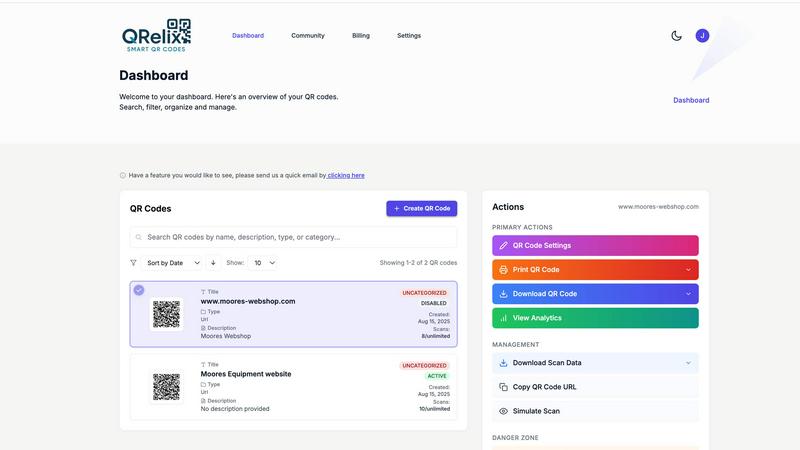
Visual Comparison
QRelix
RemoveTexts

Feature Comparison
QRelix
Dynamic QR Codes
QRelix offers dynamic QR codes that can be updated anytime without the need for reprinting. This feature ensures that users can modify the destination URL or content seamlessly, enhancing the longevity and effectiveness of their marketing efforts.
Real-Time Analytics
Gain valuable insights with QRelix's real-time analytics feature. Track every scan, including location, device type, time of access, and total scan volume, allowing users to optimize their campaigns based on actual performance data.
Customization Options
Users can personalize their QR codes with unique colors, logos, and design elements. This level of customization helps maintain brand consistency and enhances the visual appeal of the codes when printed on various materials.
Mirrored QR Feature
The Mirrored QR feature allows users to duplicate any existing QR code and transform it with their own branding. This capability is particularly useful for businesses looking to rebrand or refresh their marketing materials without starting from scratch.
RemoveTexts
Paint to Remove
This feature offers unparalleled precision and control, allowing users to become the curator of their own image. By simply brushing over the specific text or watermark they wish to eliminate, users guide the AI with intent. The system then executes a localized, intelligent inpainting process exclusively within the painted areas, ensuring that only the targeted content is removed while the rest of the image remains perfectly untouched. It is the ideal solution for complex images where selective editing is paramount.
Auto Remove All Text
For ultimate convenience and speed, this one-click solution empowers the AI to autonomously scan the entire image and detect every textual element. It intelligently identifies and erases all text, from watermarks and logos to subtitles and captions, in a single, automated operation. This feature is exceptionally powerful for cleaning screenshots, product photos, or any visual cluttered with multiple text overlays, delivering a comprehensively clean canvas in moments.
Edit & Replace Text
Moving beyond mere removal, this advanced capability allows for creative alteration of existing text within an image. Users can select text and replace it with new content, and the AI will not only remove the original but also generate replacement text that strives to match the original font style, size, color, and visual context. This opens possibilities for updating posters, memes, or informational graphics without needing to recreate the entire design from scratch.
Remove Objects & Watermarks
Extending its utility beyond text, RemoveTexts can erase a wide array of unwanted visual elements. This includes distracting objects, people, logos, and branded overlays. The AI applies the same sophisticated inpainting algorithm to analyze the surrounding environment and reconstruct a believable, seamless background, effectively making selected objects disappear as if they were never part of the original photograph.
Use Cases
QRelix
Marketing Campaigns
Marketers can leverage QRelix to create trackable QR codes that link directly to promotional content, driving engagement and measuring campaign success through real-time analytics.
Event Management
Event organizers can use QR codes for managing registrations, schedules, and attendee interactions. This streamlined approach enhances the overall event experience and simplifies logistical challenges.
Restaurant Services
Restaurants can implement QR codes for digital menus and contactless ordering systems, providing customers with a modern dining experience while minimizing physical contact.
Retail Promotions
Retail teams can utilize QR codes to share product information and inventory details, allowing customers to access essential information quickly and efficiently, enhancing the shopping experience.
RemoveTexts
Professional Marketing & E-commerce
Marketers and e-commerce professionals can effortlessly clean product photography by removing promotional watermarks, price tags, or distracting text overlays from supplier images. This results in a polished, brand-cohesive catalog that enhances product presentation and drives consumer confidence, all without costly and time-consuming manual editing.
Content Creation & Social Media
Creators, bloggers, and social media managers utilize the tool to repurpose visuals by stripping away outdated captions, subtitles, or platform-specific watermarks from memes, infographics, and video thumbnails. This enables the quick adaptation of content across different channels while maintaining a clean, professional aesthetic that engages audiences.
Document & Screenshot Preparation
Professionals across legal, educational, and corporate sectors use RemoveTexts to redact sensitive information, personal data, or confidential annotations from documents and screenshots before sharing. It ensures privacy and compliance while presenting clear, uncluttered visuals for reports, presentations, and training materials.
Personal Photo Restoration
Individuals can revitalize personal memories by erasing intrusive date stamps, unwanted photobombers, or accidental text overlays from cherished photographs. The AI's seamless reconstruction helps restore the focus to the subject and the moment, preserving the emotional value of the image without the digital clutter.
Overview
About QRelix
QRelix is an innovative QR code generator designed to empower marketers, restaurants, event organizers, and retail teams with dynamic, trackable QR codes. With over 20 QR code types available, users can create codes for a variety of applications, including URLs, files, Wi-Fi login, vCards, maps, emails, phone numbers, surveys, and deep links to major social media platforms and app stores. The dynamic nature of QRelix codes allows for seamless updates to the destination URL without the need for reprinting, ensuring that the codes remain relevant and effective. Real-time analytics provide in-depth insights into scanning activities, including location, device type, and access times. Users can customize their QR codes with brand colors, logos, and designs, and export them in print-ready 300 DPI SVG format, ideal for business cards, menus, posters, and more. With features like password protection and a centralized dashboard for management, QRelix offers a comprehensive solution for those seeking to harness the power of QR codes. Best of all, it is completely free to get started, with no credit card required.
About RemoveTexts
RemoveTexts represents the pinnacle of accessible, AI-driven image refinement, transforming a traditionally complex task into an effortless, instantaneous process. It is a sophisticated online platform engineered to intelligently remove unwanted textual and visual elements from any image with a single click. Powered by state-of-the-art generative inpainting technology, the tool meticulously analyzes the contextual pixels surrounding text—be it intrusive watermarks, dated timestamps, meme captions, or subtitles—and seamlessly reconstructs the underlying background. The result is a flawlessly clean image where the removal is utterly traceless, preserving the original aesthetic integrity and resolution up to 4K quality. Designed for the modern professional, it serves a global community of over 100,000 creators, marketers, e-commerce sellers, and designers who demand professional-grade results without the steep learning curve of advanced software like Photoshop. Its core value proposition lies in democratizing high-fidelity image editing, delivering outcomes that were once the exclusive domain of experts, now achievable in mere seconds with no technical skill required.
Frequently Asked Questions
QRelix FAQ
How do I create a QR code with QRelix?
Creating a QR code with QRelix is simple. Sign up for a free account, design your QR code by customizing colors and logos, and then track and optimize your campaigns using real-time analytics.
Is there a limit to how many QR codes I can create?
No, QRelix allows users to create an unlimited number of QR codes, providing complete flexibility for businesses of all sizes to meet their promotional needs without constraints.
Do I need a credit card to start using QRelix?
No, QRelix is entirely free to get started. There are no hidden fees or credit card requirements, allowing users to create their first QR code without any financial commitment.
Can I update my QR code after creating it?
Yes, one of the key benefits of QRelix is the ability to update the destination URL of your QR code at any time. This dynamic functionality ensures your QR codes remain relevant and effective without the need for reprinting.
RemoveTexts FAQ
What image formats does RemoveTexts support?
The platform accepts common image formats including JPG, PNG, and WebP. Users can upload files up to 10 MB in size, ensuring compatibility with most images sourced from cameras, screenshots, or the web while maintaining a balance between quality and processing speed.
Is there a watermark on the processed images?
No, RemoveTexts does not apply any watermark or branding to your downloaded results. The image you receive after processing is completely clean and yours to use freely, whether for personal projects or professional commercial purposes, subject to its content policy.
How does the AI ensure the background looks natural after removal?
The tool employs advanced deep learning inpainting models, similar to technology pioneered by industry leaders. It analyzes the patterns, textures, and colors of the pixels surrounding the removed text or object, then intelligently generates new pixel data that blends seamlessly. This results in a traceless fill that maintains structural similarity to the original background.
What are the limitations of the tool?
RemoveTexts is designed for removing text and objects from images. It does not support the processing of NSFW (Not Safe For Work) content. Additionally, while it can remove visual logos, it is not intended for the removal of copyrighted trademarks or for uses that would infringe on intellectual property rights.
Alternatives
QRelix Alternatives
QRelix is an innovative dynamic QR code generator tailored for marketers, restaurants, events, and retail teams. This sophisticated tool offers over 20 types of QR codes that facilitate seamless engagement with audiences through trackable links to various digital content. Users often seek alternatives to QRelix for a variety of reasons, including pricing structures, specific feature sets, or compatibility with different platforms. As businesses evaluate potential substitutes, it is essential to consider aspects such as user-friendliness, customization capabilities, analytics depth, and the ability to integrate with existing workflows. When selecting an alternative, prioritize options that align with your unique needs, ensuring they offer robust analytics, versatile QR code types, and strong branding customization. Additionally, a seamless user experience is crucial to facilitate quick adoption across teams. By focusing on these key factors, users can confidently navigate the landscape of QR code solutions and find one that best suits their strategic goals.
RemoveTexts Alternatives
RemoveTexts is a sophisticated AI-powered image editing tool designed to intelligently remove text and objects from any photograph or graphic. It belongs to the category of automated, generative AI photo editors, offering a streamlined alternative to complex software like Photoshop. Users seek a solution that delivers professional-grade results without the associated learning curve or time investment. Individuals often explore alternatives for a variety of reasons, including specific budget constraints, the need for different feature sets such as batch processing or advanced retouching, or compatibility with particular operating systems and workflows. The quest for the right tool is a balance between capability, convenience, and cost. When evaluating other solutions, one should consider the core intelligence of the AI, the quality and resolution of the output, the simplicity of the user interface, and the overall value proposition. The ideal alternative should not only erase unwanted elements but do so while preserving the integrity and aesthetics of the original image with minimal user effort.