AI Botkit vs ToolPortal
Side-by-side comparison to help you choose the right product.

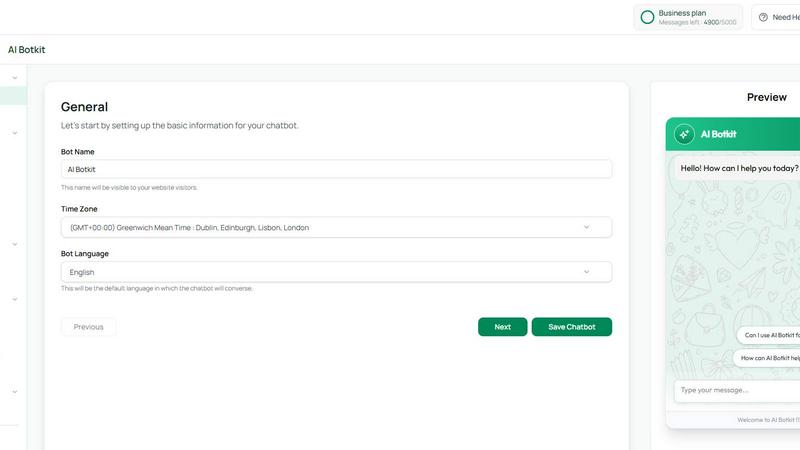
AI Botkit deploys sophisticated, no-code chatbots that automate support and capture leads instantly on your website.
Last updated: March 18, 2026

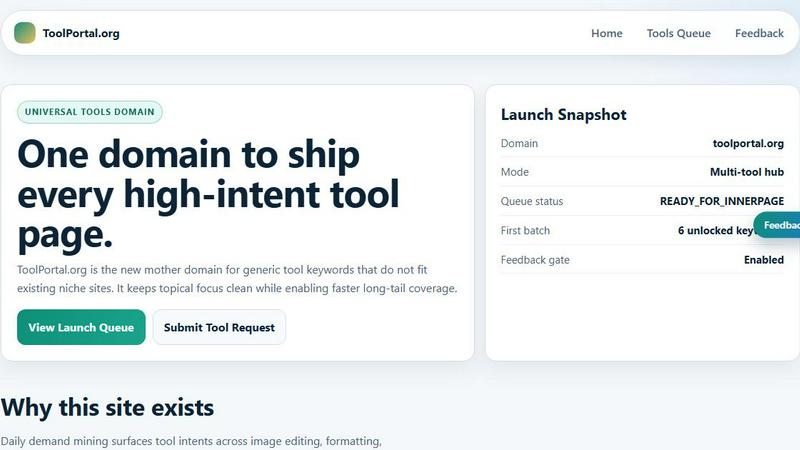
ToolPortal offers a suite of browser-based tools for effortless formatting, validation, conversion, and image management tasks.
Last updated: March 18, 2026
Visual Comparison
AI Botkit
ToolPortal
Feature Comparison
AI Botkit
No-Code Visual Builder
The platform's cornerstone is an intuitive, drag-and-drop interface that requires absolutely no programming knowledge. Users can design conversation flows, customize responses, and integrate data sources through a straightforward visual dashboard. This empowers teams to build, iterate, and manage sophisticated chatbot logic with the ease of assembling a presentation, making advanced AI automation accessible to every stakeholder within an organization.
Multi-Source Knowledge Training
AI Botkit excels in its ability to synthesize information from a diverse array of sources. You can train your chatbot by directly uploading documents (PDFs, Word files), pasting text, providing website URLs for it to crawl, or inputting detailed Q&A pairs. This holistic training approach ensures the bot develops a comprehensive understanding of your business, enabling it to provide precise, context-aware answers drawn directly from your approved content.
Advanced Analytics Dashboard
Move beyond guesswork with a comprehensive analytics suite that provides deep insights into chatbot performance. Track key metrics such as total conversations, user engagement rates, lead capture volume, frequently asked questions, and instances where the bot could not provide an answer. These actionable insights are presented through clear visualizations, allowing for continuous optimization of both bot responses and overall business strategy.
White-Label Brand Customization
Maintain a flawless and consistent brand identity across every customer touchpoint. AI Botkit offers extensive customization options for the chat widget, including colors, fonts, icons, placement, and avatars. You can fully tailor the look and feel to match your website's design, ensuring the chatbot appears as a native and integrated extension of your brand rather than a generic third-party tool.
ToolPortal
Comprehensive Tool Index
ToolPortal boasts an extensive collection of 228 live tools, encompassing generators, checkers, converters, and formatters. This dense index is designed for quick selection and efficient execution, allowing users to find the right tool for their tasks in mere seconds.
Task Lane Navigation
The platform simplifies the user experience by offering seven distinct task lanes, enabling users to filter tools by intent. This feature ensures that users can swiftly locate the best-fit tool tailored to their specific needs, enhancing productivity and satisfaction.
Updated and Fresh Tools
ToolPortal prides itself on a daily refresh cycle, continuously rolling out new pages and user interface upgrades. This commitment to innovation guarantees that users always have access to the latest tools and functionalities, keeping their workflows efficient and effective.
No Login Required
In a world where account creation often deters productivity, ToolPortal offers a seamless experience with no login flow. Users can immediately open a tool and execute their tasks without the hassle of account gating, making it an incredibly user-friendly option.
Use Cases
AI Botkit
24/7 Automated Customer Support
Deploy an intelligent first line of defense for your support team. The chatbot can instantly answer common customer inquiries regarding business hours, shipping policies, return procedures, and product specifications at any time of day. This drastically reduces ticket volume, decreases response times from hours to seconds, and allows human agents to focus on resolving more complex, high-value issues.
Proactive Lead Generation and Qualification
Transform passive website visitors into engaged prospects. The chatbot can initiate conversations, offer helpful guides or discounts, and ask qualifying questions to capture essential lead information like name, email, and project requirements. This data is collected seamlessly within the chat interface and can be exported or integrated directly with your CRM, building a robust sales pipeline automatically.
Interactive Product and Service Discovery
Enhance the digital shopping or browsing experience for users. For e-commerce sites, the bot can recommend products based on stated preferences. For service-based businesses like hotels or tour operators, it can detail amenities, check availability, and explain package options. This interactive guidance helps users find what they need faster, increasing conversion rates and customer satisfaction.
Internal Knowledge Management and Onboarding
Streamline internal operations by deploying a chatbot for employee support. Train it on company handbooks, HR policies, IT troubleshooting guides, and standard operating procedures. New hires or staff can query the bot for instant answers on common internal questions, accelerating onboarding and freeing up departmental resources for more strategic tasks.
ToolPortal
Social Media Content Creation
For marketers and creators, ToolPortal serves as an invaluable asset in crafting engaging social media content. With its array of text styling tools, such as the Glitch Text and Gothic Font Generators, users can effortlessly produce eye-catching text that stands out on various platforms.
Data Validation for Developers
Developers can leverage ToolPortal's validation tools to ensure the integrity and accuracy of their data configurations. Tools like the DMARC Checker and Rich Results Test Helper allow for swift checks before deployment, minimizing errors and enhancing project quality.
Image Preparation for Projects
ToolPortal simplifies the process of preparing images for various projects through its robust image tools. Users can crop, remove backgrounds, and optimize images for web use, streamlining the workflow for graphic design and content creation.
Quick File Conversions
Whether it is converting units, time formats, or structured data, ToolPortal's conversion workbench provides a comprehensive solution for quick file conversions. This feature is particularly beneficial for students and professionals who need reliable and immediate results for their conversion tasks.
Overview
About AI Botkit
AI Botkit represents the pinnacle of accessible conversational intelligence, a sophisticated no-code platform engineered to transform how businesses engage with their digital audience. It empowers organizations to deploy a fully functional, AI-driven chatbot in mere minutes, eliminating the traditional barriers of technical expertise and lengthy development cycles. By simply training the chatbot on your proprietary content—be it website pages, support documents, PDFs, or curated FAQs—you instill it with the unique knowledge and voice of your brand. The core value proposition is profound yet elegantly simple: deliver instant, accurate, and personalized interactions at any hour, automating critical functions like customer support, lead qualification, and visitor engagement. Crafted for the discerning business owner, marketer, and digital agency, AI Botkit is the definitive solution for those seeking to enhance operational efficiency, capture every opportunity, and provide a seamless, modern user experience without compromise.
About ToolPortal
ToolPortal is a sophisticated, browser-based hub meticulously crafted for the diverse needs of developers, marketers, creators, students, and everyday users. This versatile platform streamlines daily tasks such as text formatting, data validation, image resizing, and file conversions, all without the cumbersome requirement of software installation. With an intuitive interface that emphasizes speed and efficiency, ToolPortal allows users to access a wealth of practical utilities that can be executed in a single session. Whether you seek to generate captivating text styles, validate essential data configurations, or swiftly convert file formats, ToolPortal stands as your reliable companion. Its commitment to low-friction execution and immediate results empowers users to accomplish a myriad of tasks with ease, making it an indispensable resource in the digital toolkit.
Frequently Asked Questions
AI Botkit FAQ
How do I train the AI Botkit chatbot?
Training is a straightforward, no-code process. You simply add your knowledge sources through the platform's dashboard. This can be done by uploading documents (PDF, DOCX, TXT), providing links to your website or specific pages for the bot to crawl and index, or by manually entering questions and their corresponding answers. The AI then processes this information to understand and respond accurately to user queries.
Can the chatbot handle conversations in multiple languages?
Yes, AI Botkit offers extensive multilingual support for over 75 languages. You can set a default language for the chatbot, allow users to select their preferred language from a menu, or enable automatic language detection based on the user's browser settings. This makes it an ideal solution for businesses with a global or diverse local audience.
What happens if the chatbot cannot answer a question?
The platform is designed with a graceful degradation path. When the chatbot encounters a query outside its trained knowledge base, it can be configured to respond with a polite message acknowledging the limitation and can immediately initiate a smooth human handoff. This allows a live agent to take over the conversation seamlessly via the same chat interface, ensuring no customer inquiry is ever left unresolved.
Is my data secure with AI Botkit?
Data security is a foundational priority. Your proprietary training data and customer chat logs are never used to train public AI models or shared with unauthorized parties. The platform employs secure, token-based authentication for any third-party integrations (like CRMs or calendars), and you retain full control to update, export, or delete your data at any time from the admin dashboard.
ToolPortal FAQ
What types of tools can I find on ToolPortal?
ToolPortal offers a diverse range of tools categorized into generators, checkers, converters, formatters, and image utilities. Users can easily navigate to find exactly what they need for their specific tasks.
Is there a cost associated with using ToolPortal?
ToolPortal is entirely free to use. Users can access all tools without any charges or subscription fees, making it an accessible resource for everyone.
Do I need to create an account to use ToolPortal?
No, ToolPortal does not require users to create an account. This allows for a seamless experience where users can access tools instantly without the distractions of account management.
How often are new tools added to ToolPortal?
ToolPortal undergoes a daily refresh cycle, ensuring that users continuously benefit from new tools and interface upgrades. This commitment to innovation keeps the platform fresh and relevant for all users.
Alternatives
AI Botkit Alternatives
AI Botkit occupies a distinct space within the no-code AI chatbot landscape, offering businesses an elegant solution to deploy conversational intelligence. It simplifies the process of training a chatbot on proprietary content and seamlessly integrating it into a digital presence, all while maintaining the option for human intervention. This blend of automation and personal touch defines its value proposition. Organizations may explore alternatives for a variety of strategic reasons. These can range from budgetary considerations and specific feature requirements—such as advanced analytics or deeper platform integrations—to the need for a solution that aligns with a particular tech stack or scales with enterprise-level demands. The quest for the right tool is often a balance of capability, cost, and compatibility. When evaluating other platforms, a discerning approach is essential. Key considerations should include the sophistication of the underlying AI, the ease of training and maintenance, the quality of the user experience for both the visitor and the managing team, and the robustness of security and data privacy measures. The ideal alternative will not only meet functional checklists but also embody a level of refinement that reflects your brand's standards.
ToolPortal Alternatives
ToolPortal is an innovative browser-based tool hub designed to streamline daily tasks such as text formatting, file validation, image resizing, and quick conversions. Catering to a diverse audience that includes developers, marketers, creators, and students, ToolPortal offers a suite of utilities that are readily accessible, efficient, and user-friendly. It occupies a niche in the broader category of development tools, where speed and simplicity are paramount. Users often seek alternatives to ToolPortal for various reasons, such as pricing, additional features, or specific platform compatibility. When exploring alternatives, it is essential to consider the range of functionalities offered, the user interface's clarity, and the overall performance of the tool. A thorough assessment of these factors ensures that users find a solution that meets their unique needs and enhances their productivity.