
AI Formatter vs LuxSign
Side-by-side comparison to help you choose the right product.
AI Formatter
AI Formatter instantly transforms raw text into elegantly structured, professional documents.
Last updated: March 1, 2026

LuxSign offers a secure, legally compliant platform for effortlessly signing and managing documents online in minutes.
Last updated: February 26, 2026
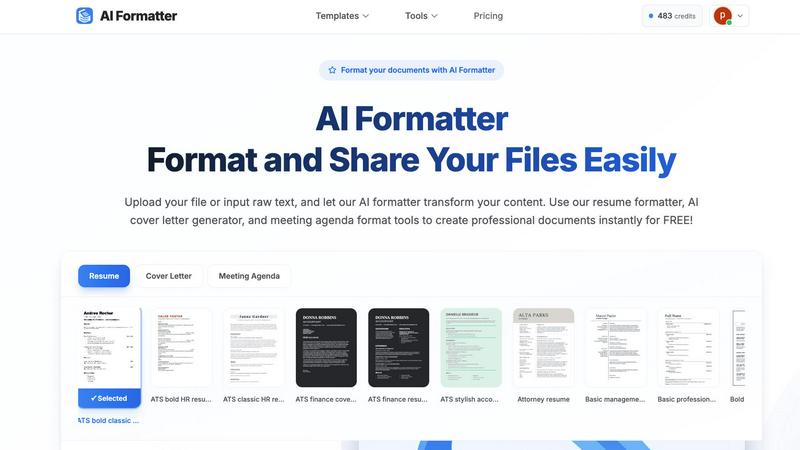
Visual Comparison
AI Formatter
LuxSign

Feature Comparison
AI Formatter
Intelligent, Context-Aware Formatting Engine
At the heart of AI Formatter is a sophisticated AI engine that does more than apply static templates. It intelligently analyzes the content's context, structure, and purpose—whether a resume, cover letter, or business report—to apply optimal formatting, logical section ordering, and professional styling. This ensures the final document is not only visually appealing but also strategically organized for its intended audience and purpose, maximizing impact and readability.
Extensive Library of ATS-Optimized Templates
Users gain access to a curated library of over 162 professional templates, each meticulously designed to pass automated screening systems and impress human recruiters. These templates for resumes, cover letters, meeting agendas, and more are built with clean layouts, strategic keyword placement, and scannable structures, providing a formidable advantage in competitive fields and ensuring your content is seen.
Seamless Multi-Format Input and Output
AI Formatter eliminates workflow friction by accepting a wide array of input formats, including raw text, DOC, DOCX, PDF, and TXT files up to 10MB. Once formatted, users can effortlessly download their polished documents in multiple high-quality output formats such as PDF and Word, ensuring compatibility with any submission requirement or professional setting.
Real-Time Collaborative Editor with Full Control
Following the AI's initial transformation, users are not locked into a rigid output. The platform features an intuitive, real-time editor that allows for granular customization. Adjust fonts, colors, spacing, and layout, or tweak the content itself, maintaining complete creative authority over the final product before sharing or downloading.
LuxSign
Multiple Signature Methods
LuxSign provides versatile signing options, allowing users to draw their signature using a mouse, type their name, or upload an image. This feature includes support for custom initials, facilitating quick and efficient document signing for all users.
Advanced Security
The platform prioritizes security with industry-standard encryption protocols during the upload, storage, and transmission of documents. This ensures that sensitive information remains confidential and protected against unauthorized access throughout the signing process.
Complete Audit Trail
LuxSign maintains a detailed audit trail for every document signed. This includes comprehensive logs with timestamps, IP addresses, and signer information, ensuring full transparency and compliance for both businesses and regulatory bodies.
Collaboration Workspaces
With LuxSign, teams can create shared workspaces that enhance collaboration. This feature allows users to organize documents into folders, manage member access, and work together seamlessly on signing workflows, streamlining processes for teams of all sizes.
Use Cases
AI Formatter
Accelerating Job Search Success
For job seekers, AI Formatter is an indispensable career tool. It transforms a basic career history into an ATS-optimized, visually compelling resume and generates a personalized, persuasive cover letter in moments. This end-to-end preparation significantly reduces application time while dramatically improving the quality and success rate of job applications.
Standardizing Professional Business Communications
Businesses and professionals can leverage AI Formatter to ensure all external and internal documents—from client proposals and reports to meeting agendas and invoices—adhere to a consistent, professional brand standard. This elevates the company's image, enhances communication clarity, and projects a unified, credible identity to partners and clients.
Streamlining Academic and Research Publishing
Academics, researchers, and students can expedite the manuscript preparation process. By uploading draft text, the AI applies strict journal or institutional formatting guidelines, manages citations and references, and structures content for peer review, saving countless hours otherwise spent on manual layout adjustments.
Automating Administrative Document Creation
Entrepreneurs, freelancers, and administrators can instantly generate polished, professional documents like invoices, receipts, and formal letters. By inputting raw data or draft text, the AI formatter structures the information into clean, legally sound, and brand-appropriate formats, streamlining administrative overhead.
LuxSign
Contract Management for Small Businesses
Small businesses can leverage LuxSign to manage their contracts efficiently. By using the platform, they can ensure that all agreements are signed promptly and securely, reducing turnaround times and enhancing client satisfaction.
Remote Team Collaboration
For organizations with remote teams, LuxSign offers a robust solution for signing documents from any location. Team members can collaborate in real-time, ensuring that important documents are signed without the constraints of geographical barriers.
Compliance-Focused Industries
Industries that require stringent compliance, such as finance and healthcare, can utilize LuxSign to ensure that all documents meet legal standards. The platform’s audit trails and GDPR compliance make it an ideal choice for maintaining regulatory adherence.
Streamlined Onboarding Processes
Businesses can simplify their onboarding procedures by using LuxSign to send employment contracts and other necessary documents to new hires. This allows for swift processing and ensures that all paperwork is completed securely and efficiently.
Overview
About AI Formatter
AI Formatter, engineered by Sun Sky LLC, transcends conventional document editing by merging sophisticated artificial intelligence with the principles of elite design. It is a cloud-based platform dedicated to eradicating the inefficiency of manual formatting, transforming raw text and common file uploads—including Word documents, PDFs, and TXT files—into impeccably structured, publication-ready materials. The platform's core intelligence lies not only in applying aesthetically pleasing layouts but also in its strategic optimization for modern digital ecosystems, such as ensuring resumes achieve a remarkable 95%+ pass rate through Applicant Tracking Systems (ATS). Designed for a discerning clientele of ambitious job seekers, time-pressed executives, scaling enterprises, and meticulous academics, AI Formatter acts as a powerful productivity engine. It streamlines career advancement by crafting compelling, optimized application materials, standardizes business communications for a cohesive brand identity, and accelerates the path to academic publishing. Through an intuitive, real-time editor that grants complete creative control, and a generous free tier that scales to enterprise solutions, AI Formatter democratizes access to professional-grade document presentation, empowering every user to present their work with the authority and polish it inherently deserves.
About LuxSign
LuxSign is an innovative, secure, cloud-based electronic signature platform meticulously designed for businesses that demand rigorous compliance and data protection. Originating from Luxembourg, LuxSign is built to provide unparalleled security, ensuring that all documents are encrypted end-to-end and stored exclusively within the country’s borders. This guarantees strict adherence to GDPR regulations, making it a prime choice for organizations operating within the European Union. LuxSign supports the eIDAS SES standards, thereby offering legal validity for contracts throughout the EU. With its user-friendly interface, businesses can effortlessly manage their documentation processes, utilizing features such as parallel or sequential signing workflows, drag-and-drop signature field placement, and automated email notifications. Advanced tiers of the platform unlock additional capabilities, including document templates, comprehensive audit trails, bulk signing options, collaboration workspaces, bespoke branding solutions, and a complete REST API with an embeddable SDK for seamless system integrations. LuxSign truly embodies the intersection of security, compliance, and efficiency in digital signatures.
Frequently Asked Questions
AI Formatter FAQ
What file formats does AI Formatter support for upload?
AI Formatter is designed for maximum flexibility, supporting direct raw text input as well as uploads of common document formats including PDF, DOC, DOCX, and TXT files. This ensures you can start from virtually any existing document or draft. There is a maximum file size limit of 10MB per upload.
How does the AI ensure my resume passes through Applicant Tracking Systems (ATS)?
Our resume templates are specifically engineered for ATS compatibility. The AI applies clean, parsable layouts, avoids complex graphics and columns that scanners misinterpret, and strategically structures content with standard section headers. This optimization, tested to achieve a 95%+ pass rate, ensures your resume's content is accurately read and ranked by automated systems.
Can I edit the document after the AI formats it?
Absolutely. The AI provides a powerful starting point, but you retain full creative control. The formatted document opens in our intuitive real-time editor, where you can customize every element—from text and fonts to spacing, colors, and overall layout—before finalizing and downloading your document.
Is there a free version of AI Formatter available?
Yes, AI Formatter believes in democratizing professional formatting. We offer a generous free tier that allows users to access core formatting tools and templates to create professional documents instantly. This provides an excellent opportunity to experience the platform's transformative capabilities before exploring our premium, feature-rich plans.
LuxSign FAQ
How secure is the LuxSign platform?
LuxSign employs industry-standard encryption methods to protect documents during upload, storage, and transmission. All data is stored securely in Luxembourg, ensuring compliance with GDPR and local data protection laws.
What types of documents can be signed using LuxSign?
Users can upload various document formats, including PDF, DOC, and DOCX files. The platform supports automatic conversion, allowing for seamless signing of documents up to 10MB in size.
Can multiple signers be added to a single document?
Yes, LuxSign allows users to add up to four signers per document. You can choose between parallel signing or sequential signing workflows, providing flexibility to meet different signing requirements.
Is there a free trial available for LuxSign?
LuxSign offers a free plan that allows users to sign their own files and documents sent to them. This plan includes essential features such as end-to-end encryption and email support, enabling users to explore the platform without any financial commitment.
Alternatives
AI Formatter Alternatives
AI Formatter stands as a premier solution in the productivity and document management category, leveraging sophisticated artificial intelligence to instantly transform raw text into polished, professional documents. It is engineered for those who demand excellence in presentation, from job seekers to enterprise leaders. Users may explore alternatives for various reasons, including specific budgetary constraints, a need for specialized features beyond core formatting, or a preference for different software ecosystems. The landscape offers a spectrum of tools, each with its own approach to streamlining document creation. When evaluating other solutions, discerning professionals should consider the depth of intelligent automation, the quality and relevance of design templates, and the tool's proficiency with systems like applicant trackers. The ideal alternative should not only beautify text but also enhance its strategic impact, marrying form with function to serve your unique professional narrative.
LuxSign Alternatives
LuxSign is a sophisticated electronic signature platform hailing from Luxembourg, designed to meet the needs of businesses that require stringent compliance with legal standards. As an eIDAS SES compliant service, it ensures that electronic signatures are recognized and enforceable across all EU member states. Users often seek alternatives to LuxSign for a variety of reasons, including pricing concerns, specific feature requirements, or the need for integration with existing systems. When selecting an alternative to LuxSign, it is essential to evaluate the platform’s security measures, compliance with relevant regulations, user experience, and the breadth of features offered. Additionally, consider the ease of implementation and whether the platform can adapt to your unique business workflow needs, ensuring a seamless transition and continued operational efficiency.