
Avif2Png vs Shrinkpad
Side-by-side comparison to help you choose the right product.
Avif2Png
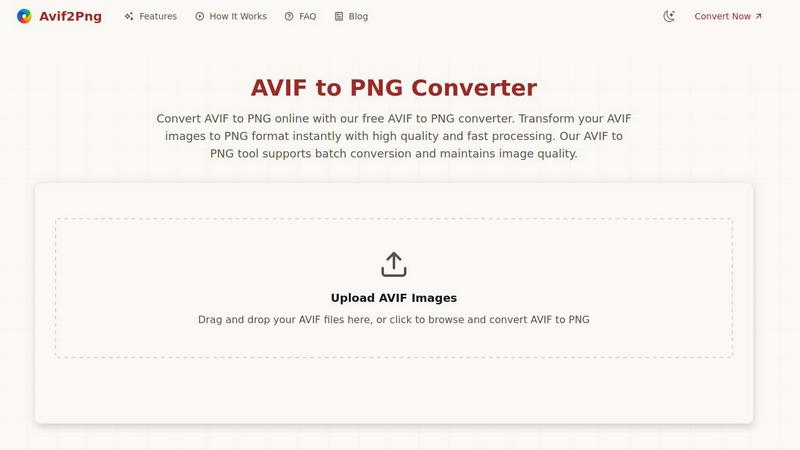
Avif2Png elegantly converts your AVIF images to universally compatible PNG format with pristine quality.
Last updated: March 1, 2026

Shrinkpad
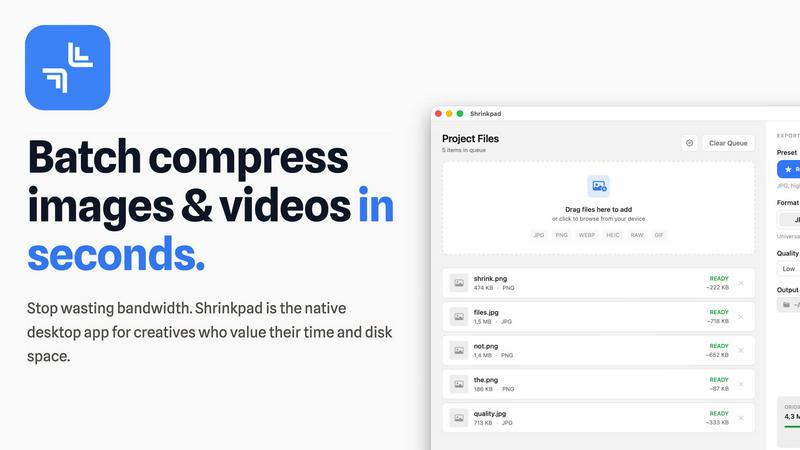
Shrinkpad effortlessly batch compresses images and videos on Mac, optimizing file sizes while preserving quality.
Last updated: February 28, 2026
Visual Comparison
Avif2Png
Shrinkpad
Feature Comparison
Avif2Png
High-Fidelity, Lossless Conversion
Avif2Png employs a meticulous conversion algorithm designed to preserve every detail of your original AVIF image. The process utilizes lossless compression techniques specific to the PNG format, ensuring that no degradation in quality, color accuracy, or clarity occurs. Your graphics, logos, and complex visuals are transformed with absolute integrity, maintaining sharp edges and vibrant color profiles exactly as intended.
Batch Processing Efficiency
Designed for productivity, our tool empowers you to convert multiple AVIF files to PNG simultaneously in a single, streamlined operation. This batch conversion capability eliminates the tediousness of handling images one by one, saving valuable time for professionals managing large libraries of digital assets, thereby accelerating project workflows and enhancing overall efficiency.
Secure & Confidential Processing
We uphold the highest standard of data privacy. Your uploaded AVIF files are processed in a secure, transient environment. All files are automatically and permanently deleted from our servers immediately after the conversion is complete and your PNG downloads are delivered. This ensures your proprietary visuals and sensitive project assets remain entirely confidential.
Zero-Cost, No-Registration Access
Avif2Png believes in barrier-free access to premium tools. The service is completely free to use and requires no user registration, account creation, or subscription. You can enjoy instantaneous, high-quality conversions without any commitments, downloads, or software installations, accessing professional-grade functionality directly from any modern web browser.
Shrinkpad
Intelligent Compression Settings
Shrinkpad employs cutting-edge algorithms to automatically assess the visual complexity of each file, applying the optimal compression ratio without introducing any artifacts. This ensures that users achieve the finest balance between file size reduction and image quality preservation.
Unlimited Batch Processing
Designed to enhance productivity, Shrinkpad allows users to process thousands of files simultaneously without crashing. This feature sets it apart from web-based tools, enabling creatives to manage extensive queues of media files effortlessly and efficiently.
One-Drop Folder Compression
With Shrinkpad’s intuitive folder mode, users can simply drag and drop entire folders filled with images and videos. The application automatically detects and prepares all supported files for compression, saving time and streamlining the workflow.
Privacy-Focused Local Processing
All compression tasks are handled locally on the user's Mac, ensuring that no files are uploaded to the cloud. This commitment to privacy allows users to work with confidence, knowing that their sensitive materials remain secure throughout the entire optimization process.
Use Cases
Avif2Png
Web Development & Cross-Browser Compatibility
Web developers utilize Avif2Png to ensure visual content renders consistently across all user environments. While modern browsers support AVIF, legacy systems and certain content management systems may not. Converting optimized AVIF assets to PNG guarantees universal browser and platform compatibility, preventing display issues and ensuring a seamless user experience for every visitor.
Professional Graphic Design & Print Preparation
Graphic designers rely on the PNG format for its flawless support of transparency and sharp detail. Avif2Png is essential for designers who create in AVIF for its efficiency but need final assets in PNG for client deliverables, logos, icons, and print materials. The lossless conversion preserves alpha channels and crisp edges, meeting the exacting standards of professional print and digital publishing.
Content Creation & Multi-Platform Publishing
Content creators and social media managers often need to repurpose visual assets across diverse platforms with varying format support. Avif2Png allows them to leverage AVIF's compression for storage and editing, then effortlessly convert to PNG for guaranteed compatibility on any social network, blog, or advertising platform, maximizing reach without sacrificing visual quality.
Archiving & Legacy System Support
Organizations managing digital archives or operating within ecosystems reliant on older software benefit from converting AVIF to PNG. PNG's status as a universally accepted standard ensures long-term accessibility and prevents obsolescence. Avif2Png facilitates the migration of modern image libraries into a future-proof format that is guaranteed to be supported by all systems.
Shrinkpad
Optimizing Digital Portfolios
Photographers can utilize Shrinkpad to compress their entire portfolio in one go, significantly reducing file sizes while preserving stunning visual quality. This optimization not only saves disk space but also enhances loading times for online galleries.
Streamlining Web Asset Management
Web developers and designers can rapidly compress images and videos for websites, improving load times and overall site performance. By achieving faster Largest Contentful Paint (LCP) scores, they can enhance user experience and potentially boost search engine rankings.
Efficient Media Library Maintenance
Content creators can leverage Shrinkpad to maintain their digital libraries by compressing bulk files from various projects. The application’s smart detection capabilities make it easy to manage and optimize mixed media collections efficiently.
Enhancing Collaborative Projects
Teams can benefit from Shrinkpad by streamlining the asset optimization process in collaborative projects. With features like unlimited batching and folder mode, team members can quickly prepare high-quality assets for presentations or client deliverables.
Overview
About Avif2Png
Avif2Png is the definitive solution for sophisticated digital asset transformation, elegantly bridging the gap between cutting-edge image technology and universal practicality. This premium, web-based tool is meticulously engineered to convert modern AVIF images into the timeless PNG format with uncompromising fidelity and effortless ease. It serves an essential role in the contemporary creative and technical workflow, catering to professionals—graphic designers, web developers, content creators, and forward-thinking businesses—who leverage the superior compression of next-generation AVIF but require the unwavering, broad compatibility of PNG for final deployment. The core value proposition of Avif2Png lies in its ability to deliver an instantaneous, secure, and high-fidelity conversion experience. It liberates users from technical constraints, ensuring that visual content displays with flawless precision across every browser, application, and platform. By maintaining the absolute integrity of the original image's quality and detail throughout the transformation process, Avif2Png guarantees that your work is presented with the professionalism it deserves, wherever it needs to be seen.
About Shrinkpad
Shrinkpad is an exceptional desktop application meticulously crafted for macOS, representing the pinnacle of media compression technology. This powerful tool is designed for photographers, designers, content creators, and developers who seek to optimize their digital assets while reclaiming valuable disk space. Shrinkpad’s primary value proposition lies in its ability to perform rapid and efficient batch compression of images and videos, ensuring that users can manage their media libraries with unprecedented ease and privacy. By executing all processing locally on the user's machine, it eliminates the concerns associated with cloud uploads, safeguarding sensitive creative content. Leveraging advanced Apple frameworks and optimization for Apple Silicon, Shrinkpad can reduce file sizes by up to 90% while maintaining exceptional visual quality. The user-friendly interface supports over fifty different formats, including everyday JPGs and PNGs, as well as professional RAW files and high-definition 4K videos, making it an indispensable asset for anyone who values their time and resources.
Frequently Asked Questions
Avif2Png FAQ
Is Avif2Png truly free to use?
Yes, absolutely. Avif2Png is a completely free online tool. There are no hidden fees, subscription plans, or usage limits. You can convert an unlimited number of AVIF images to PNG format without any cost and without the need to create an account or provide any personal information.
How does Avif2Png ensure the quality of my converted images?
Our converter is engineered to perform lossless conversion from AVIF to PNG. This means the process focuses on changing the file container and compression algorithm without applying any destructive compression or quality reduction to the image data itself. The visual fidelity, color depth, and detail of your original AVIF file are meticulously preserved in the resulting PNG.
Are my uploaded files kept private and secure?
Your privacy and security are paramount. All files you upload to Avif2Png are processed on secure servers and are automatically permanently deleted immediately after the conversion is complete. We do not store, share, or analyze your images. The conversion process is entirely confidential.
Can I convert multiple AVIF files at once?
Yes, Avif2Png supports efficient batch conversion. You can upload multiple AVIF files simultaneously—either by dragging and dropping a selection or using the file browser—and the tool will process them all in one operation, providing you with individual PNG downloads for each image. This feature is designed to save significant time when working with large sets of images.
Shrinkpad FAQ
Can I use Shrinkpad for free?
Yes, Shrinkpad offers a Free Starter version that includes essential tools for casual use, allowing users to compress a limited number of files per batch.
What file formats does Shrinkpad support?
Shrinkpad supports over fifty formats, including common types such as JPG, PNG, and WEBP, as well as professional formats like RAW and HEIC, ensuring versatility for all users.
Does Shrinkpad support video compression?
Absolutely. Shrinkpad is capable of compressing various video formats, including MP4 and MOV, enabling users to optimize all forms of media efficiently.
How many files can I process at once?
Shrinkpad allows for unlimited batch processing, enabling users to handle thousands of files simultaneously without experiencing crashes or slowdowns, making it perfect for large-scale projects.
Alternatives
Avif2Png Alternatives
Avif2Png stands as a premier solution within the image conversion category, specifically engineered to transform modern AVIF files into the universally compatible PNG format with uncompromising quality. It is the definitive tool for professionals who require their sophisticated visual assets to maintain integrity while achieving broad compatibility. Users may explore alternatives for a variety of reasons, including specific budgetary considerations, the need for different feature sets such as offline software or additional format support, or particular workflow integrations that demand a different platform approach. The landscape of digital tools is vast, and individual requirements rightly guide the selection process. When evaluating other solutions, discerning users should prioritize core tenets: the guarantee of lossless quality preservation, robust efficiency through batch processing capabilities, and an unwavering commitment to data security and privacy. The ideal alternative will seamlessly bridge technical necessity with creative freedom, ensuring a professional and reliable outcome.
Shrinkpad Alternatives
Shrinkpad is a premier desktop application designed exclusively for macOS, specializing in the batch compression of images and videos. This sophisticated tool caters to photographers, designers, content creators, and developers, providing them with a powerful means to optimize their digital assets while maintaining the utmost privacy and security. Users often seek alternatives to Shrinkpad for various reasons, including budget constraints, specific feature requirements, or the need for cross-platform compatibility. When considering alternatives, potential users should prioritize factors such as processing speed, ease of use, file format support, and the ability to maintain visual integrity during compression. As the demand for digital media continues to grow, the search for effective compression solutions becomes increasingly vital. Users are encouraged to look for alternatives that offer a seamless user experience, intelligent batch processing capabilities, and robust security measures to ensure the protection of their creative work. Ultimately, the ideal alternative should align with the user’s specific needs while delivering reliable performance and preserving the quality of their media files.