Beesift vs Pauso - Screen Time Controller
Side-by-side comparison to help you choose the right product.
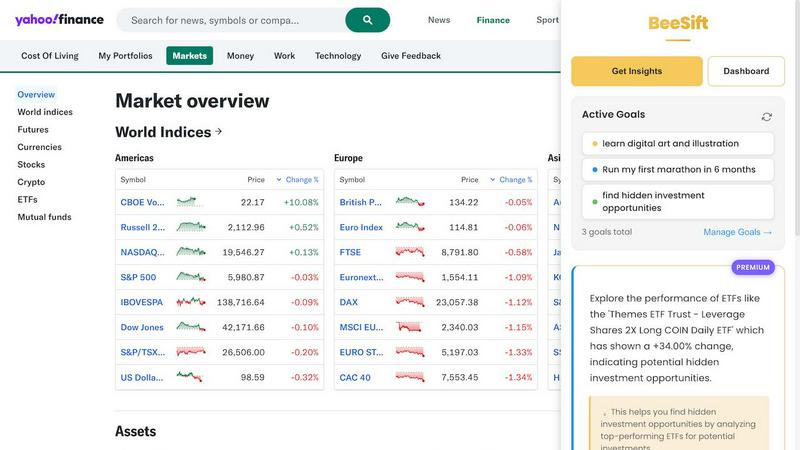
BeeSift extracts goal-aligned insights from any webpage, cutting through the noise for focused thinkers.
Last updated: March 1, 2026

Pauso - Screen Time Controller
Pauso empowers you to regain control of your screen time through mindful breathing, transforming distraction into deliberate choice.
Last updated: March 26, 2026
Visual Comparison
Beesift
Pauso - Screen Time Controller

Feature Comparison
Beesift
Goal-Aligned Intelligence Extraction
Beesift transcends generic summarization by filtering all content through the lens of your defined objectives. Simply set goals like "Learn Python for data science" or "Start investing wisely," and the AI will scan any webpage to deliver 3-8 concise, actionable bullets that directly contribute to that aim. It systematically ignores irrelevant fluff, delivering only the substantive insights that matter to you.
One-Shortcut Activation
Integration into your workflow is seamless and instantaneous. With a single keystroke (Ctrl+Shift+K) on any webpage, you activate Beesift's powerful analysis. There is no need for cumbersome copy-pasting or switching between tabs. This elegant shortcut transforms your browser into a real-time opportunity scanner, delivering personalized insights without disrupting your natural browsing rhythm.
Privacy-First Personal Knowledge Base
Every insight you save is automatically tagged and organized within your private dashboard, building a searchable arsenal of knowledge tied directly to your goals. Crucially, this is built with privacy by design. Beesift does not store your browsing history or track the sites you visit. Your goals and extracted insights remain securely localized, ensuring your intellectual exploration remains confidential.
Universal Web Compatibility
Beesift is engineered to work across the entire digital landscape. Whether you are reading long-form articles, technical documentation, academic research, forum discussions, or social media threads, the extension can process and extract value. If the content is rendered in your browser, Beesift can analyze it, making it a versatile tool for any information-intensive task.
Pauso - Screen Time Controller
Breathe Mode
Breathe Mode epitomizes Pauso's commitment to fostering awareness over restriction. When you attempt to access a distracting app, the app presents a brief guided breathing exercise, allowing you to pause and reflect before making a decision. This gentle intervention helps disrupt habitual app usage, encouraging users to reconsider their impulses without feeling judged or constrained.
Block Mode
Block Mode offers a robust solution for those times when sheer willpower proves insufficient. Utilizing Apple's iOS Family Controls framework, this feature effectively blocks selected apps during predetermined times, providing an impenetrable barrier against distractions. Ideal for focused work sessions or study periods, Block Mode ensures that users can concentrate without the temptation of bypassing restrictions.
Progress Tracking
Pauso’s Progress Tracking feature meticulously records every breathing exercise completed and every app you consciously decide not to open. Users can visualize their progress through elegant charts that reveal daily and weekly trends, allowing for deeper insights into their screen time habits. This data-driven approach empowers individuals to celebrate their achievements and commit to ongoing improvements.
Daily Insights Widget
The Daily Insights Widget serves as a constant reminder of your progress without needing to open the app. This feature displays key statistics directly on your home screen, allowing you to keep track of your mindful minutes and the effectiveness of your chosen modes. This seamless integration into your daily routine reinforces a commitment to intentional screen time management.
Use Cases
Beesift
For the Aspiring Learner
Students and autodidacts can cut through verbose educational content to extract key concepts, recommended resources, and structured learning paths. For instance, when reading a broad tutorial on web development, Beesift can instantly identify and highlight the exact frameworks, tools, and critical syntax examples relevant to the learner's current skill level and project goals.
For the Founder and Builder
Entrepreneurs and developers can efficiently navigate dense technical documentation, product manuals, and competitive analyses. Beesift digs into lengthy texts to surface specific implementation details, best practices, potential pitfalls, and innovative solutions, accelerating research and development cycles without getting lost in ancillary details.
For the Strategic Professional
Analysts, consultants, and knowledge workers can distill lengthy industry reports, market analyses, and news articles into the precise trends, data points, and strategic insights that impact their business decisions. This allows professionals to stay informed with depth and relevance, turning information overload into a competitive advantage.
For the Goal-Oriented Individual
Anyone pursuing personal development goals, from training for a marathon to planning investments, can use Beesift to filter advice-heavy content. It extracts only the actionable steps, evidence-based methods, and critical warnings that align with their specific plan, turning generic online advice into a personalized, actionable guide.
Pauso - Screen Time Controller
Mindful Social Media Use
For those who find themselves habitually scrolling through social media, Pauso provides a moment of pause before diving into the digital abyss. The Breathe Mode encourages users to reflect on their motivations, often leading to reduced engagement and a more intentional approach to social media.
Focused Study Sessions
Students can leverage Block Mode to eliminate distractions during critical study times. By scheduling app blocks, learners can create a conducive environment for concentration, ultimately enhancing their academic performance and reducing the stress associated with multi-tasking.
Evening Wind-Down
In an age where late-night screen use can disrupt sleep patterns, Pauso offers a solution. Utilizing Block Mode in the evenings helps users wind down by eliminating engaging apps that often lead to prolonged screen time, promoting healthier sleep routines and better overall well-being.
Enhanced Productivity at Work
Professionals looking to maximize productivity can benefit from Pauso's dual modes. By using Breathe Mode for brief mental resets and Block Mode for uninterrupted work periods, users can cultivate a more balanced and effective workflow, thus enhancing their overall performance.
Overview
About Beesift
In the digital age, we are paradoxically both inundated with information and starved for meaningful insight. Beesift is the definitive solution to this modern cognitive dilemma. It is a sophisticated Chrome extension that acts not as a mere summarizer, but as a precision intelligence filter for the discerning mind. By understanding your unique personal and professional ambitions, Beesift's advanced AI meticulously analyzes any webpage to extract only the insights, data points, and actionable knowledge that directly advance your specific goals. It elegantly transforms the chaotic expanse of the internet into a curated stream of purposeful intelligence. Designed with an uncompromising commitment to privacy and a minimalist ethos, it empowers students, professionals, founders, and lifelong learners to replace endless, unfocused reading with targeted, goal-aligned discovery. The core promise is profound: to enable you to build a powerful, personal knowledge arsenal with unparalleled efficiency, ensuring that every moment spent online is a strategic step toward your aspirations.
About Pauso - Screen Time Controller
Pauso - Screen Time Controller is an innovative mobile application designed to empower users in reclaiming their time from the grips of mindless scrolling and digital distractions. At its core, Pauso encourages mindful awareness through the simplicity of breath, offering a unique approach to managing screen time that transcends traditional punitive measures. This app is ideally suited for individuals of all ages seeking to foster a healthier relationship with their devices, from busy professionals striving for productivity to students navigating the challenges of study habits. By introducing a moment of reflection before engaging with distracting applications, Pauso not only promotes intentionality but also facilitates a deeper connection to one's digital habits. The app's dual functionality allows users to choose between gentle reminders and strict app blocking, making it a versatile tool for enhancing focus and mindfulness in an increasingly distracting world.
Frequently Asked Questions
Beesift FAQ
How is Beesift different from using a general AI like ChatGPT?
While ChatGPT is a versatile, general-purpose conversational tool, Beesift is a specialized instrument laser-focused on your declared objectives. It doesn't just summarize; it contextually filters all information through your unique goals, ensuring every output is directly relevant and actionable for your specific projects, unlike a broad AI chat which requires manual prompting and context-setting.
Does Beesift work on all websites and types of content?
Yes. Beesift is designed to function on virtually any webpage you can access and read in your Chrome browser. This includes news sites, blogs, academic journals, PDFs viewed in-browser, documentation portals, community forums, and even social media platforms. Its versatility makes it a universal tool for information extraction.
How does Beesift handle my privacy and data?
Privacy is a foundational principle. Beesift processes page content locally in your browser session to generate insights. We do not store your browsing history, track the URLs you visit, or sell your data. Your defined goals and saved insights are stored locally on your device or in your private, encrypted account, never used for advertising or external profiling.
Can I modify my goals after setting them up?
Absolutely. Your intellectual pursuits evolve, and so should your tools. You can add, edit, or remove your active goals at any time within the extension's dashboard. Beesift adapts instantly, immediately beginning to filter new content through the updated lens of your current ambitions and focus areas.
Pauso - Screen Time Controller FAQ
How does Pauso help reduce screen time?
Pauso helps reduce screen time by introducing a mindful breathing exercise whenever you attempt to open a distracting app. This moment of reflection encourages users to reconsider their choices, breaking the cycle of habitual app usage.
Is Block Mode easy to set up?
Yes, setting up Block Mode is straightforward. Users can select specific apps to block during scheduled times or activate it on demand, ensuring that distractions are kept at bay whenever necessary.
Does Pauso require an account to use?
No, Pauso does not require users to create an account. All data remains on your device by default, ensuring that your screen time habits are kept private and secure.
Can I track my progress with Pauso?
Absolutely. Pauso includes a comprehensive Progress Tracking feature that allows users to monitor their breathing exercises and app usage patterns over time, providing valuable insights into their screen time behaviors.
Alternatives
Beesift Alternatives
Beesift is a premium productivity tool designed for the focused thinker, operating within the category of intelligent content curation and knowledge management. It distinguishes itself by filtering digital noise through the lens of a user's personal and professional goals, transforming passive browsing into active, purpose-driven discovery. Users may explore alternatives for various reasons, such as budget considerations, a need for different feature sets like team collaboration, or compatibility with specific platforms beyond the browser. The quest for a tool that aligns with one's unique workflow and cognitive style is a common and prudent endeavor in personal productivity. When evaluating alternatives, discerning individuals should prioritize the core philosophy of the tool. Seek solutions that offer not just summarization, but contextual intelligence; that respect data privacy as a fundamental right; and that integrate seamlessly into your existing habits without adding cognitive burden. The ideal tool acts as a silent, efficient partner in your intellectual pursuits.
Pauso - Screen Time Controller Alternatives
Pauso - Screen Time Controller is an innovative tool designed to help users regain control over their device usage by promoting mindfulness and intentional screen time. Positioned within the productivity and management category, it offers a unique approach to tackling the pervasive issue of digital distraction through guided breathing exercises. Users often seek alternatives to Pauso due to various reasons, including pricing concerns, feature sets that may better suit their personal habits, or compatibility with specific devices and platforms. When exploring potential alternatives, it is essential to consider the app's usability, the effectiveness of its features in managing screen time, and the overall approach it takes to promote healthier digital habits.