BlitzCut vs SeeDance Ai
Side-by-side comparison to help you choose the right product.

BlitzCut
BlitzCut transforms raw video into polished, captioned content for social media in minutes using advanced AI technology.
Last updated: February 26, 2026

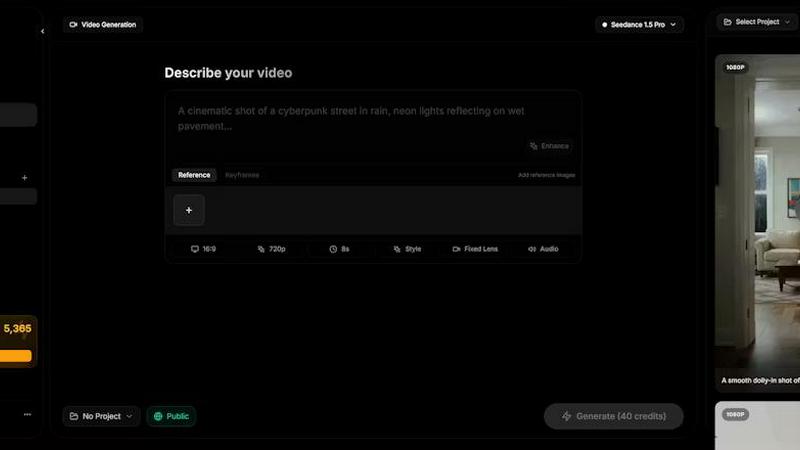
Seedance AI transforms your text, images, audio, and video into polished, cinematic clips with synchronized sound in a single generation.
Last updated: April 13, 2026
Visual Comparison
BlitzCut

SeeDance Ai
Feature Comparison
BlitzCut
Automatic Silence Removal
BlitzCut's Automatic Silence Removal feature utilizes advanced AI algorithms to identify and remove silent gaps in your video, effectively saving you the hassle of manual editing. This functionality significantly reduces editing time, allowing creators to focus on the essence of their content while the app ensures a smooth, uninterrupted flow.
AI Captions
With over 95% accuracy, BlitzCut's AI Captions feature automatically generates stylish captions that resonate with current trends. This capability not only enhances accessibility but also elevates the aesthetic appeal of your videos, making them more engaging for viewers who prefer watching on mute.
Text-Based Editing
BlitzCut introduces a revolutionary Text-Based Editing feature, allowing users to edit their videos by simply deleting sentences from the generated transcription. This intuitive method streamlines the editing process, making it accessible even for those with minimal video editing experience, and ensures that your final cut aligns perfectly with your intended message.
2-Minute Workflow
Designed for speed, BlitzCut's 2-Minute Workflow allows users to go from import to export in under two minutes. This rapid process ensures that creators can produce and share high-quality videos efficiently, meeting the demands of a fast-paced digital landscape where timely content is crucial for success.
SeeDance Ai
Multimodal @ Reference System
This revolutionary input framework allows creators to upload and tag up to 12 reference files—including images, videos, and audio clips—directly within their text prompt using the @ symbol. By tagging assets like @Image1 or @Video1, you provide the AI with precise, unambiguous instructions rather than vague inspiration. This system eliminates guesswork, enabling you to combine a specific face from one image, a camera movement from a reference clip, and the rhythm from an audio track into a single, coherent generation prompt for unparalleled creative fidelity.
Native Audio-Visual Synchronization
Unlike tools that treat sound as a post-production overlay, SeeDance Ai generates audio and video simultaneously within a single model pass. This foundational architecture ensures perfect temporal alignment: footsteps match the stride, dialogue syncs with lip movements, and sound effects land on the exact frame. The model natively produces environmental ambience, background scores, and character speech, transforming raw generation into a polished final product and making extensive sound design an optional enhancement rather than a mandatory step.
Consistent Character & Identity Lock
Addressing the common flaw of character drift, SeeDance Ai employs an advanced cross-attention reference system that anchors a character's facial geometry, apparel, and stylistic details across disparate scenes and shots. This ensures that a subject remains visually consistent throughout a narrative sequence, making the platform indispensable for serialized content, branded campaigns, and any project requiring reliable character recurrence. The technology also preserves fine details like logos and text with remarkable sharpness.
Director-Level Motion & Camera Control
The platform grants filmmakers precise command over cinematography and choreography by learning from reference videos. You can instruct the AI to replicate complex camera behaviors—such as dolly zooms, tracking shots, or orbital movements—by simply providing a visual example. Similarly, intricate human motion, from dance routines to martial arts sequences, can be transferred from a reference video to generated characters with high physical fidelity, ensuring smooth, realistic, and intentional movement.
Use Cases
BlitzCut
Social Media Posting
Content creators can leverage BlitzCut to prepare videos for social media platforms like TikTok, Instagram Reels, and YouTube Shorts. The app's fast processing time enables daily posting, helping creators maintain a consistent presence and engage their audience effectively.
Influencer Content Creation
Influencers can utilize BlitzCut to quickly edit raw footage from events, product reviews, or personal vlogs. With features like automatic silence removal and AI-generated captions, they can focus on storytelling and personal branding rather than spending excessive time on technical details.
Marketing and Promotion
Businesses and marketers can harness BlitzCut to produce promotional videos that highlight products or services. The app’s efficiency allows for rapid turnaround times, making it easier to launch timely marketing campaigns that capture audience interest.
Educational Content Development
Educators and trainers can create instructional videos swiftly using BlitzCut. The ability to edit based on transcriptions and automatically add captions ensures that educational materials are both engaging and accessible, accommodating diverse learning preferences.
SeeDance Ai
Cinematic Marketing & Advertisement Clips
Brands and agencies can leverage SeeDance Ai to produce high-impact promotional videos with cinematic quality. By using product images and brand audio as references, teams can generate cohesive, multi-shot ad sequences featuring consistent product showcases and synchronized voiceovers or music. This enables rapid prototyping and production of television commercials, social media ads, and product demo videos without the logistical burden and cost of traditional film shoots.
Dynamic Social Media & Viral Content Creation
Content creators and influencers can produce engaging, professional-grade short-form videos tailored for platforms like TikTok, Instagram Reels, and YouTube Shorts. The ability to quickly turn a trending audio clip or a personal image into a dynamic, multi-scene video with smooth transitions and perfect sync allows for the rapid creation of trending dance videos, comedic skits, and educational content that stands out in crowded social feeds.
Storytelling & Animated Narrative Production
Writers and indie filmmakers can use the platform to visualize scripts and animate stories. By providing descriptive text prompts and character reference images, users can generate sequential scenes with consistent characters, appropriate camera angles, and ambient soundtracks. This use case is perfect for creating animated short films, storyboards, book trailers, and narrative sequences that require emotional depth and visual continuity.
Choreography Visualization & Dance Video Production
Dance instructors, choreographers, and performers can utilize the motion transfer capabilities to plan and showcase routines. By uploading a reference video of a key movement sequence, they can generate new videos where different characters or avatars perform the exact choreography in varied environments. This is invaluable for teaching, creating performance reels, and experimenting with stylistic variations without organizing full-scale rehearsals.
Overview
About BlitzCut
BlitzCut is an innovative AI-powered video editing application designed to streamline the video creation process for content creators across various platforms. By prioritizing speed and efficiency, BlitzCut empowers users to transform their raw video footage into polished, shareable content for social media in mere minutes. Whether you are a seasoned influencer, a budding TikTok creator, or a professional marketer, BlitzCut's intuitive features allow you to focus on crafting engaging narratives rather than getting bogged down in the editing process. Its mobile-first design caters to the on-the-go demands of today's creators, enabling seamless editing and exporting directly from your iPhone, iPad, or Mac. With BlitzCut, you can elevate your content strategy, ensuring your videos are not only captivating but also posted promptly, maintaining engagement with your audience.
About SeeDance Ai
SeeDance Ai represents a paradigm shift in AI-driven cinematography, moving beyond simple clip generation to offer a comprehensive, director-level production suite. It is a sophisticated multimodal video generation platform engineered for creators, marketers, and storytellers who demand cinematic quality and precise creative control. The platform intelligently synthesizes text prompts with image, audio, and video references to produce polished, multi-shot sequences complete with natively synchronized sound and realistic motion. Its core innovation lies in solving pervasive industry challenges such as anatomical drift and character inconsistency, ensuring that generated subjects move with physically plausible integrity and maintain their identity across every scene. With a suite of specialized models including SeeDance 2.0, 1.5 Pro, 1.0, and 1.0 Pro, the platform caters to a spectrum of professional needs, from high-fidelity marketing content to dynamic social media clips and expressive dance videos. SeeDance Ai is not merely a tool; it is an automated production pipeline that empowers visionaries to translate complex creative concepts into seamless audiovisual narratives without the overhead of a physical studio.
Frequently Asked Questions
BlitzCut FAQ
How does BlitzCut ensure quick editing times?
BlitzCut employs advanced AI technology to automate tedious editing tasks like silence removal and caption generation. This allows users to complete their editing in approximately two minutes, significantly reducing the time spent on manual adjustments.
What platforms is BlitzCut available on?
BlitzCut is designed for a mobile-first experience and is available for iPhone, iPad, and Mac users. This accessibility ensures that creators can edit and post videos anywhere and at any time, catering to their busy lifestyles.
Is there a cost associated with using BlitzCut?
BlitzCut is free to download and use, providing creators with powerful editing tools without any initial investment. This approach encourages widespread access to professional-quality video editing capabilities.
Can I export my edited videos directly to social media?
Absolutely. BlitzCut allows seamless exporting of your edited videos directly to popular platforms like TikTok, Instagram, and YouTube. This streamlined process makes sharing your content quick and effortless.
SeeDance Ai FAQ
What is SeeDance Ai?
SeeDance Ai is a multimodal AI video generation platform that transforms text prompts along with optional image, audio, or video references into cinematic, multi-shot video clips. It distinguishes itself by generating audio and video in sync from the outset and providing director-level control over motion, camera work, and character consistency, functioning as an automated end-to-end production pipeline for professional creators.
How does the @ reference system work?
The @ reference system allows you to upload media files (images, videos, audio) to the platform and tag them directly within your text prompt using handles like @Image1. When you include these tags, the AI uses the specific visual or auditory elements from those references as direct instructions for the generation, such as applying a particular face, camera move, or sound rhythm. This provides precise, multimodal control over the final output.
Can SeeDance Ai create videos with consistent characters?
Yes, maintaining character consistency is a core capability. Using its cross-attention reference system, SeeDance Ai can "lock" a character's identity—including facial features, hairstyle, and clothing—across multiple shots and entirely different scenes. This prevents the common AI video issue of character drift, making it reliable for projects like serialized web content, branded narratives, or any story following a specific protagonist.
What are the available SeeDance AI models?
The platform offers a suite of models tailored for different needs: SeeDance 2.0, SeeDance 1.5 Pro, SeeDance 1.0, and SeeDance 1.0 Pro. These models represent successive generations of the technology, with newer versions like 2.0 offering advancements in motion physics, prompt adherence, and output fidelity. Users can select the model that best suits their project's requirements for quality, speed, and specific feature support.
Alternatives
BlitzCut Alternatives
BlitzCut is an innovative AI-powered video editor tailored for the modern content creator, streamlining the editing process by automatically removing silences, transcribing speech, and integrating captions effortlessly. Designed with a focus on speed and accessibility, it serves as an essential tool for those aiming to produce compelling video content rapidly. Users often seek alternatives to BlitzCut for various reasons, including pricing considerations, specific feature sets, or compatibility with different platforms. When exploring alternatives, it is crucial to evaluate aspects such as ease of use, the efficiency of workflows, and the ability to meet individual editing needs without sacrificing creativity. Finding a solution that aligns with one's unique content creation goals is paramount.
SeeDance Ai Alternatives
In the sophisticated arena of AI video generation, SeeDance Ai distinguishes itself as a premier platform dedicated to cinematic creation. It transforms text, images, and audio into multi-shot videos with a level of directorial control that prioritizes anatomical precision and motion integrity. This focus places it within a specialized category of tools designed for creators who demand professional-grade output for marketing, storytelling, and dynamic content. Users may explore alternatives for various reasons, including budgetary considerations, specific feature requirements not covered by a single platform, or integration needs within a larger creative workflow. The search often stems from a desire to find the perfect balance between capability, cost, and ease of use for a particular project or ongoing content strategy. When evaluating other solutions, discerning creators should prioritize core competencies such as motion realism, prompt adherence, and output consistency. The hallmark of a superior platform is its ability to maintain skeletal and identity coherence across shots, eliminating the jarring "anatomical drift" that plagues lesser models, thereby ensuring every frame meets a professional standard.