Caller vs Dokta
Side-by-side comparison to help you choose the right product.

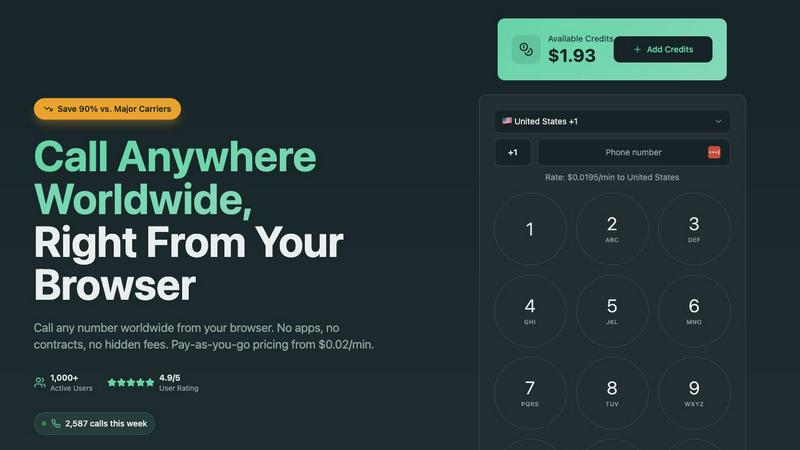
Caller delivers premium, pay-as-you-go international calls directly from your browser.
Last updated: March 1, 2026

Dokta streamlines document management for SMBs and freelancers, automating invoicing, contracts, and cash flow effortlessly.
Last updated: April 4, 2026
Visual Comparison
Caller
Dokta

Feature Comparison
Caller
Browser-Based Global Calling
Experience the pinnacle of convenience with a platform that operates entirely within your web browser. Eliminate the need for software downloads, app installations, or specialized hardware. From any device with an internet connection—be it a laptop, desktop, or tablet—you can instantly access a global telephone network, making the process of international calling as simple as visiting a website.
Transparent Pay-As-You-Go Pricing
Caller operates on a fundamentally honest financial model. You only pay for the minutes you actually use on completed calls, with no monthly subscriptions, minimum fees, or hidden charges. Credits never expire, providing complete control and predictability over your communication budget. This approach ensures significant savings, with rates starting from just $0.02 per minute.
Enterprise-Grade HD Voice Quality
Do not equate simplicity with compromise. Caller is powered by robust, enterprise-level telecommunications infrastructure, delivering consistently crystal-clear HD voice quality on every call. This commitment to technical excellence ensures that your conversations are free from distortion, delay, or dropouts, fostering a connection that feels immediate and intimate, regardless of distance.
Dedicated Virtual Phone Numbers
Elevate your professional presence with your own dedicated phone number from prestigious regions like the United States or the United Kingdom. Use this number as your caller ID for outbound calls or to receive calls, instantly enhancing credibility with clients and contacts. Numbers activate immediately and are available as local, toll-free, or mobile formats, starting from a modest monthly fee.
Dokta
Automated Invoice Management
Dokta simplifies the entire invoice management process by allowing users to upload any document type—be it a photo, scan, or PDF. The AI engine processes the document in under 60 seconds, identifying key information such as the document type, amount, due date, and client or supplier details. This feature greatly reduces the burden of manual entry and minimizes errors.
Real-Time Cash Flow Tracking
Users can gain insights into their financial health through real-time cash flow tracking. Dokta provides a clear overview of billed revenue, collected payments, outstanding invoices, and VAT obligations, all presented in an intuitive graphical format spanning twelve months. This empowers users to make informed financial decisions promptly.
Contract Management and Automation
Dokta enables users to create invoices and quotes with just a few clicks. It also supports contract management, allowing for automatic monthly billing based on time and materials (TJM) contracts. This feature ensures that users can effortlessly manage recurring billing without the hassle of manual intervention.
Client and Supplier Insights
The platform enriches client and supplier data by automatically retrieving relevant SIRET information, offering payment scoring, and maintaining comprehensive historical records for each entity. This feature allows users to develop deeper insights into their client relationships and enhances overall business strategy.
Use Cases
Caller
International Business Development
Sales professionals and business developers can connect with leads, partners, and clients across the globe without incurring exorbitant carrier fees. The ability to present a local caller ID (e.g., a US number while calling from abroad) builds immediate trust and increases answer rates, making every call a more effective tool for growth and relationship building.
Remote Team Collaboration
For distributed companies and remote teams, Caller provides a unified, cost-effective communication layer. Team members in different countries can connect for meetings, quick syncs, or client calls using a reliable, high-quality service that doesn't require everyone to download the same app or manage complex corporate telephony systems.
Personal & Family Connections
Global citizens, expatriates, and immigrants can maintain vital, affordable connections with family and friends in their home countries. The straightforward, browser-based interface removes technological barriers, allowing for spontaneous, clear conversations that bridge emotional distances without the financial burden traditionally associated with international dialing.
Customer Support & Service
Businesses offering international support can leverage Caller to provide a direct, low-cost calling channel for their customers. The pay-as-you-go model scales perfectly with call volume, and the HD quality ensures issues are resolved quickly and without miscommunication. Dedicated numbers also allow for establishing local presence in key markets.
Dokta
Freelance Developer Management
For freelance developers, Dokta provides essential tools to manage contracts and billing seamlessly. With automated invoice generation based on project milestones, developers can focus on coding while Dokta handles the administrative tasks, ensuring timely payment and contract adherence.
Creative Project Tracking
Freelance creatives can benefit immensely from Dokta's intuitive workflow. The platform enables users to send quotes with acceptance links, converting them to invoices in just one click. This streamlined process allows for efficient project management from initial proposal to final payment.
Auto-Entrepreneur Compliance
Auto-entrepreneurs can utilize Dokta to maintain compliance with URSSAF regulations effortlessly. The platform generates compliant invoices, tracks payments, and alerts users of important deadlines, ensuring they remain compliant with local laws without added stress.
Small Business Optimization
For SMBs, Dokta offers comprehensive document management capabilities that enhance operational efficiency. With features such as automated reminders for unpaid invoices and real-time cash flow visualization, businesses can optimize their financial processes and focus on growth.
Overview
About Caller
Caller represents a fundamental evolution in global telephony, transforming the complex landscape of international communication into an experience of effortless elegance and efficiency. It is a sophisticated, browser-based calling platform that liberates users from the constraints of traditional telephony—no physical hardware, cumbersome mobile apps, or opaque long-term contracts are required. Designed for the discerning professional, the global citizen, and forward-thinking businesses, Caller provides an immediate bridge to over 200 countries directly from any web browser. Its core genius lies in the harmonious marriage of unparalleled simplicity and profound economic advantage. Users enjoy crystal-clear, HD voice quality at rates demonstrably up to 90% lower than those of conventional carriers, all governed by a transparent, pay-as-you-go model that charges only for successfully completed minutes. This platform is engineered for those who demand clarity, reliability, and global reach without compromise, offering a seamless, secure, and premium communication solution that connects the world with a single click.
About Dokta
Dokta is an innovative AI-powered document management platform designed specifically for freelancers, solo entrepreneurs, auto-entrepreneurs, and small to medium-sized businesses (SMBs). This sophisticated tool revolutionizes the way users manage their documents by allowing them to effortlessly drop invoices, quotes, contracts, and other essential files into the system. Within a mere 60 seconds, Dokta's advanced AI engine reads, classifies, and extracts vital data, streamlining the entire document lifecycle. Users can create professional invoices and quotes, track payments, automate reminders for unpaid invoices, manage contracts and deadlines, and even generate actionable tasks directly from their documents. With Dokta, users will no longer struggle with lost files, missed deadlines, or tedious administrative tasks on weekends. The platform builds a comprehensive client database from users' documents, tracks cash flow in real time, and provides easy export options to CSV for accounting purposes. Whether you are a freelance developer looking to optimize your workflow or a growing SMB seeking efficient document management solutions, Dokta places your documents at the core of your business, expertly managed by cutting-edge AI technology.
Frequently Asked Questions
Caller FAQ
How do I start making calls with Caller?
Beginning is remarkably simple. First, create your free account on the Caller website—no credit card is required for sign-up. Next, add funds to your account wallet using a secure payment method. Finally, navigate to the dialer interface within your browser, enter the full international number you wish to reach, and click the call button. The connection is established instantly through your device's microphone and speakers.
What countries can I call with Caller?
Caller offers extensive global coverage, enabling you to call phone numbers in over 200 countries and territories worldwide. This includes all major destinations across North and South America, Europe, Asia-Pacific, Africa, and the Middle East. You can reach both landline and mobile numbers virtually anywhere on the planet.
Is Caller secure and private?
Absolutely. Caller employs bank-level security protocols to protect your communications and data. All calls are encrypted using SSL technology, ensuring your conversations remain private. Furthermore, all financial transactions are processed through secure, PCI-compliant payment gateways, and the company maintains a strict policy of no hidden fees, guaranteeing transparency.
Do I need to verify a phone number to use Caller?
No, a significant advantage of Caller is that it does not require you to link or verify a personal phone number to use the service for outbound calls. Your account is your identity, and you can begin calling immediately after adding credits. This simplifies setup and enhances privacy, as your personal number is not associated with the platform.
Dokta FAQ
What types of documents can I upload to Dokta?
Dokta supports a variety of document formats, including photos, scans, and PDFs. This flexibility allows users to upload virtually any type of document for processing.
How does Dokta ensure data security and compliance?
Dokta is fully compliant with GDPR regulations, ensuring that all data is securely hosted in Europe (AWS). Additionally, it uses AES-256 encryption to protect sensitive information.
Is there a free trial available?
Yes, Dokta offers a free tier that allows users to manage up to 15 documents per month without any cost. This provides an excellent opportunity for potential users to explore the platform's capabilities.
What types of businesses can benefit from using Dokta?
Dokta is designed for a wide range of users, including freelancers, solo entrepreneurs, auto-entrepreneurs, and small to medium-sized businesses. Its versatile features cater to various industries, making it a valuable tool for anyone who manages documents regularly.
Alternatives
Caller Alternatives
Caller represents the pinnacle of modern, browser-based telephony, a sophisticated tool within the productivity and management category designed to connect you globally with unparalleled ease. Users may explore alternatives for various reasons, such as seeking different pricing structures, specific integrations with existing business platforms, or a preference for dedicated mobile applications over a purely web-based interface. When evaluating other solutions, discerning users should prioritize core principles: transparent and competitive pricing without hidden commitments, the quality and reliability of the connection, and the overall simplicity of the user experience. The ideal platform should dissolve the friction of international communication, not introduce new complexities. Ultimately, the choice hinges on aligning a service’s capabilities with your specific needs for flexibility, reach, and clarity. Whether for critical business negotiations or personal connections, the right tool should feel like a seamless extension of your intent to communicate across borders.
Dokta Alternatives
Dokta is an innovative AI-driven document management platform tailored for freelancers, solo entrepreneurs, auto-entrepreneurs, and small to medium-sized businesses (SMBs). By seamlessly automating the handling of various documents such as invoices, quotes, and contracts, Dokta enhances productivity and streamlines administrative tasks, allowing users to focus on their core business operations. However, users often seek alternatives to Dokta for various reasons, including pricing considerations, specific feature requirements, or compatibility with existing platforms. When exploring alternatives, it is crucial to evaluate factors such as ease of use, document processing capabilities, integration with other tools, and compliance with data protection regulations to ensure the solution aligns with both operational needs and budget constraints.