Hush Touch | Voice-to-Text for MacOS vs Prompt Builder
Side-by-side comparison to help you choose the right product.

Hush Touch | Voice-to-Text for MacOS
Hush Touch offers intelligent offline voice-to-text dictation for Mac, learning your vocabulary and enhancing accuracy.
Last updated: February 26, 2026

Prompt Builder
Prompt Builder instantly crafts, refines, and manages optimized AI prompts for all major models in one elegant workspace.
Last updated: April 13, 2026
Visual Comparison
Hush Touch | Voice-to-Text for MacOS

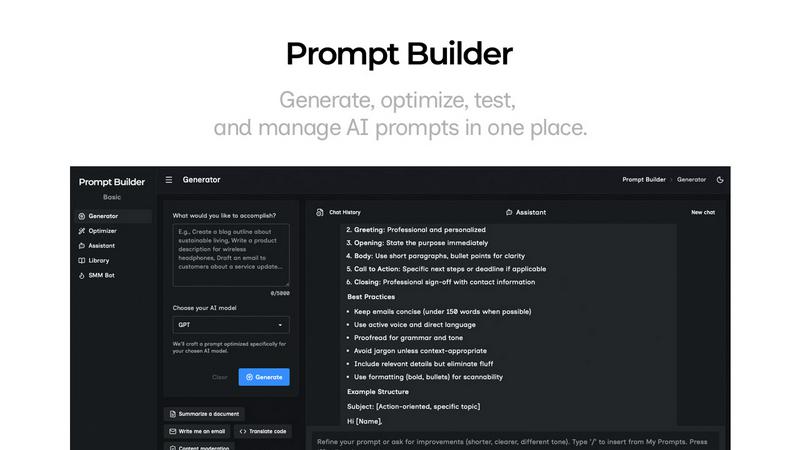
Prompt Builder
Feature Comparison
Hush Touch | Voice-to-Text for MacOS
Dual-Engine Recognition
Hush Touch employs a sophisticated dual-engine recognition system that combines DictationTranscriber for natural flow and punctuation with SFSpeechRecognizer, which enhances custom vocabulary recognition. This integration ensures that users receive highly accurate transcriptions tailored to their unique speaking patterns and terminologies.
Custom Vocabulary
With the ability to store up to 500 custom terms and an auto-learn feature from corrections, Hush Touch is remarkably adept at recognizing specialized jargon, brand names, and medical terms. This feature ensures that users can dictate complex language confidently, knowing that their specific vocabulary will be understood and transcribed accurately.
Smart Text Processing
The smart text processing capabilities of Hush Touch include the removal of filler words and automatic correction of common errors, such as misheard phrases. Additionally, the app can format voice snippets for repeated phrases and create numbered lists, all performed in real time. This functionality enhances the clarity and professionalism of dictated text.
100% On-Device Privacy
Hush Touch stands out for its commitment to user privacy, processing all voice data on the user's Mac without any reliance on cloud services. This approach guarantees that sensitive information remains private and secure, making it an optimal choice for individuals and organizations that prioritize confidentiality.
Prompt Builder
Intelligent Prompt Generator
This core feature acts as your creative catalyst. Simply describe your objective in natural language, select your target AI model (e.g., Gemini, Claude, GPT-4), and the Generator crafts a professionally structured, model-aware prompt. It intelligently adapts the prompt's structure, constraints, and output format to align with the selected model's strengths, providing a superior first draft that requires minimal adjustment. You can then enter a dedicated chat to refine this draft through iterative conversation, ensuring the final prompt is perfectly tuned.
Integrated Prompt Assistant
The Assistant feature eliminates the need to juggle between applications. It is a fully functional chat workspace built directly into Prompt Builder, allowing you to run and test your prompts in real-time. Select from a variety of assistant models like Grok, Gemini, or GPT, insert prompts directly from your Generator, Optimizer, or Library, and engage in follow-up dialogue. This seamless integration keeps your entire workflow—creation, testing, and iteration—organized in one elegant, cohesive environment.
Advanced Prompt Optimizer
Transform existing, suboptimal prompts into powerful, high-performance instructions. Paste any prompt or select one from your personal Library, and the Optimizer deconstructs and enhances it across key dimensions: clarity, specificity, constraints, and output formatting. It can also inject relevant examples to guide the AI. Every optimization is saved in a history log, and you can pin your favorite improved versions for immediate use or further testing in the Assistant.
Curated Prompt Library
Your centralized repository for prompt mastery. The Library allows you to systematically save, tag, and organize your most effective prompts for easy reuse across projects and teams. Beyond personal storage, it provides access to a community-driven collection of vetted templates and prompts. With robust search and filtering by category and model, you can instantly discover, adapt, and deploy proven prompt strategies, building a valuable institutional knowledge base over time.
Use Cases
Hush Touch | Voice-to-Text for MacOS
Drafting Emails
Professionals can use Hush Touch to quickly and accurately dictate emails, allowing them to focus on their thoughts without the distractions of typing. This feature streamlines communication, particularly for those who need to send multiple messages throughout the day.
Taking Notes
Students and researchers can leverage Hush Touch to take notes during lectures or meetings, ensuring that they capture every important detail without missing a moment. The app's ability to process information in real time allows for a fluid and engaging note-taking experience.
Writing Content
Content creators can benefit from Hush Touch by using it to generate articles, blogs, or reports. The app's adaptive learning and custom vocabulary features make it perfect for maintaining a consistent tone and style, while also accommodating specific industry terminology.
Medical Documentation
Healthcare professionals can utilize Hush Touch to dictate medical notes and reports efficiently. The app's proficiency in recognizing medical jargon and its ability to learn from corrections make it an invaluable tool in busy clinical environments, where accuracy and speed are paramount.
Prompt Builder
Content Creation and Marketing
For marketers and content strategists, Prompt Builder accelerates the ideation and drafting process. Use the SMM Bot to generate platform-specific social media posts for LinkedIn, Instagram, or Twitter, complete with tone adjustments and CTAs. Refine marketing copy, blog outlines, or product descriptions in the chat, then save the highest-converting prompt formulas to your Library for consistent, on-brand content production across all channels.
Software Development and Technical Writing
Developers and technical writers can generate precise code snippets, API documentation, debugging explanations, or architectural advice tailored to specific models. The model-aware generation ensures prompts are structured to elicit clean, executable code or comprehensive technical explanations from AI assistants, drastically reducing time spent on boilerplate and increasing the accuracy of technical outputs.
Research and Data Analysis
Academics, analysts, and researchers can leverage Prompt Builder to craft sophisticated queries for literature reviews, data summarization, hypothesis generation, or complex reasoning tasks. The Optimizer helps refine vague research questions into structured, analytical prompts that command the AI to provide detailed, sourced, and logically formatted responses, making the research process more efficient and thorough.
Creative Ideation and Brainstorming
Writers, designers, and creative professionals can break through blocks by using the Generator to spark new ideas for stories, character designs, campaign concepts, or artistic directions. The iterative chat refinement allows for collaborative exploration with the AI, helping to flesh out nascent thoughts into fully realized creative briefs and saving successful brainstorming prompts for future projects.
Overview
About Hush Touch | Voice-to-Text for MacOS
Hush Touch is an innovative voice-to-text application designed specifically for macOS users, providing a seamless and efficient dictation experience that prioritizes speed, natural flow, and privacy. Unlike many dictation tools that rely on cloud processing, Hush Touch operates entirely on-device, allowing for offline functionality without sacrificing accuracy. By harnessing the power of two advanced Apple transcription engines combined with an Apple Intelligence final pass, Hush Touch delivers clean and precise text outputs that evolve and improve with each use. With a lightweight footprint of just 5.5 MB, the app integrates effortlessly into daily writing workflows, enabling users to draft emails, messages, and documents hands-free. This product is ideal for professionals and creatives alike, who seek a reliable dictation solution that respects their privacy while enhancing their productivity. The commitment to user control is further exemplified by a one-time purchase of $20 for a lifetime license, eliminating the burden of subscription fees.
About Prompt Builder
Prompt Builder is the definitive prompt engineering workspace, designed for professionals who demand precision and efficiency in their AI workflows. It transforms the arduous, often inconsistent task of prompt creation into a streamlined, elegant process. At its core, Prompt Builder is an intelligent platform that allows you to describe a task in plain English and instantly receive a sophisticated, model-optimized prompt draft. This initial draft is just the beginning; you can then refine it within a built-in chat interface, save or pin your most effective versions, and execute them on demand. It serves as a unified command center, compatible with all major AI models including GPT, Claude, Gemini, Llama, Mistral, and more. Beyond generation, it offers an Optimizer for enhancing existing prompts, an Assistant for live testing, and a curated Library for organizing personal and community-sourced templates. Prompt Builder is for creators, developers, marketers, and strategists who refuse to let clunky processes hinder their output, enabling them to turn a nascent idea into a production-ready prompt in seconds, not hours.
Frequently Asked Questions
Hush Touch | Voice-to-Text for MacOS FAQ
How does Hush Touch ensure accuracy in transcriptions?
Hush Touch utilizes dual transcription engines that work in tandem to provide enhanced accuracy. The app combines the strengths of DictationTranscriber and SFSpeechRecognizer, followed by an Apple Intelligence final pass, to refine the output text.
Is there a trial available for Hush Touch?
Yes, Hush Touch offers a 7-day free trial that does not require a credit card, allowing potential users to experience its features and capabilities before making a purchase decision.
Can Hush Touch be used offline?
Absolutely. One of the key features of Hush Touch is its on-device processing capability, which means that users can dictate and transcribe text without needing an internet connection.
What is the pricing structure for Hush Touch?
Hush Touch is available for a one-time purchase of $20, offering users a lifetime license without the burden of ongoing subscription fees. This straightforward pricing structure makes it an economical choice for long-term use.
Prompt Builder FAQ
Which AI models does Prompt Builder support?
Prompt Builder is designed as a universal prompt engineering platform. It supports and optimizes prompts for a wide array of leading AI models including OpenAI's GPT series, Anthropic's Claude, Google's Gemini, Meta's Llama, Mistral AI, DeepSeek, xAI's Grok, Perplexity, and Cohere. The Assistant feature also allows you to run and test prompts using many of these models directly within the workspace.
How does the free plan work?
The free plan is designed to let you experience the full power of Prompt Builder's workflow without commitment. It includes full access to the Prompt Generator, Optimizer, Library, and SMM Bot. You also receive 25 Assistant requests per month to test your prompts with live AI models, all without requiring a credit card. This allows you to thoroughly evaluate the platform's capability to streamline your prompt engineering process.
What is the difference between the Generator and the Optimizer?
The Generator is your starting point, transforming a simple idea described in plain English into a complete, model-tuned prompt draft. The Optimizer, conversely, is for enhancement. You feed it an existing prompt—whether from an old chat, a document, or your Library—and it systematically improves it by increasing clarity, adding constraints, defining output formats, and incorporating examples to yield more reliable and higher-quality AI responses.
Can I share and collaborate on prompts with my team?
Yes, collaboration is a fundamental aspect of the Prompt Builder ecosystem. Your personal Library allows you to organize and manage prompts, which can be shared with team members to ensure consistency and best practices. Furthermore, the Community Prompts section within the Library enables you to explore, favorite, and utilize templates shared by a broader network of users, fostering a collective intelligence around effective prompt design.
Alternatives
Hush Touch | Voice-to-Text for MacOS Alternatives
Hush Touch | Voice-to-Text for MacOS is a sophisticated dictation application designed to provide seamless and private voice-to-text conversion on Apple's operating system. As part of the AI Assistants category, it harnesses the power of on-device processing to ensure user privacy while delivering highly accurate transcriptions. With its lightweight design and ease of use, Hush Touch appeals to a diverse range of users, from professionals drafting emails to students taking notes. Users often seek alternatives to Hush Touch for various reasons, including budget constraints, specific feature requirements, or compatibility with different operating systems. When selecting an alternative, it is essential to consider factors such as transcription accuracy, ease of integration into existing workflows, and the app's ability to function offline. Additionally, features that enhance user experience—like voice command customization and learning capabilities—can significantly impact the overall effectiveness of a voice-to-text solution.
Prompt Builder Alternatives
Prompt Builder is a sophisticated prompt engineering workspace, a specialized category of AI assistant designed to streamline the creation and management of AI prompts. It transforms a simple idea into a finely-tuned instruction for models like GPT, Claude, and Gemini, all within a unified environment for drafting, testing, and version control. Users may explore alternatives for various reasons, from seeking different pricing structures and feature sets to requiring integration with specific platforms or workflows. The landscape offers tools with varying focuses, from minimalist interfaces to expansive enterprise systems. When evaluating options, consider the depth of prompt optimization tools, the breadth of supported AI models, and the robustness of features for collaboration and knowledge management. The ideal solution should not only generate prompts but enhance your entire workflow, turning iterative refinement into a seamless, productive process.