
Nano AI vs Shrinkpad
Side-by-side comparison to help you choose the right product.

Nano AI
Nano AI is your all-in-one creative platform for ultra-fast AI image generation and seamless editing.
Last updated: February 28, 2026

Shrinkpad
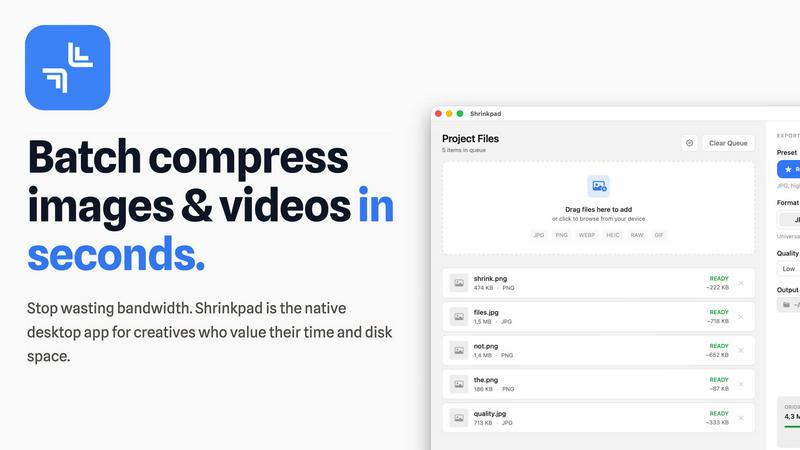
Shrinkpad effortlessly batch compresses images and videos on Mac, optimizing file sizes while preserving quality.
Last updated: February 28, 2026
Visual Comparison
Nano AI

Shrinkpad
Feature Comparison
Nano AI
Flash-Speed Nano Banana AI Model
The cornerstone of the platform is the proprietary Nano Banana model, engineered for sub-10-second generation times. This flash-speed inference applies to both text-to-image and image-to-image tasks, ensuring that the creative workflow is never interrupted by lengthy render waits. The model intelligently interprets layered instructions and nuanced stylistic cues, delivering high-fidelity results without requiring extensive prompt engineering, making professional-grade generation accessible and instantaneous.
All-in-One Creative Workspace
Nano AI consolidates the entire asset creation pipeline into one streamlined interface. Users can seamlessly move from generating an initial draft with text-to-image, refining it through image-to-image transformation, and then polishing details with built-in utility tools—all without switching between disparate applications. This integrated environment is designed to keep every experiment, edit, and export in one cohesive place, maximizing efficiency and creative focus.
Advanced Inpainting & Magic Edit
Move beyond simple filters with powerful, language-driven editing. The Magic Edit feature allows users to inpaint, outpaint, and reimagine specific regions of any image using natural language. Simply highlight an area—whether to change a shirt color, add an accessory, or expand a background—and describe the desired change. The AI understands the context and executes the edit with remarkable coherence, enabling precise creative control without complex software.
Deep Style Tuning & Neural Effects
Nano AI offers profound stylistic control that goes beyond generic presets. By pairing with the Nano Banana style model, users gain granular influence over lighting, texture, and composition simply by describing the desired aesthetic. This enables sophisticated style generation and transfer, allowing for creative mashups like applying Renaissance lighting to a cyberpunk scene. Additionally, a suite of neural effects—like Photo to Watercolor or Sketch—provides instant artistic transformations.
Shrinkpad
Intelligent Compression Settings
Shrinkpad employs cutting-edge algorithms to automatically assess the visual complexity of each file, applying the optimal compression ratio without introducing any artifacts. This ensures that users achieve the finest balance between file size reduction and image quality preservation.
Unlimited Batch Processing
Designed to enhance productivity, Shrinkpad allows users to process thousands of files simultaneously without crashing. This feature sets it apart from web-based tools, enabling creatives to manage extensive queues of media files effortlessly and efficiently.
One-Drop Folder Compression
With Shrinkpad’s intuitive folder mode, users can simply drag and drop entire folders filled with images and videos. The application automatically detects and prepares all supported files for compression, saving time and streamlining the workflow.
Privacy-Focused Local Processing
All compression tasks are handled locally on the user's Mac, ensuring that no files are uploaded to the cloud. This commitment to privacy allows users to work with confidence, knowing that their sensitive materials remain secure throughout the entire optimization process.
Use Cases
Nano AI
Rapid Marketing Asset Creation
Marketing teams can leverage Nano AI to dramatically accelerate campaign development. From generating multiple ad concept variations and social media visuals to creating product mockups and banner designs, the platform's speed and quality enable rapid prototyping and iteration. This allows teams to respond to trends in real-time and produce a high volume of compelling, on-brand assets without the bottleneck of traditional design processes or stock photo searches.
Conceptual Design & Storyboarding
Creators, filmmakers, and game developers can use Nano AI to visualize concepts and build storyboards with unprecedented ease. By quickly generating scenes, characters, and environments from textual descriptions, teams can explore artistic directions and establish visual tone early in the creative process. The image-to-image function further allows for the refinement of these concepts, turning rough ideas into clear visual guides for production.
E-commerce & Product Visualization
Online retailers and brands can utilize Nano AI to generate high-quality product visuals, lifestyle imagery, and alternative design variations. The background removal tool instantly isolates subjects for clean product shots, while the platform can create contextual scenes showing products in use. This reduces dependency on costly photoshoots and enables the creation of diverse, engaging visual content for catalogs and websites at scale.
Personalized Content & Artistic Exploration
Individual artists, content creators, and hobbyists can use Nano AI as a boundless source of inspiration and a powerful co-creation tool. Whether transforming personal photos into different art styles, experimenting with unique visual mashups through deep style tuning, or generating original artwork for projects, the platform makes advanced AI creativity accessible. It serves as both a muse and a versatile brush for bringing unique personal visions to life.
Shrinkpad
Optimizing Digital Portfolios
Photographers can utilize Shrinkpad to compress their entire portfolio in one go, significantly reducing file sizes while preserving stunning visual quality. This optimization not only saves disk space but also enhances loading times for online galleries.
Streamlining Web Asset Management
Web developers and designers can rapidly compress images and videos for websites, improving load times and overall site performance. By achieving faster Largest Contentful Paint (LCP) scores, they can enhance user experience and potentially boost search engine rankings.
Efficient Media Library Maintenance
Content creators can leverage Shrinkpad to maintain their digital libraries by compressing bulk files from various projects. The application’s smart detection capabilities make it easy to manage and optimize mixed media collections efficiently.
Enhancing Collaborative Projects
Teams can benefit from Shrinkpad by streamlining the asset optimization process in collaborative projects. With features like unlimited batching and folder mode, team members can quickly prepare high-quality assets for presentations or client deliverables.
Overview
About Nano AI
Nano AI is the definitive all-in-one creative platform engineered to dissolve the friction between conceptual vision and production-ready visual assets. It represents a paradigm shift for modern creators, marketing teams, and businesses who refuse to compromise between speed and professional-grade quality. At its heart lies the proprietary Nano Banana model, a sophisticated AI engine that orchestrates flash-speed inference, delivering both text-to-image and image-to-image generations in under ten seconds. This unprecedented velocity ensures creative momentum remains unbroken, transforming fleeting inspiration into tangible visuals almost instantaneously. The platform elegantly consolidates the entire creative journey—from initial ideation and prompt experimentation to granular editing with tools like inpainting and background removal, and finally to sharing via collaborative galleries—into a single, intuitive workspace. With upcoming capabilities like 4K neural upscaling and robust API access, Nano AI transcends the label of a mere generator. It positions itself as a comprehensive partner in visual creation, empowering teams to ideate, iterate, and ship compelling, commercially viable assets faster than ever before.
About Shrinkpad
Shrinkpad is an exceptional desktop application meticulously crafted for macOS, representing the pinnacle of media compression technology. This powerful tool is designed for photographers, designers, content creators, and developers who seek to optimize their digital assets while reclaiming valuable disk space. Shrinkpad’s primary value proposition lies in its ability to perform rapid and efficient batch compression of images and videos, ensuring that users can manage their media libraries with unprecedented ease and privacy. By executing all processing locally on the user's machine, it eliminates the concerns associated with cloud uploads, safeguarding sensitive creative content. Leveraging advanced Apple frameworks and optimization for Apple Silicon, Shrinkpad can reduce file sizes by up to 90% while maintaining exceptional visual quality. The user-friendly interface supports over fifty different formats, including everyday JPGs and PNGs, as well as professional RAW files and high-definition 4K videos, making it an indispensable asset for anyone who values their time and resources.
Frequently Asked Questions
Nano AI FAQ
What makes Nano AI different from other AI image generators?
Nano AI distinguishes itself through its integrated, all-in-one workspace and its unparalleled speed powered by the Nano Banana model. Unlike tools that only focus on generation, Nano AI combines flash-speed text-to-image and image-to-image creation with a suite of practical editing and utility tools like inpainting and background removal in a single platform. This end-to-end workflow, designed for sub-10-second generations, is built to maintain creative momentum from idea to final asset without switching apps.
Do I need technical expertise or prompt engineering skills to use Nano AI?
No, Nano AI is designed for both professionals and newcomers. The Nano Banana model is specifically engineered to understand layered instructions and stylistic cues from natural, casual language. The intuitive, single-tap interface removes complex manual setup, allowing anyone to generate impressive results quickly. For advanced users, the platform offers deep control through detailed prompting and style descriptions without requiring obscure technical syntax.
What is the upcoming 4K Neural Upscaling feature?
The upcoming 4K Neural Upscaling is an advanced feature designed to transform lower-resolution AI generations into production-ready, high-resolution assets. It goes beyond simple sharpening by intelligently hallucinating and adding believable detail—such as skin texture, fabric weave, or material grain—where it matters. This allows users to create generations at a standard size and then upscale them to print-quality resolutions suitable for large formats like billboards or high-definition media.
Can I use Nano AI for commercial projects?
Yes, Nano AI is engineered to produce commercially viable visual assets. The professional-grade output of the Nano Banana model, combined with features like high-resolution support and upcoming 4K upscaling, is designed to meet the quality demands of marketing materials, product visuals, and other commercial content. Users retain the rights to create and export assets for use in their commercial projects, making it a powerful tool for businesses and professional creators.
Shrinkpad FAQ
Can I use Shrinkpad for free?
Yes, Shrinkpad offers a Free Starter version that includes essential tools for casual use, allowing users to compress a limited number of files per batch.
What file formats does Shrinkpad support?
Shrinkpad supports over fifty formats, including common types such as JPG, PNG, and WEBP, as well as professional formats like RAW and HEIC, ensuring versatility for all users.
Does Shrinkpad support video compression?
Absolutely. Shrinkpad is capable of compressing various video formats, including MP4 and MOV, enabling users to optimize all forms of media efficiently.
How many files can I process at once?
Shrinkpad allows for unlimited batch processing, enabling users to handle thousands of files simultaneously without experiencing crashes or slowdowns, making it perfect for large-scale projects.
Alternatives
Nano AI Alternatives
Nano AI is a sophisticated, all-in-one creative platform specializing in ultra-fast AI image generation and seamless editing. It represents a premium solution within the AI image generation and editing category, designed to consolidate the entire creative workflow into a single, frictionless environment. Users seek such powerful tools to transform conceptual ideas into production-ready visual assets with both speed and professional finesse. Even with its compelling value proposition, creators and businesses may explore alternatives for various reasons. These can include specific budget constraints, a need for different feature sets like video generation or 3D modeling, or a preference for a different user interface or integration ecosystem. The search for the right tool is often a balance between computational power, creative control, and operational fit. When evaluating alternatives, consider the core pillars that define a premium creative AI platform. Key factors include the speed and quality of image generation, the depth and intuitiveness of the editing suite, and the overall cohesion of the workflow. A discerning assessment should weigh the model's artistic capabilities, the platform's ability to maintain creative momentum, and how well it integrates into your existing production pipeline to deliver commercially viable results.
Shrinkpad Alternatives
Shrinkpad is a premier desktop application designed exclusively for macOS, specializing in the batch compression of images and videos. This sophisticated tool caters to photographers, designers, content creators, and developers, providing them with a powerful means to optimize their digital assets while maintaining the utmost privacy and security. Users often seek alternatives to Shrinkpad for various reasons, including budget constraints, specific feature requirements, or the need for cross-platform compatibility. When considering alternatives, potential users should prioritize factors such as processing speed, ease of use, file format support, and the ability to maintain visual integrity during compression. As the demand for digital media continues to grow, the search for effective compression solutions becomes increasingly vital. Users are encouraged to look for alternatives that offer a seamless user experience, intelligent batch processing capabilities, and robust security measures to ensure the protection of their creative work. Ultimately, the ideal alternative should align with the user’s specific needs while delivering reliable performance and preserving the quality of their media files.