Playwriter vs The SaaS Ads Studio
Side-by-side comparison to help you choose the right product.

Playwriter
Playwriter seamlessly empowers agents to control Chrome with AI, leveraging existing sessions for enhanced performance and flexibility.
Last updated: March 18, 2026

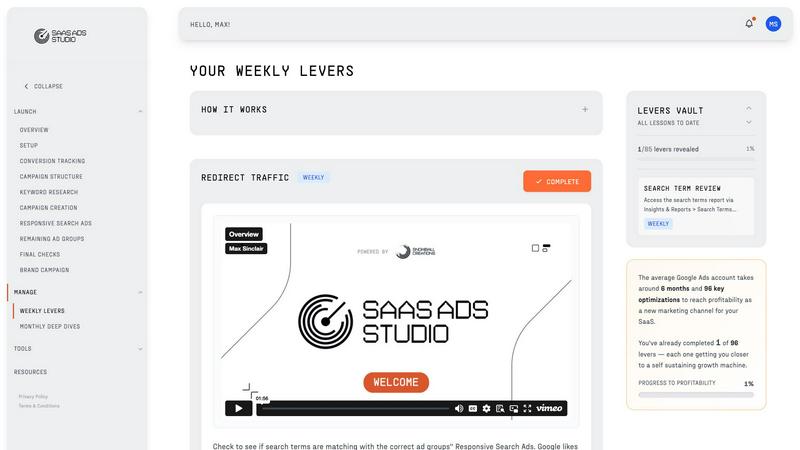
The SaaS Ads Studio
Effortlessly launch and scale profitable Google and Facebook Ads for your B2B SaaS with expert-guided precision.
Last updated: February 28, 2026
Visual Comparison
Playwriter

The SaaS Ads Studio
Feature Comparison
Playwriter
Full Browser Session Access
Playwriter grants AI agents direct control over your existing browser session, encompassing all your cookies, logins, and extensions. This ensures that agents can operate without the limitations of fresh instances, allowing for smooth and efficient web interactions.
Comprehensive Automation API
With a straightforward one-tool approach, Playwriter exposes the full Playwright API. This eliminates the need for complex wrappers and provides agents with direct access to any Playwright code, simplifying the automation process while reducing contextual overhead.
Real-Time Collaboration
Playwriter facilitates a unique collaborative environment where users can monitor and interact with agents in real-time. When an agent encounters obstacles, such as CAPTCHAs or consent walls, users can step in instantly, ensuring smooth navigation and task completion without losing momentum.
Advanced Debugger and Editor
The integrated debugger allows for live code editing and performance profiling, enabling users to set breakpoints and intercept network requests. This feature empowers users to troubleshoot issues on-the-fly, enhancing the overall effectiveness of automated browsing tasks.
The SaaS Ads Studio
Guided Google and Facebook Ads Builder
The SaaS Ads Studio features a user-friendly interface that guides users through the process of launching profitable Google and Facebook Ads specifically tailored for B2B SaaS. This feature allows users to build meticulously structured campaigns that are conversion tracked, ensuring optimal performance from the outset.
Brand DNA Analysis
Upon entering the platform, users benefit from an instant analysis of their brand through the Brand DNA feature. This sophisticated tool synthesizes elements from your website, messaging, audience, and positioning, creating a robust brand profile that fuels every tool within the platform, optimizing the entire advertising process.
Data-Driven Keyword Generation
Leveraging a unique combination of your Brand DNA and a substantial dataset derived from over £3 million in SaaS ad spend, The SaaS Ads Studio generates high-intent keyword clusters. This feature minimizes waste and focuses efforts on attracting genuine buyers rather than casual browsers, ensuring maximum effectiveness of your campaigns.
Weekly Optimization Tasks
The Manage phase introduces a structured approach to ongoing campaign management, delivering a set of weekly optimization tasks tailored to both Google and Facebook platforms. This feature simplifies the process of improving campaign performance by providing actionable insights and eliminating guesswork, allowing users to execute and measure improvements efficiently.
Use Cases
Playwriter
Automated Testing
Playwriter is an invaluable tool for developers conducting automated testing of web applications. By allowing agents to navigate through your actual browser session, it ensures that tests are executed in a realistic environment, providing accurate results and reducing false positives.
Data Scraping
For data analysts and researchers, Playwriter facilitates seamless data scraping tasks. Agents can access dynamic content, fill forms, and interact with web pages as a real user would, thus extracting valuable information efficiently.
Workflow Automation
Businesses can leverage Playwriter to automate repetitive tasks such as form submissions, online purchases, or account management. By delegating these tasks to AI agents while retaining full control, organizations can optimize their workflows and focus on more strategic initiatives.
User Experience Analysis
Playwriter allows UX researchers to observe how agents interact with web applications, providing insights into user behavior and identifying potential areas for improvement. This capability fosters data-driven decisions that enhance overall user engagement and satisfaction.
The SaaS Ads Studio
Rapid Campaign Launch
B2B SaaS founders can utilize The SaaS Ads Studio to launch their first Google or Facebook campaign within a weekend. The step-by-step guidance ensures that users create a clean, conversion-focused setup, significantly reducing time to market.
Continuous Performance Improvement
Growth leaders can employ the weekly optimization tasks to maintain and enhance campaign performance consistently. This feature enables teams to execute small, manageable tasks that compound over time, leading to sustained profitability.
Effective Budget Management
Teams can leverage the data-driven insights generated by the platform to identify wasteful spending and areas for budget reallocation. This ensures that every dollar spent is strategically aligned with high-performing keywords and audiences, maximizing return on investment.
Comprehensive Learning Experience
Marketers can transform their understanding of Google Ads through the educational content embedded within the platform. By engaging with the intuitive tools and resources, users develop a deeper comprehension of digital advertising strategies and best practices.
Overview
About Playwriter
Playwriter is an innovative tool designed to revolutionize the way AI agents interact with web environments by providing them with seamless access to a user's actual browser session. Unlike traditional solutions that rely on separate instances of Chrome with no logins or extensions, Playwriter allows agents to harness the full capabilities of your existing browser, complete with all your preferences, extensions, and logged-in accounts. This comprehensive integration ensures that agents can perform tasks with minimal friction, significantly enhancing their efficiency and accuracy. Ideal for developers, testers, and enterprises that leverage automation, Playwriter optimizes workflows by enabling real-time collaboration between human users and AI. With its sophisticated features such as network interception, live code editing, and accessibility snapshots, Playwriter stands out as a premier solution for automated browsing tasks, ensuring that critical interactions remain under human control while maximizing the capabilities of AI.
About The SaaS Ads Studio
The SaaS Ads Studio is an innovative, self-serve platform meticulously crafted for B2B SaaS founders and growth leaders seeking to establish a profitable and scalable Google Ads channel devoid of the lengthy timelines and exorbitant costs typically associated with traditional agencies. This platform encapsulates years of high-stakes agency experience and millions in managed ad spend, translating it into a streamlined, two-stage process: Launch and Manage. More than a mere toolkit, The SaaS Ads Studio is a guided journey that empowers users to construct a finely-tuned, conversion-tracked Google Ads account from scratch in just a weekend. By harnessing AI informed by your brand's unique identity, it demystifies the complexities of digital advertising. The Manage phase further simplifies ongoing optimization, transforming it into a disciplined routine that compounds gains over time. In doing so, it provides a clear alternative to the prevalent cycle of budget waste and strategic uncertainty, paving the way for sustainable advertising profitability and genuine insight.
Frequently Asked Questions
Playwriter FAQ
How does Playwriter ensure security during browsing?
Playwriter connects to a local WebSocket relay on your machine, meaning that no data is sent to external servers. This keeps your browsing secure and private, as all interactions remain within your local environment.
Can I use Playwriter with other tools or frameworks?
Yes, Playwriter is compatible with various MCP clients, including Cursor, Claude, and VS Code. This flexibility allows users to incorporate Playwriter into their existing workflows seamlessly.
What are the technical requirements for using Playwriter?
To use Playwriter, users must have the Chrome browser installed along with Node.js. The installation process involves adding a Chrome extension and setting up the CLI, which is straightforward and efficient.
Is Playwriter open source?
Absolutely. Playwriter is open source and released under the MIT license, allowing users to modify and adapt the tool according to their specific needs, thereby fostering a collaborative development environment.
The SaaS Ads Studio FAQ
What makes The SaaS Ads Studio different from traditional agencies?
The SaaS Ads Studio empowers users to manage their Google and Facebook Ads independently, providing a comprehensive suite of tools and guidance that eliminates the need for costly agency services while delivering expert-level results.
How long does it take to set up my first campaign?
Users can expect to launch their first campaign within a weekend. The platform offers step-by-step instructions and AI-powered tools to streamline the process, making it accessible even for those without prior experience.
Is the platform suitable for beginners?
Absolutely. The SaaS Ads Studio is designed with user-friendliness in mind, featuring guided processes and educational resources that cater to both novices and experienced marketers looking to refine their skills.
Can I use The SaaS Ads Studio for both Google and Facebook Ads?
Yes, The SaaS Ads Studio provides a comprehensive solution for managing both Google and Facebook Ads, allowing users to create and optimize campaigns across multiple platforms seamlessly.
Alternatives
Playwriter Alternatives
Playwriter is an innovative automation tool designed to enhance user interaction with Chrome through the power of artificial intelligence. It operates within the realm of automation, providing users with a unique control interface via command line or MCP, allowing AI agents to utilize their actual browser sessions. This capability addresses the limitations faced by many AI solutions that struggle with browser access and user authentication. As users explore alternatives to Playwriter, they often seek options that better align with their specific needs, whether driven by pricing, feature sets, or platform compatibility. When selecting a suitable alternative, consider the core functionalities that matter most to you, such as ease of integration, automation capabilities, support for various clients, and the overall user experience. The right choice will ultimately depend on your individual requirements and the specific tasks you wish to automate.
The SaaS Ads Studio Alternatives
The SaaS Ads Studio is an innovative platform designed specifically for B2B SaaS founders and growth leaders, enabling them to effectively launch and manage profitable Google Ads campaigns. As a self-serve system, it consolidates extensive agency expertise and advanced AI technology, allowing users to create targeted and conversion-optimized ad accounts with ease. Users often seek alternatives due to various factors such as pricing structures, feature sets, or specific platform requirements that may better align with their unique business needs. When exploring alternatives, it is essential to consider the platform's ability to facilitate ease of use, the effectiveness of its optimization tools, and the overall support it provides to enhance advertising success and profitability.