Proofapp vs SimpleDraw
Side-by-side comparison to help you choose the right product.

Proofapp
Effortlessly enhance design reviews with visual feedback pinned directly on your website, streamlining collaboration.
Last updated: March 4, 2026

SimpleDraw
Create precise floor plans and scale drawings effortlessly online with SimpleDraw’s elegant, user-friendly tools.
Last updated: March 1, 2026
Visual Comparison
Proofapp

SimpleDraw
Feature Comparison
Proofapp
Visual Commenting
Proof's visual commenting feature allows users to click anywhere on a screenshot to leave contextual feedback, eliminating ambiguity. No longer will reviewers need to describe locations in vague terms; instead, they can provide precise comments directly on the design, ensuring that all feedback is clear and actionable.
Multi-Breakpoint Testing
With multi-breakpoint testing, Proof automatically captures and reviews your website at various desktop and mobile breakpoints. This ensures that feedback can be gathered for all device formats, allowing teams to address design issues comprehensively and efficiently.
Real-time Collaboration
The platform enables real-time collaboration, allowing team members to see comments and updates as they happen. Users can reply, resolve issues, and track progress collectively, fostering an environment of transparency and immediate communication that enhances workflow and productivity.
Secure Share Links
Proof offers secure share links that allow users to share projects with clients easily. These links can be set to expire, ensuring that sensitive feedback remains protected while still providing clients with the ability to view and comment on designs without needing to create an account.
SimpleDraw
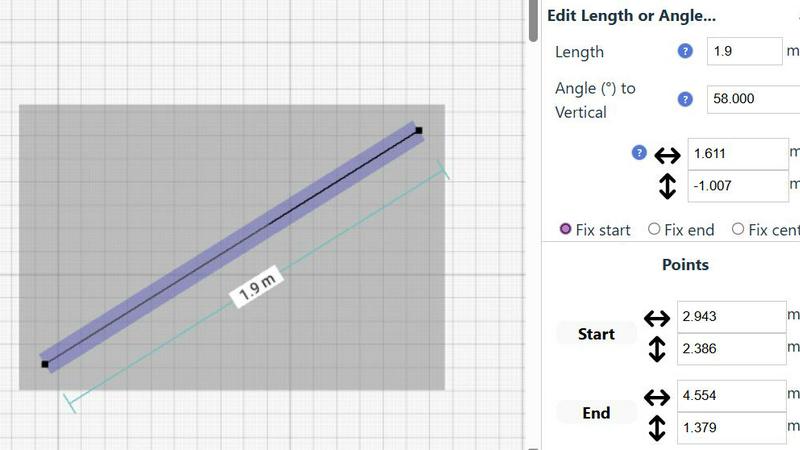
Accurate Measurements & Scale Drawing
SimpleDraw provides precise measurements and smart alignment features that ensure every drawing is accurate and to scale. Users can trust that their dimensions will reflect reality, which is crucial for effective planning and design.
Specialized Floor Plan Creator
The dedicated Floor Plan Mode allows users to create detailed floor plans effortlessly. With the ability to draw walls, place windows and doors, and visualize layouts in real time, this feature simplifies the design process for any project.
Smart Alignment System
The Smart Alignment System assists users in placing elements exactly where they want them. This intuitive feature offers visual guidance, ensuring that lines and points are positioned accurately, enhancing the overall precision of the drawings.
Comprehensive Measurement System
SimpleDraw boasts a robust measurement system that displays contextual measurements dynamically as users work. The option to choose between metric and standard US units empowers users to create drawings that are tailored to their needs.
Use Cases
Proofapp
Freelancers Collecting Client Feedback
Freelancers can utilize Proof to collect feedback from clients in a professional and organized manner. By eliminating lengthy email threads and providing visual feedback tools, freelancers can save time and enhance client satisfaction with clear, actionable insights.
Design Teams Reviewing Projects
Design teams can leverage Proof to gather precise, visual feedback on their designs. The ability to pin comments directly on specific elements of a webpage allows for focused discussions, reducing the time spent on revisions and increasing overall project efficiency.
Marketing Teams Evaluating Campaigns
Marketing teams can use Proof to review landing pages and promotional campaigns visually. By collaborating in real-time and providing immediate feedback, they can ensure that all marketing materials align with brand standards and campaign goals, ultimately enhancing their effectiveness.
Agencies Managing Multiple Projects
Agencies can benefit from Proof by streamlining their project management processes. With the ability to handle multiple clients and projects simultaneously, teams can keep all feedback organized and accessible, reducing the chaos often associated with managing numerous design revisions.
SimpleDraw
Kitchen & Bathroom Floor Plans
Users can effectively plan renovations for kitchens and bathrooms by visualizing layouts with accurate measurements. SimpleDraw allows for the exploration of different configurations before any physical work begins.
Room Layouts & Furniture Planning
Designing room layouts becomes effortless with SimpleDraw. Users can experiment with furniture placement to ensure that items fit perfectly within their spaces, ultimately saving time and eliminating costly purchasing mistakes.
House & Apartment Plans
SimpleDraw is ideal for creating complete floor plans for various living spaces. Whether for home projects or rental listings, users can develop comprehensive designs that meet their specific requirements and preferences.
Community-Driven Development
Engaging with the SimpleDraw community enables users to influence product evolution. By providing feedback and suggestions, users can help shape future features, ensuring that the platform continues to meet the needs of its diverse audience.
Overview
About Proofapp
Proof is an innovative visual feedback and website review platform meticulously designed to facilitate seamless collaboration among designers, developers, and their clients. By allowing users to upload any website URL, Proof automatically captures high-quality screenshots for both desktop and mobile views, empowering teams to communicate visual feedback with ease. Reviewers can pin comments directly onto the design, engage in threaded discussions, attach relevant files, and resolve feedback—all without the necessity of creating an account. This streamlined approach not only enhances productivity but also significantly reduces the confusion that often accompanies traditional feedback methods. With features like real-time notifications and Slack integration, Proof provides an organized and actionable framework for managing client feedback. Whether you are a freelancer looking to impress clients or an agency juggling multiple projects, Proof eliminates the chaos of scattered emails and vague revision notes, transforming feedback into a structured, visual format that drives efficiency and clarity.
About SimpleDraw
SimpleDraw redefines the landscape of technical sketching, presenting a sophisticated yet accessible online platform tailored for the modern creator. It caters to a diverse audience, from the DIY enthusiast embarking on a home renovation to the professional seeking a quick, reliable floor plan. SimpleDraw empowers users to craft precise, scale-accurate drawings with remarkable ease, eliminating the steep learning curve associated with traditional CAD software. The platform’s core value proposition lies in its ability to merge professional-grade precision with effortless usability, entirely free of charge. Users can transform their browsers into dynamic drafting tables, utilizing intuitive tools that translate abstract ideas into meticulously measured realities. Each line, angle, and dimension can be crafted with confidence, ensuring that every detail reflects the user’s intent. With no downloads, installations, or mandatory registrations, SimpleDraw invites creativity without barriers, making it an essential tool for anyone looking to visualize their space accurately.
Frequently Asked Questions
Proofapp FAQ
How does Proofapp improve the feedback process?
Proofapp revolutionizes the feedback process by providing a visual platform where comments can be pinned directly onto designs. This eliminates ambiguity and miscommunication, leading to more efficient revisions and quicker project turnaround times.
Do clients need an account to provide feedback?
No, clients do not need an account to leave feedback on designs. Proof allows clients to comment directly on the project through secure share links, simplifying the feedback process and enhancing accessibility.
Is Proofapp suitable for large teams?
Yes, Proofapp is designed to scale with teams of all sizes. Its real-time collaboration features and enterprise-level security options ensure that both small and large teams can manage their projects efficiently without compromising on security or functionality.
What makes Proofapp more affordable than other tools?
Proofapp is positioned as a cost-effective solution, offering enterprise-level features at a fraction of the price of competitors. With early bird pricing available for its first users, Proofapp makes professional feedback tools accessible to freelancers and small teams without the burden of high costs.
SimpleDraw FAQ
How do I get started with SimpleDraw?
Getting started is simple; just visit the SimpleDraw website, and you can begin drawing immediately. There is no need for downloads or account creation.
Is SimpleDraw really free to use?
Yes, SimpleDraw is completely free to use. It offers professional-grade tools without any hidden costs, allowing users to access all features without financial barriers.
Can I save my drawings in SimpleDraw?
Currently, SimpleDraw offers a seamless online experience without the need for saving files on your device. Users can always return to their drawings as long as they are in the same session.
What types of projects can I create with SimpleDraw?
With SimpleDraw, users can create various projects, including detailed floor plans, room layouts, and furniture arrangements, making it suitable for both personal and professional design needs.
Alternatives
Proofapp Alternatives
Proofapp is a sophisticated visual feedback and website review platform that streamlines collaboration among designers, developers, and clients. By allowing users to upload any website URL, Proofapp captures both desktop and mobile screenshots, enabling reviewers to provide direct, actionable feedback through pinned comments. This elegant solution falls within the category of design tools, facilitating seamless communication and project management. Users often seek alternatives to Proofapp for various reasons, including pricing considerations, specific feature requirements, or preferences for different platforms. When evaluating alternatives, it is essential to consider factors such as ease of use, integration capabilities, and the ability to manage feedback effectively. A well-rounded alternative should not only address the unique needs of your workflow but also enhance the overall collaborative experience.
SimpleDraw Alternatives
SimpleDraw is an elegant, free online tool designed for creating precise scale drawings and floor plans, catering to the needs of both amateurs and professionals alike. As a sophisticated design tool, it serves a diverse audience, including DIY enthusiasts and professionals involved in architectural projects. Users often seek alternatives to SimpleDraw for various reasons, such as a desire for enhanced features, specific platform compatibility, or different pricing structures. When exploring alternatives, it is crucial to consider factors such as usability, advanced functionalities, customer support, and overall value to ensure the chosen tool meets your particular design needs.