SimpleDraw vs vaethat
Side-by-side comparison to help you choose the right product.

SimpleDraw
Create precise floor plans and scale drawings effortlessly online with SimpleDraw’s elegant, user-friendly tools.
Last updated: March 1, 2026

vaethat
Vaethat effortlessly enhances architectural renders, delivering superior clarity and detail while preserving your.
Last updated: February 26, 2026
Visual Comparison
SimpleDraw
vaethat

Feature Comparison
SimpleDraw
Accurate Measurements & Scale Drawing
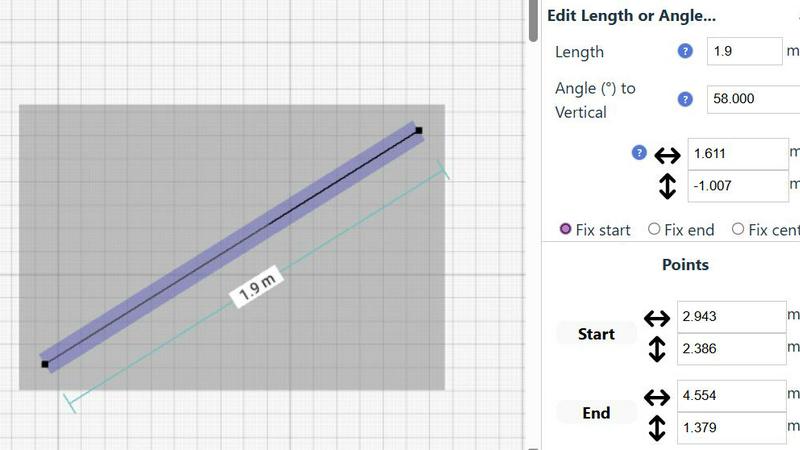
SimpleDraw provides precise measurements and smart alignment features that ensure every drawing is accurate and to scale. Users can trust that their dimensions will reflect reality, which is crucial for effective planning and design.
Specialized Floor Plan Creator
The dedicated Floor Plan Mode allows users to create detailed floor plans effortlessly. With the ability to draw walls, place windows and doors, and visualize layouts in real time, this feature simplifies the design process for any project.
Smart Alignment System
The Smart Alignment System assists users in placing elements exactly where they want them. This intuitive feature offers visual guidance, ensuring that lines and points are positioned accurately, enhancing the overall precision of the drawings.
Comprehensive Measurement System
SimpleDraw boasts a robust measurement system that displays contextual measurements dynamically as users work. The option to choose between metric and standard US units empowers users to create drawings that are tailored to their needs.
vaethat
AI Render Upscaling
Vaethat's AI render upscaling feature elevates the resolution and sharpness of 3D architectural renders, ensuring that geometry remains clean and consistent. This technology allows users to present their work in stunning detail, contributing to a more immersive viewing experience.
Detail Refinement
With a focus on enhancing fine textures, edges, and small architectural elements, the detail refinement feature provides a crisper and more polished appearance to renders. This meticulous attention to detail ensures that every aspect of the architectural visualization is highlighted, enhancing the overall aesthetic quality.
Material and Lighting Enhancement
The material and lighting enhancement feature significantly boosts the perceived realism of renders by refining material definition, enhancing contrast, and balancing lighting. This results in a more lifelike portrayal of architectural designs, allowing viewers to appreciate the nuances of materials and the interplay of light.
Noise and Artifact Cleanup
Vaethat excels at reducing noise and common rendering artifacts, producing cleaner, presentation-ready images. This cleanup process is essential for achieving professional-grade quality, ensuring that the final output is devoid of distracting imperfections that could detract from the viewer's experience.
Use Cases
SimpleDraw
Kitchen & Bathroom Floor Plans
Users can effectively plan renovations for kitchens and bathrooms by visualizing layouts with accurate measurements. SimpleDraw allows for the exploration of different configurations before any physical work begins.
Room Layouts & Furniture Planning
Designing room layouts becomes effortless with SimpleDraw. Users can experiment with furniture placement to ensure that items fit perfectly within their spaces, ultimately saving time and eliminating costly purchasing mistakes.
House & Apartment Plans
SimpleDraw is ideal for creating complete floor plans for various living spaces. Whether for home projects or rental listings, users can develop comprehensive designs that meet their specific requirements and preferences.
Community-Driven Development
Engaging with the SimpleDraw community enables users to influence product evolution. By providing feedback and suggestions, users can help shape future features, ensuring that the platform continues to meet the needs of its diverse audience.
vaethat
Architectural Presentations
Vaethat is ideal for creating compelling architectural presentations. By enhancing 3D renders, professionals can showcase their designs with striking clarity and realism, making a lasting impression on clients and stakeholders.
Portfolio Development
For architects and visualizers, Vaethat serves as an invaluable tool for portfolio development. The ability to enhance multiple renders simultaneously allows users to create a cohesive and visually stunning collection that effectively demonstrates their skills and creativity.
Marketing and Promotional Materials
When producing marketing materials, high-quality visuals are crucial. Vaethat enhances renders to meet the demands of promotional content, ensuring that images are eye-catching and capable of captivating potential clients.
Project Approvals
In the realm of project approvals, clear and polished visuals can significantly influence decision-making. Vaethat enables architects to present their designs in the best possible light, facilitating smoother approval processes by highlighting the project's strengths and intentions.
Overview
About SimpleDraw
SimpleDraw redefines the landscape of technical sketching, presenting a sophisticated yet accessible online platform tailored for the modern creator. It caters to a diverse audience, from the DIY enthusiast embarking on a home renovation to the professional seeking a quick, reliable floor plan. SimpleDraw empowers users to craft precise, scale-accurate drawings with remarkable ease, eliminating the steep learning curve associated with traditional CAD software. The platform’s core value proposition lies in its ability to merge professional-grade precision with effortless usability, entirely free of charge. Users can transform their browsers into dynamic drafting tables, utilizing intuitive tools that translate abstract ideas into meticulously measured realities. Each line, angle, and dimension can be crafted with confidence, ensuring that every detail reflects the user’s intent. With no downloads, installations, or mandatory registrations, SimpleDraw invites creativity without barriers, making it an essential tool for anyone looking to visualize their space accurately.
About vaethat
Vaethat is a groundbreaking AI-powered tool meticulously crafted to upscale and enhance 3D renders specifically for the architectural visualization industry. Designed with archviz professionals in mind, Vaethat leverages advanced artificial intelligence to significantly improve the clarity, sharpness, and overall realism of architectural images. This innovative solution empowers architects and visualizers to present their projects with unparalleled quality, ensuring that every detail is meticulously rendered. By simplifying the enhancement process through a user-friendly interface, Vaethat eliminates the complexities often associated with traditional render enhancement techniques. Its primary value proposition lies in its ability to deliver high-quality images while preserving the design intent, thereby providing professionals with a reliable tool that enhances their creative output without compromising artistic vision.
Frequently Asked Questions
SimpleDraw FAQ
How do I get started with SimpleDraw?
Getting started is simple; just visit the SimpleDraw website, and you can begin drawing immediately. There is no need for downloads or account creation.
Is SimpleDraw really free to use?
Yes, SimpleDraw is completely free to use. It offers professional-grade tools without any hidden costs, allowing users to access all features without financial barriers.
Can I save my drawings in SimpleDraw?
Currently, SimpleDraw offers a seamless online experience without the need for saving files on your device. Users can always return to their drawings as long as they are in the same session.
What types of projects can I create with SimpleDraw?
With SimpleDraw, users can create various projects, including detailed floor plans, room layouts, and furniture arrangements, making it suitable for both personal and professional design needs.
vaethat FAQ
How does the AI render enhancer calculate credits?
The AI render enhancer calculates credits based on the number of images processed and the complexity of enhancements applied. Each enhancement action consumes a predetermined number of credits, allowing users to manage their usage effectively.
Can I use the archviz AI upscaler with V-Ray, Lumion, Enscape, 3ds Max, and SketchUp?
Yes, Vaethat is compatible with various architectural visualization software, including V-Ray, Lumion, Enscape, 3ds Max, and SketchUp. This versatility ensures that users can seamlessly integrate Vaethat into their existing workflows.
What makes this AI post-production tool different from manual editing?
Unlike manual editing, which can be time-consuming and subjective, Vaethat employs advanced AI algorithms to automate the enhancement process. This leads to consistent results across different images while saving valuable time for professionals.
Can I upgrade or downgrade my AI enhancement plan anytime?
Yes, Vaethat offers flexible subscription options that allow users to upgrade or downgrade their AI enhancement plans at any time. This adaptability ensures that users can align their plans with their evolving needs and projects.
Alternatives
SimpleDraw Alternatives
SimpleDraw is an elegant, free online tool designed for creating precise scale drawings and floor plans, catering to the needs of both amateurs and professionals alike. As a sophisticated design tool, it serves a diverse audience, including DIY enthusiasts and professionals involved in architectural projects. Users often seek alternatives to SimpleDraw for various reasons, such as a desire for enhanced features, specific platform compatibility, or different pricing structures. When exploring alternatives, it is crucial to consider factors such as usability, advanced functionalities, customer support, and overall value to ensure the chosen tool meets your particular design needs.
vaethat Alternatives
Vaethat is an advanced AI tool meticulously designed for architectural visualization professionals, empowering them to upscale 3D renders while enhancing clarity and detail. This innovative solution stands out in the realm of design tools, providing a seamless experience for users aiming to elevate the quality of their architectural images. However, users often seek alternatives due to various factors such as pricing, specific feature sets, or compatibility with their existing software platforms. When searching for alternatives to Vaethat, it is essential to consider the features that will best meet your needs as an archviz professional. Assessing the capability to upscale renders without compromising design intent, the ease of use, and the quality of enhancements offered can guide your decision. Additionally, ensure that any alternative provides a workflow that aligns with your project requirements and enhances your creative output effectively.