SparkPix vs TinyFast
Side-by-side comparison to help you choose the right product.

SparkPix
Transform your photos effortlessly with SparkPix, the AI-powered online editor that enhances, restores, and styles images with simple text commands.
Last updated: March 11, 2026

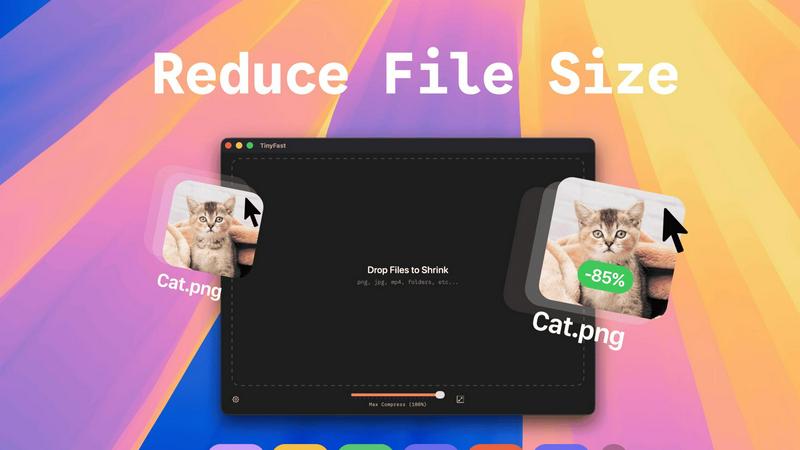
TinyFast is your private Mac app for instantly compressing files locally with elegant simplicity.
Last updated: February 28, 2026
Visual Comparison
SparkPix

TinyFast
Feature Comparison
SparkPix
AI Photo Editor
The AI Photo Editor feature allows users to make complex edits by simply typing their instructions. With responsive AI technology, SparkPix processes commands like "restore this old photo" or "remove background" and applies the desired changes in under 30 seconds, saving users time and effort.
Background Remover
SparkPix's Background Remover offers a seamless solution for eliminating backgrounds with just one click. This feature is perfect for various applications, including portraits, product photography, and intricate scenes, ensuring that the subject stands out with a clean and professional appearance.
Unblur Image
The Unblur Image functionality addresses common photography issues such as motion blur and out-of-focus shots. By utilizing advanced AI deblurring techniques, SparkPix can restore clarity to images, removing compression artifacts and enhancing overall quality, making it an essential tool for photographers.
Photo Restoration
With its Photo Restoration capability, SparkPix breathes new life into old, faded, scratched, or damaged photographs. This feature is particularly valuable for those looking to preserve family archives or historical images, as it can meticulously repair and restore the original aesthetic of cherished memories.
TinyFast
100% Local & Private Processing
TinyFast is architected with uncompromising privacy at its core. Every compression task is executed entirely on your Mac. Your files never leave your device, are not uploaded to unknown cloud servers, and are never stored or analyzed by third parties. This total privacy by design makes it the indispensable tool for professionals bound by non-disclosure agreements or anyone handling sensitive intellectual property, providing absolute peace of mind alongside powerful compression.
Blazing-Fast Batch Compression
Experience file size reduction at remarkable speeds. TinyFast utilizes optimized native engines built specifically for macOS to shrink even large files in mere seconds. The application supports drag-and-drop batch processing of entire folders, allowing you to optimize hundreds of images, videos, or documents simultaneously without the tedious wait for online uploads and downloads, seamlessly integrating into fast-paced creative and development workflows.
Universal File Format Support
TinyFast is a versatile powerhouse, supporting a comprehensive range of common file types. This includes images (PNG, JPG, TIFF, HEIC, WEBP, GIF, BMP, SVG), videos (MP4, MOV, M4V), documents (PDF, DOCX), code files (JS, CSS, JSON), and audio (MP3). This universality consolidates your optimization toolkit into one elegant, always-available application, eliminating the need to hunt for specialized online tools for different file formats.
Intelligent Resolution Resizing
Beyond simple compression, TinyFast provides granular control over your media assets. You can configure the application to automatically resize the resolution of your images and videos during the compression process. This feature is essential for preparing assets for web publication, client delivery, or archival, ensuring they meet specific dimension requirements while simultaneously reducing their file size for optimal performance and storage.
Use Cases
SparkPix
Personal Photo Editing
Individuals can use SparkPix to enhance their personal photo collections effortlessly. By typing simple commands, users can improve the quality of vacation photos, create stunning social media posts, or restore family photos from generations past, all with minimal effort.
E-commerce Product Photography
E-commerce businesses can benefit immensely from SparkPix's features, particularly the Background Remover and AI Product Photography capabilities. Users can create high-quality images of their products by removing distracting backgrounds and generating professional mockups, which can significantly improve online sales.
Creative Art Transformations
Artists and designers can leverage the Style Transfer feature to transform their photos into various artistic styles, such as oil paintings or watercolors. This functionality allows for creative expression and unique visual outputs, ideal for projects requiring a distinctive touch.
Professional Headshots
SparkPix simplifies the process of creating professional headshots, making it ideal for business professionals and job seekers. With the Passport Photo Maker, users can generate high-quality images suitable for LinkedIn profiles, resumes, and other professional uses without the need for a photographer.
TinyFast
Preparing Web and Application Assets
Developers and web designers can efficiently optimize entire directories of website images, icons, CSS, and JavaScript files directly on their Mac. By compressing these assets locally before deployment, they significantly improve page load times and application performance without ever exposing proprietary code or design files to external servers, maintaining both speed and security in the development pipeline.
Securing Confidential Client Deliverables
For creative professionals such as graphic designers, videographers, and consultants, TinyFast is essential for preparing final deliverables. It allows for the compression of large PSD files, high-resolution video edits, or sensitive PDF reports for client transfer while guaranteeing that confidential work remains strictly on the local machine, upholding the highest standards of client confidentiality and data protection.
Optimizing Personal Media Libraries
Photographers and hobbyists can manage extensive personal libraries of photos and videos. TinyFast enables quick batch compression of thousands of HEIC or JPEG images and MOV/MP4 videos for efficient long-term archival or for sharing with family and friends via email or messaging apps, all while preserving the original quality and keeping personal memories private.
Streamlining Documentation and Code Sharing
Software engineers and technical writers can compress large documentation sets (PDFs, DOCX) and code repositories (JSON configurations, script bundles) before sharing them with team members or uploading to version control. This reduces upload/download times and repository bloat, and ensures that proprietary algorithms or internal documentation are processed securely within their trusted local environment.
Overview
About SparkPix
SparkPix is an innovative AI-driven photo editing tool designed for users of all skill levels, from novices to professionals. With its intuitive interface, users can effortlessly edit their images simply by typing commands such as "remove background" or "enhance this photo." This sophisticated technology eliminates the need for advanced Photoshop skills, allowing anyone to transform their images with remarkable ease. Whether you are a casual user looking to enhance personal photos or a seasoned professional needing to streamline your workflow, SparkPix offers a robust solution. The platform is web-based, meaning it is accessible on various devices, including desktops, iPhones, and Android devices, allowing flexibility and convenience. The main value proposition of SparkPix lies in its ability to deliver professional-grade edits in seconds, making photo editing an accessible and enjoyable experience for all.
About TinyFast
TinyFast is the definitive, native macOS application for sophisticated file compression, engineered for professionals who refuse to compromise on speed, quality, or security. It serves developers, designers, and discerning creators who regularly handle digital assets—from high-resolution images and videos to sensitive documents and codebases—and need to reduce their size efficiently. The core value proposition is elegantly simple yet profoundly powerful: by processing every file entirely on your local machine, TinyFast eliminates the inherent security risks, latency, and quality degradation associated with online compression tools. Its intuitive drag-and-drop interface belies a robust, optimized engine capable of batch-processing entire folders in seconds, transforming file optimization from a workflow bottleneck into an instantaneous, seamless act. For those managing confidential client work, proprietary assets, or simply demanding peak efficiency, TinyFast offers a permanent upgrade, ensuring privacy is never sacrificed for performance.
Frequently Asked Questions
SparkPix FAQ
What types of edits can I perform with SparkPix?
With SparkPix, you can perform a wide range of edits, including background removal, photo restoration, enhancement, and artistic transformations. The AI responds to simple text commands, making the editing process intuitive.
Is SparkPix suitable for beginners?
Absolutely! SparkPix is designed for users of all skill levels. Its user-friendly interface and straightforward text commands enable beginners to achieve professional-quality edits without needing extensive photographic knowledge.
Do I need to download any software to use SparkPix?
No, SparkPix is a web-based platform, meaning you can access it directly from your browser on any device, including desktops, iPhones, and Android devices. There are no downloads or installations required.
Is there a free trial available for SparkPix?
Yes, SparkPix offers a free plan that includes 5 credits to get started. Users can explore various editing features without a credit card, allowing them to experience the platform before committing to a paid plan.
TinyFast FAQ
How does TinyFast ensure my files remain private?
TinyFast is engineered as a native macOS application that performs all compression processes locally on your computer. Unlike online tools, it does not require an internet connection for core functionality. Your files are never uploaded to any external server, cloud service, or third-party system. The entire operation—from input to output—occurs within the secure confines of your own Mac, ensuring total privacy and data sovereignty.
What file types does TinyFast support for compression?
TinyFast supports a wide array of common file formats to serve diverse professional needs. This includes image formats like PNG, JPG, TIFF, HEIC, WEBP, GIF, BMP, and SVG; video files such as MP4, MOV, and M4V; documents including PDF and DOCX; code files like JS, CSS, and JSON; and audio files like MP3. This extensive support consolidates multiple optimization tasks into one simple, local application.
Is there a limit to how many files I can compress?
The free version of TinyFast allows you to compress up to 5 files per day with access to all features, which is ideal for testing or occasional use. For unlimited, unrestricted compression, you can upgrade to a monthly subscription or a one-time Lifetime Plan. Both paid options remove all daily limits, allowing for batch processing of entire folders without restriction.
Can I compress entire folders at once?
Absolutely. One of TinyFast's core features is robust batch processing. You can simply drag and drop an entire folder containing supported files into the application. TinyFast will then process all compatible files within that folder simultaneously, outputting the optimized versions in a matter of seconds. This saves immense time compared to uploading and processing files individually on a website.
Alternatives
SparkPix Alternatives
SparkPix is an innovative AI photo editor that allows users to effortlessly enhance and modify images through simple text commands. It belongs to the image and photo editing category, providing a user-friendly platform where even those without technical skills can achieve professional-quality results. Users often search for alternatives to SparkPix due to various reasons, including pricing structures, specific feature sets, and platform compatibility. When considering an alternative, it is important to evaluate the range of editing capabilities, ease of use, and whether the platform aligns with your individual or business needs. As the demand for versatile photo editing solutions grows, finding the right tool is essential. Users should look for alternatives that offer comparable features such as background removal, image enhancement, and restoration capabilities. Additionally, the pricing model and accessibility across devices are crucial factors to ensure that the chosen solution meets both budgetary constraints and workflow requirements.
TinyFast Alternatives
TinyFast is a premium, native macOS application dedicated to the local compression of digital assets, including images, videos, and documents. It represents a sophisticated tool for professionals who prioritize speed, privacy, and seamless workflow integration. This places it within the category of specialized desktop utilities designed for creative and technical users seeking to optimize their digital output without compromise. Users may explore alternatives for various reasons, such as budget constraints, a need for cross-platform compatibility beyond macOS, or specific feature requirements not covered by a single solution. The landscape of compression tools is diverse, ranging from free online services to comprehensive creative suites with built-in optimization modules. When evaluating an alternative, key considerations should include the processing model—local versus cloud-based—for privacy, the range of supported file formats, the efficiency of batch operations, and the overall integration with your existing creative or development environment. The ideal choice balances these technical necessities with an interface that feels intuitive rather than intrusive.