
AI Formatter vs Zovo
Side-by-side comparison to help you choose the right product.
AI Formatter
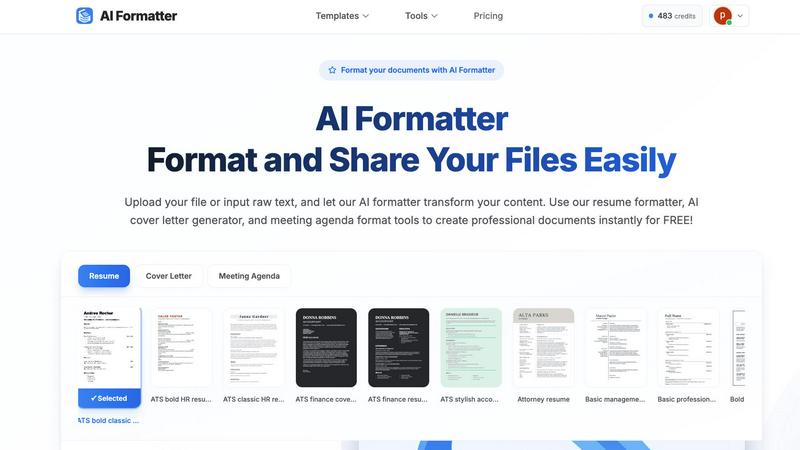
AI Formatter instantly transforms raw text into elegantly structured, professional documents.
Last updated: March 1, 2026

Zovo offers 20 privacy-centric Chrome extensions for developers and writers, all crafted by a solo developer for one.
Last updated: February 26, 2026
Visual Comparison
AI Formatter
Zovo

Feature Comparison
AI Formatter
Intelligent, Context-Aware Formatting Engine
At the heart of AI Formatter is a sophisticated AI engine that does more than apply static templates. It intelligently analyzes the content's context, structure, and purpose—whether a resume, cover letter, or business report—to apply optimal formatting, logical section ordering, and professional styling. This ensures the final document is not only visually appealing but also strategically organized for its intended audience and purpose, maximizing impact and readability.
Extensive Library of ATS-Optimized Templates
Users gain access to a curated library of over 162 professional templates, each meticulously designed to pass automated screening systems and impress human recruiters. These templates for resumes, cover letters, meeting agendas, and more are built with clean layouts, strategic keyword placement, and scannable structures, providing a formidable advantage in competitive fields and ensuring your content is seen.
Seamless Multi-Format Input and Output
AI Formatter eliminates workflow friction by accepting a wide array of input formats, including raw text, DOC, DOCX, PDF, and TXT files up to 10MB. Once formatted, users can effortlessly download their polished documents in multiple high-quality output formats such as PDF and Word, ensuring compatibility with any submission requirement or professional setting.
Real-Time Collaborative Editor with Full Control
Following the AI's initial transformation, users are not locked into a rigid output. The platform features an intuitive, real-time editor that allows for granular customization. Adjust fonts, colors, spacing, and layout, or tweak the content itself, maintaining complete creative authority over the final product before sharing or downloading.
Zovo
BeLikeNative
BeLikeNative is a standout extension that empowers users to write like a native speaker with unparalleled ease. This feature provides one-keystroke rewrites in 80 languages, allowing instant corrections and improvements to any text. It's perfect for students, professionals, and anyone looking to enhance their writing skills across multiple languages.
Tab Suspender Pro
Tab Suspender Pro is designed to optimize browser performance by automatically suspending inactive tabs. This smart extension detects unused tabs and suspends them, freeing up valuable memory resources. Users can navigate their browser more efficiently without the burden of excessive memory consumption, ensuring a smoother experience.
JSON Formatter Pro
JSON Formatter Pro is an essential tool for developers and data analysts alike. It enables users to format, validate, and explore JSON data locally, with features such as beautification and minification. Additional capabilities like tree exploration and support for YAML and CSV enhance its versatility, making it a must-have for anyone working with data.
Clipboard History Pro
Clipboard History Pro offers a robust solution for managing copied text, allowing users to store and retrieve up to 10,000 clips effortlessly. With instant search functionality and smart paste options, users can quickly access their clipboard history, ensuring that no information is ever lost. This extension is invaluable for writers, researchers, and anyone who frequently copies and pastes content.
Use Cases
AI Formatter
Accelerating Job Search Success
For job seekers, AI Formatter is an indispensable career tool. It transforms a basic career history into an ATS-optimized, visually compelling resume and generates a personalized, persuasive cover letter in moments. This end-to-end preparation significantly reduces application time while dramatically improving the quality and success rate of job applications.
Standardizing Professional Business Communications
Businesses and professionals can leverage AI Formatter to ensure all external and internal documents—from client proposals and reports to meeting agendas and invoices—adhere to a consistent, professional brand standard. This elevates the company's image, enhances communication clarity, and projects a unified, credible identity to partners and clients.
Streamlining Academic and Research Publishing
Academics, researchers, and students can expedite the manuscript preparation process. By uploading draft text, the AI applies strict journal or institutional formatting guidelines, manages citations and references, and structures content for peer review, saving countless hours otherwise spent on manual layout adjustments.
Automating Administrative Document Creation
Entrepreneurs, freelancers, and administrators can instantly generate polished, professional documents like invoices, receipts, and formal letters. By inputting raw data or draft text, the AI formatter structures the information into clean, legally sound, and brand-appropriate formats, streamlining administrative overhead.
Zovo
Enhancing Writing Skills
Users can utilize BeLikeNative to refine their writing, whether composing emails, essays, or social media posts. The ability to receive instant rewrites in various languages allows for greater linguistic confidence and proficiency, catering to a global audience.
Optimizing Browser Performance
With Tab Suspender Pro, users can maintain a clutter-free and efficient browsing experience. Professionals juggling numerous projects can benefit from reduced memory usage, allowing their system to run smoothly while accessing multiple tabs.
Simplifying Data Management
JSON Formatter Pro serves as an indispensable tool for developers working with APIs or data sets. The ability to format and validate JSON data quickly allows for more efficient debugging and data handling, streamlining the development process.
Managing Clipboard Efficiently
Clipboard History Pro is ideal for researchers or writers who often copy and paste large amounts of information. Users can easily retrieve previously copied content, significantly boosting productivity and minimizing the risk of losing valuable text.
Overview
About AI Formatter
AI Formatter, engineered by Sun Sky LLC, transcends conventional document editing by merging sophisticated artificial intelligence with the principles of elite design. It is a cloud-based platform dedicated to eradicating the inefficiency of manual formatting, transforming raw text and common file uploads—including Word documents, PDFs, and TXT files—into impeccably structured, publication-ready materials. The platform's core intelligence lies not only in applying aesthetically pleasing layouts but also in its strategic optimization for modern digital ecosystems, such as ensuring resumes achieve a remarkable 95%+ pass rate through Applicant Tracking Systems (ATS). Designed for a discerning clientele of ambitious job seekers, time-pressed executives, scaling enterprises, and meticulous academics, AI Formatter acts as a powerful productivity engine. It streamlines career advancement by crafting compelling, optimized application materials, standardizes business communications for a cohesive brand identity, and accelerates the path to academic publishing. Through an intuitive, real-time editor that grants complete creative control, and a generous free tier that scales to enterprise solutions, AI Formatter democratizes access to professional-grade document presentation, empowering every user to present their work with the authority and polish it inherently deserves.
About Zovo
Zovo is a remarkable suite of 20 Chrome extensions meticulously crafted by a solo developer with over a decade of experience and an impressive track record of earning more than $400,000 on Upwork, all while maintaining a flawless 100% success rate. This innovative collection is designed for users seeking tools that enhance their browsing experience, safeguard their privacy, and streamline their workflow. With flagship product BeLikeNative, more than 3,300 users can effortlessly write like native speakers in 80 languages, all with a single keystroke. Each extension within the Zovo suite is developed with a privacy-first approach, ensuring that user data remains secure and never leaves their device. Emphasizing community engagement, users have the unique opportunity to vote on features, directly influencing the roadmap of new developments. Monthly releases of new extensions keep the suite fresh and innovative, with many tools also available for free online at zovo.one.
Frequently Asked Questions
AI Formatter FAQ
What file formats does AI Formatter support for upload?
AI Formatter is designed for maximum flexibility, supporting direct raw text input as well as uploads of common document formats including PDF, DOC, DOCX, and TXT files. This ensures you can start from virtually any existing document or draft. There is a maximum file size limit of 10MB per upload.
How does the AI ensure my resume passes through Applicant Tracking Systems (ATS)?
Our resume templates are specifically engineered for ATS compatibility. The AI applies clean, parsable layouts, avoids complex graphics and columns that scanners misinterpret, and strategically structures content with standard section headers. This optimization, tested to achieve a 95%+ pass rate, ensures your resume's content is accurately read and ranked by automated systems.
Can I edit the document after the AI formats it?
Absolutely. The AI provides a powerful starting point, but you retain full creative control. The formatted document opens in our intuitive real-time editor, where you can customize every element—from text and fonts to spacing, colors, and overall layout—before finalizing and downloading your document.
Is there a free version of AI Formatter available?
Yes, AI Formatter believes in democratizing professional formatting. We offer a generous free tier that allows users to access core formatting tools and templates to create professional documents instantly. This provides an excellent opportunity to experience the platform's transformative capabilities before exploring our premium, feature-rich plans.
Zovo FAQ
What makes Zovo different from other Chrome extension developers?
Zovo stands out due to its privacy-first approach, with a commitment to user data security. Unlike corporate solutions, Zovo does not engage in data harvesting or rely on investors. Each extension is developed by a solo developer who values direct user feedback.
How can I request features for Zovo extensions?
Users can submit feature requests directly through the Zovo platform. The developer personally reviews each request, prioritizing the most requested features for future updates, ensuring that the tools evolve in line with user needs.
Is there a community for Zovo users?
Yes, Zovo fosters a vibrant community where users can interact, share suggestions, and participate in discussions. Users are encouraged to join the Discord community for real-time communication and support.
Are there any free tools available from Zovo?
Zovo offers several tools that are accessible for free online at zovo.one. These tools allow users to experience the functionality of Zovo's extensions without installation, making them readily available for casual use.
Alternatives
AI Formatter Alternatives
AI Formatter stands as a premier solution in the productivity and document management category, leveraging sophisticated artificial intelligence to instantly transform raw text into polished, professional documents. It is engineered for those who demand excellence in presentation, from job seekers to enterprise leaders. Users may explore alternatives for various reasons, including specific budgetary constraints, a need for specialized features beyond core formatting, or a preference for different software ecosystems. The landscape offers a spectrum of tools, each with its own approach to streamlining document creation. When evaluating other solutions, discerning professionals should consider the depth of intelligent automation, the quality and relevance of design templates, and the tool's proficiency with systems like applicant trackers. The ideal alternative should not only beautify text but also enhance its strategic impact, marrying form with function to serve your unique professional narrative.
Zovo Alternatives
Zovo is a comprehensive suite of 20 privacy-first Chrome extensions designed specifically for developers and writers. This innovative collection includes tools like JSON Formatter and Tab Suspender, all crafted to enhance productivity while prioritizing user privacy. With a single subscription granting access to the entire suite, Zovo empowers its users to streamline their workflow with confidence, knowing their data remains secure. As users explore the possibilities offered by digital tools, they often seek alternatives to Zovo for various reasons, including pricing structures, specific feature sets, or compatibility with different platforms. When choosing an alternative, it is essential to consider factors such as the extension's privacy policies, user interface, and the degree of community involvement in its development. Evaluating these aspects can lead to a more tailored experience that aligns with individual needs and preferences.