
AskFormulas vs Zovo
Side-by-side comparison to help you choose the right product.

AskFormulas
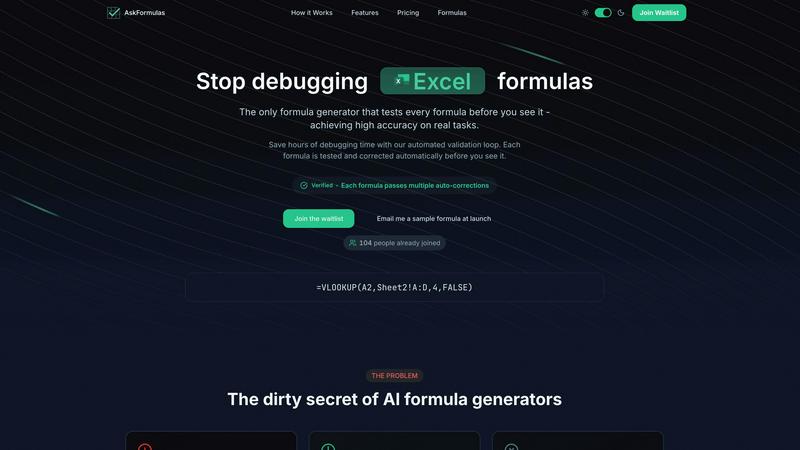
AskFormulas generates and validates Excel and Google Sheets formulas with guaranteed accuracy.
Last updated: February 28, 2026

Zovo offers 20 privacy-centric Chrome extensions for developers and writers, all crafted by a solo developer for one.
Last updated: February 26, 2026
Visual Comparison
AskFormulas
Zovo

Feature Comparison
AskFormulas
The Validation Loop
This is the cornerstone of AskFormulas' reliability. Every user request initiates a three-step automated process. First, natural language is parsed into precise formula intent. Second, the generated formula is executed within a secure sandbox environment using synthetic test data. Third, any errors detected are automatically corrected through iterative validation cycles until the formula passes all tests, resulting in a "Verified" output. This loop guarantees high accuracy where other tools fail.
Natural Language to Formula
The platform eliminates the need for any prior knowledge of spreadsheet syntax. Users can articulate their calculation needs in simple, plain English, such as "sum all values in column B where column A contains the word Sales." AskFormulas' advanced AI interprets the context and intent behind the description, seamlessly translating everyday language into precise, executable formula logic without requiring the user to understand functions or references.
Cross-Platform Syntax Automation
AskFormulas provides seamless support for both Microsoft Excel and Google Sheets through a simple one-click toggle. The system intelligently adjusts the formula syntax to match the conventions and function names of the selected platform. This automates the translation between equivalents like VLOOKUP and XLOOKUP or array formula structures, ensuring a correct, ready-to-use result regardless of your spreadsheet software.
Smart Error Detection & Correction
Unlike static generators, AskFormulas proactively identifies and resolves formula errors. If a constructed formula returns a common spreadsheet error like #REF!, #VALUE!, or #N/A, the system's validation engine diagnoses the issue—be it an incorrect range reference or mismatched argument—and automatically rewrites the formula to correct it. This happens iteratively within the sandbox, invisible to the user, until a flawless formula is produced.
Zovo
BeLikeNative
BeLikeNative is a standout extension that empowers users to write like a native speaker with unparalleled ease. This feature provides one-keystroke rewrites in 80 languages, allowing instant corrections and improvements to any text. It's perfect for students, professionals, and anyone looking to enhance their writing skills across multiple languages.
Tab Suspender Pro
Tab Suspender Pro is designed to optimize browser performance by automatically suspending inactive tabs. This smart extension detects unused tabs and suspends them, freeing up valuable memory resources. Users can navigate their browser more efficiently without the burden of excessive memory consumption, ensuring a smoother experience.
JSON Formatter Pro
JSON Formatter Pro is an essential tool for developers and data analysts alike. It enables users to format, validate, and explore JSON data locally, with features such as beautification and minification. Additional capabilities like tree exploration and support for YAML and CSV enhance its versatility, making it a must-have for anyone working with data.
Clipboard History Pro
Clipboard History Pro offers a robust solution for managing copied text, allowing users to store and retrieve up to 10,000 clips effortlessly. With instant search functionality and smart paste options, users can quickly access their clipboard history, ensuring that no information is ever lost. This extension is invaluable for writers, researchers, and anyone who frequently copies and pastes content.
Use Cases
AskFormulas
Complex Financial Modeling
Financial analysts and accountants can accelerate the construction of intricate models. By describing logic for dynamic forecasts, depreciation schedules, or nested conditional calculations in plain language, they receive validated, error-free formulas. This drastically reduces manual debugging time, ensures calculation integrity, and allows experts to focus on strategic analysis rather than formula syntax.
Automated Business Reporting
Revenue managers and operations professionals can automate the generation of critical reports. AskFormulas can quickly generate validated formulas for summarizing sales data by region, calculating month-over-month growth percentages, or pulling specific records with lookups. This transforms hours of manual report building into a process of simple descriptive requests, ensuring accuracy in time-sensitive deliverables.
Data Cleansing and Transformation
Users managing large datasets can streamline data preparation tasks. Describing needs like "extract the first name from a full name in column A" or "combine date and time columns into a single timestamp" yields immediate, working formulas. This empowers users to clean, standardize, and reshape their data efficiently without deep technical knowledge of text or date functions.
Accessibility for Non-Technical Users
Small business owners, marketers, and administrative staff who lack formal spreadsheet training can achieve advanced outcomes. Tasks like calculating commissions, analyzing survey responses, or managing inventory levels become accessible through simple English descriptions. AskFormulas democratizes powerful data manipulation, enabling informed decision-making without a steep learning curve.
Zovo
Enhancing Writing Skills
Users can utilize BeLikeNative to refine their writing, whether composing emails, essays, or social media posts. The ability to receive instant rewrites in various languages allows for greater linguistic confidence and proficiency, catering to a global audience.
Optimizing Browser Performance
With Tab Suspender Pro, users can maintain a clutter-free and efficient browsing experience. Professionals juggling numerous projects can benefit from reduced memory usage, allowing their system to run smoothly while accessing multiple tabs.
Simplifying Data Management
JSON Formatter Pro serves as an indispensable tool for developers working with APIs or data sets. The ability to format and validate JSON data quickly allows for more efficient debugging and data handling, streamlining the development process.
Managing Clipboard Efficiently
Clipboard History Pro is ideal for researchers or writers who often copy and paste large amounts of information. Users can easily retrieve previously copied content, significantly boosting productivity and minimizing the risk of losing valuable text.
Overview
About AskFormulas
AskFormulas redefines the art of spreadsheet calculation by introducing an unprecedented standard of reliability. It is an intelligent formula generator that transcends the limitations of conventional AI tools, which often deliver untested, error-prone code. The platform's core innovation is its proprietary validation loop, a sophisticated system that rigorously tests and automatically corrects every formula in a secure sandbox environment before it reaches the user. By simply describing a calculation need in plain English, users initiate a process where the AI interprets intent, constructs the appropriate formula, and iteratively runs it against synthetic test data. Any errors, such as #REF! or #VALUE!, are identified and corrected until a fully functional solution is achieved, earning a definitive "Verified" badge. This product is meticulously engineered for professionals who cannot afford inaccuracy: financial analysts building complex models, revenue managers automating critical reports, small business owners lacking deep technical expertise, and any individual who values precision. Its fundamental promise is to eliminate the hours wasted on debugging, delivering working, validated formulas from the very first request and restoring trust to the essential spreadsheet workflow.
About Zovo
Zovo is a remarkable suite of 20 Chrome extensions meticulously crafted by a solo developer with over a decade of experience and an impressive track record of earning more than $400,000 on Upwork, all while maintaining a flawless 100% success rate. This innovative collection is designed for users seeking tools that enhance their browsing experience, safeguard their privacy, and streamline their workflow. With flagship product BeLikeNative, more than 3,300 users can effortlessly write like native speakers in 80 languages, all with a single keystroke. Each extension within the Zovo suite is developed with a privacy-first approach, ensuring that user data remains secure and never leaves their device. Emphasizing community engagement, users have the unique opportunity to vote on features, directly influencing the roadmap of new developments. Monthly releases of new extensions keep the suite fresh and innovative, with many tools also available for free online at zovo.one.
Frequently Asked Questions
AskFormulas FAQ
How accurate are the generated formulas?
AskFormulas is engineered for exceptionally high accuracy, specifically targeting real-world tasks. While conventional AI formula generators can fail 40-60% of the time, our proprietary validation loop tests and auto-corrects every formula in a simulated spreadsheet environment before you see it. This process continues until the formula works flawlessly, resulting in a "Verified" badge that guarantees a ready-to-use, error-free solution.
Does it work with both Excel and Google Sheets?
Yes, AskFormulas provides full, seamless support for both major spreadsheet platforms. A simple toggle allows you to switch between Excel and Google Sheets mode. The system automatically adjusts the formula syntax, function names, and structural conventions (like array formulas) to be perfectly compatible with your chosen software, delivering a correct formula every time.
How does the validation loop work?
The validation loop is a three-step automated process. First, your natural language request is analyzed and converted into formula syntax. Second, this formula is executed in a secure sandbox with comprehensive synthetic test data to simulate real spreadsheet behavior. Third, if any errors are found, the system automatically corrects them and retests. This loop repeats until the formula passes all tests, at which point it is marked as "Verified" and presented to you.
What happens if my formula has an error?
If the initially constructed formula contains an error, you will never see the broken version. AskFormulas' smart error detection identifies issues like #REF! or #VALUE! during the sandbox testing phase. The system then automatically performs corrections—such as fixing range references or argument order—and retests the new version. This iterative correction happens behind the scenes until a fully functional formula is achieved.
Zovo FAQ
What makes Zovo different from other Chrome extension developers?
Zovo stands out due to its privacy-first approach, with a commitment to user data security. Unlike corporate solutions, Zovo does not engage in data harvesting or rely on investors. Each extension is developed by a solo developer who values direct user feedback.
How can I request features for Zovo extensions?
Users can submit feature requests directly through the Zovo platform. The developer personally reviews each request, prioritizing the most requested features for future updates, ensuring that the tools evolve in line with user needs.
Is there a community for Zovo users?
Yes, Zovo fosters a vibrant community where users can interact, share suggestions, and participate in discussions. Users are encouraged to join the Discord community for real-time communication and support.
Are there any free tools available from Zovo?
Zovo offers several tools that are accessible for free online at zovo.one. These tools allow users to experience the functionality of Zovo's extensions without installation, making them readily available for casual use.
Alternatives
AskFormulas Alternatives
AskFormulas is an intelligent formula generator for Excel and Google Sheets, distinguished within the productivity software category by its foundational guarantee of accuracy. It transcends the role of a simple suggestion engine by employing a proprietary validation loop that rigorously tests and corrects every formula before delivery, ensuring users receive a verified, working solution from their very first request. Users may explore alternatives for various reasons, including budget constraints, specific feature requirements not addressed by a single platform, or a need for tools integrated within a broader software ecosystem. The search for a different solution is a natural part of selecting the optimal tool for one's unique workflow and technical environment. When evaluating other options, key considerations should include the reliability of output, the depth of platform-specific knowledge, and the overall efficiency gain. The paramount criterion is whether the tool delivers consistently accurate, executable formulas that integrate seamlessly into your spreadsheets, thereby eliminating the hidden cost of debugging and uncertainty.
Zovo Alternatives
Zovo is a comprehensive suite of 20 privacy-first Chrome extensions designed specifically for developers and writers. This innovative collection includes tools like JSON Formatter and Tab Suspender, all crafted to enhance productivity while prioritizing user privacy. With a single subscription granting access to the entire suite, Zovo empowers its users to streamline their workflow with confidence, knowing their data remains secure. As users explore the possibilities offered by digital tools, they often seek alternatives to Zovo for various reasons, including pricing structures, specific feature sets, or compatibility with different platforms. When choosing an alternative, it is essential to consider factors such as the extension's privacy policies, user interface, and the degree of community involvement in its development. Evaluating these aspects can lead to a more tailored experience that aligns with individual needs and preferences.