
audiovideogenerator vs YouTube to Transcript
Side-by-side comparison to help you choose the right product.

audiovideogenerator
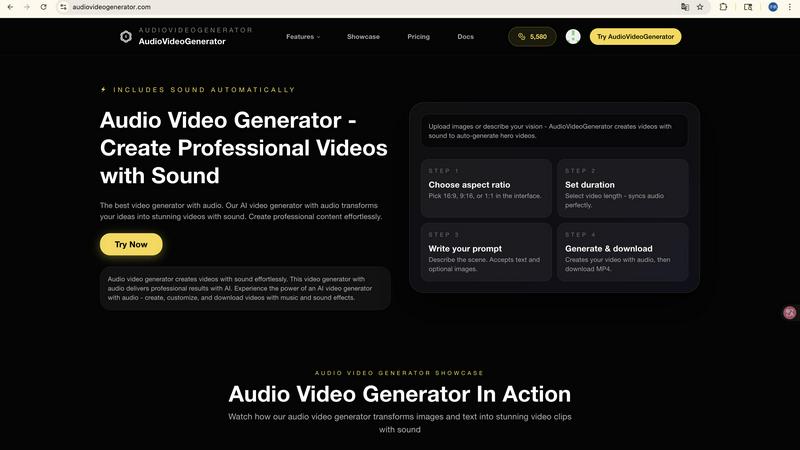
Transform your ideas into professional videos with synchronized audio using our AI generator.

YouTube to Transcript
Effortlessly extract accurate transcripts from any YouTube video, entirely free and without registration, in just.
Last updated: February 26, 2026
Visual Comparison
audiovideogenerator
YouTube to Transcript

Feature Comparison
audiovideogenerator
Multi-Model AI Video Generation
AudioVideoGenerator provides access to a curated suite of the world's most advanced AI video models, allowing you to match the tool to your creative vision and quality requirements. Choose from options like OpenAI's Sora 2 for extended, detailed narratives, Google's Veo 3.1 for cinematic quality, or Wan 2.5 for faster iterations. This flexibility ensures you have the perfect engine for any project, from a quick social media clip to a long-form promotional film, all within a single, unified interface.
Intelligent Automatic Audio Synchronization
This is the platform's defining capability. Beyond simple video generation, AudioVideoGenerator's AI meticulously analyzes the visual content, mood, and pacing to automatically compose and integrate a complete audio landscape. It seamlessly adds fitting background music, contextual sound effects, and ambient audio that evolves in perfect harmony with the on-screen action, creating a professional, emotionally resonant final product without any manual audio editing.
Versatile Content Creation Pathways
The platform supports multiple intuitive entry points for creation. Utilize the Text-to-Video function to generate scenes from descriptive prompts alone. Employ Image-to-Video to animate and bring depth to static photographs. Leverage the unique Audio-to-Video capability, where an uploaded audio file inspires and guides the visual narrative. This versatility empowers users to start from their strongest asset, whether it's a script, a logo, or a musical track.
Professional-Grade Output for Diverse Scenarios
AudioVideoGenerator is engineered to produce broadcast-ready content tailored for specific applications. It automatically optimizes videos for various platforms with correct aspect ratios, supports longer durations for detailed storytelling, and ensures the audio-visual pairing meets professional standards for marketing, education, and entertainment. The output is consistently polished, engaging, and ready to publish across any channel.
YouTube to Transcript
Completely Free
YouTube to Transcript is dedicated to providing a completely free service, allowing users to generate transcripts without any sign-up requirements or hidden costs. This commitment to accessibility ensures that everyone can benefit from the tool without financial barriers.
Multi-language Support
This utility excels in its ability to generate transcripts in over 125 languages, catering to a global audience. Users can not only access transcripts in their native language but also seamlessly translate content, making it a versatile tool for multilingual applications.
Unlimited Usage
Users can generate an unlimited number of transcripts without any restrictions on video duration. This feature is particularly beneficial for educators, researchers, and content creators who work with diverse video lengths, from short clips to lengthy documentaries.
Clean Formatting
The transcripts generated by YouTube to Transcript come with clean formatting, making them ideal for various applications. Whether for SEO purposes, note-taking, or content repurposing, users can easily export the text in a TXT file format for convenience.
Use Cases
audiovideogenerator
Social Media Content Creation
Generate a constant stream of engaging, platform-optimized videos for Instagram Reels, TikTok, and YouTube Shorts. The AI creates eye-catching visuals paired with trending or brand-appropriate audio, enabling creators and businesses to maintain a dynamic and professional social media presence effortlessly, significantly boosting audience engagement and growth.
Brand Marketing and Product Launches
Craft high-impact promotional videos, advertisements, and product demonstration films. The platform allows marketers to produce cinema-quality visuals with compelling soundtracks and sound effects that highlight product features and evoke desired emotions, effectively telling a brand's story without the need for expensive production crews or equipment.
Educational and Training Material Development
Transform static learning materials, presentations, and tutorials into dynamic, engaging educational videos. Instructors and institutions can create content where complex concepts are visualized and enhanced with explanatory voiceovers and supportive audio cues, leading to improved knowledge retention and a more immersive learning experience for students.
Event Recaps and Brand Storytelling
Produce captivating highlight reels from events, conferences, or company milestones. By combining generated visuals that capture key moments with emotive background music, the tool helps create powerful, shareable narratives that extend the life and emotional impact of an event and strengthen community or customer connections.
YouTube to Transcript
Academic Research
Students and researchers often rely on video content for information. YouTube to Transcript allows them to quickly obtain accurate transcripts of lectures, interviews, and documentaries, facilitating more efficient study and analysis.
Content Creation
Content creators can utilize this tool to transcribe their own YouTube videos or those of others. This enables them to create written content from video sources, enhancing their blogs, articles, or social media posts with valuable text.
Language Learning
Language students can benefit from transcribing YouTube videos in foreign languages, allowing them to read along while listening. This dual approach aids in comprehension and vocabulary acquisition, making it a powerful learning tool.
Accessibility Improvements
YouTube to Transcript serves as an essential resource for making content more accessible. By providing text versions of videos, it ensures that individuals with hearing impairments can engage with the material, promoting inclusivity in content consumption.
Overview
About audiovideogenerator
AudioVideoGenerator represents the pinnacle of AI-driven creative technology, a sophisticated platform engineered to transform abstract ideas into fully-realized, professional audiovisual experiences. It is an all-in-one solution that masterfully unites stunning visual generation with perfectly synchronized, context-aware audio. The platform transcends traditional video editing by intelligently automating the entire production pipeline, from initial concept to final render. It is designed for the discerning creator: the marketer crafting a compelling brand narrative, the educator developing engaging learning modules, the content producer fueling social media channels, and the visionary storyteller bringing their imagination to life. Its core value proposition lies in its seamless integration of sight and sound, eliminating the complex, time-consuming tasks of sourcing music, recording voiceovers, and manually syncing audio tracks. By harnessing cutting-edge AI models, AudioVideoGenerator delivers not just videos, but cohesive sensory experiences crafted for enhanced engagement and emotional impact, all achievable in minutes rather than days.
About YouTube to Transcript
YouTube to Transcript is an innovative, web-based tool that empowers users to effortlessly extract transcripts and subtitles from any YouTube video. This service is designed for a diverse audience, including content creators, students, researchers, and professionals who require quick and reliable access to video content in text format. By simply pasting a YouTube video URL, users can receive high-quality transcripts in mere seconds, facilitating an efficient workflow for studying, content creation, or research. The platform stands out with its commitment to being completely free forever, with no hidden fees or premium tiers, ensuring accessibility for all. With support for over 125 languages and no restrictions on video length, YouTube to Transcript transforms video content into an invaluable text resource.
Frequently Asked Questions
audiovideogenerator FAQ
What makes AudioVideoGenerator different from other AI video tools?
AudioVideoGenerator's distinct advantage is its fully integrated, intelligent audio synthesis. While other tools may generate silent videos or require manual audio addition, our platform's AI automatically creates and synchronizes a complete audio track—including music, sound effects, and ambiance—tailored specifically to the generated visuals. This end-to-end automation for both sight and sound sets it apart as a complete production solution.
Which AI models does AudioVideoGenerator support?
The platform offers a matrix of leading AI video generation models to suit different needs. This includes options like Wan 2.5 for faster generation, Veo 3.1 for high-quality cinematic output, and Sora 2 for advanced, detailed scene generation. You can select the model that best aligns with your project's requirements for duration, quality, and style directly within the application.
Can I use my own images or audio to generate a video?
Absolutely. AudioVideoGenerator specializes in transforming your assets into dynamic videos. You can upload static images to be animated through the Image-to-Video feature. Furthermore, the unique Audio-to-Video (A2V) function allows you to upload an audio file, and the AI will generate a video sequence inspired by and synchronized to that audio's rhythm, tone, and content.
Is the content generated by AudioVideoGenerator royalty-free for commercial use?
Yes, videos created with AudioVideoGenerator are intended for your commercial use. The platform's AI generates original visual and audio content, providing you with the rights to use the final rendered videos for business purposes, including marketing, advertising, and social media, without concerns over licensing fees for stock media.
YouTube to Transcript FAQ
Is YouTube to Transcript free to use?
Yes, YouTube to Transcript is completely free to use. There are no hidden fees or premium tiers, ensuring that all users can access its features without any cost.
How do I get a transcript of a YouTube video?
To obtain a transcript, simply copy the URL of the YouTube video you wish to transcribe, paste it into the input field on the YouTube to Transcript website, and click the generate button. The transcript will be ready in seconds.
How long does it take to generate the transcript?
The transcript generation process is remarkably quick, typically taking just a few seconds to extract and present the text from the video, regardless of its length.
Can I download the transcript?
Absolutely. Once the transcript is generated, users can easily copy the text to their clipboard or download it as a TXT file for further use or sharing.