DocuExtractor vs Dokta
Side-by-side comparison to help you choose the right product.

DocuExtractor
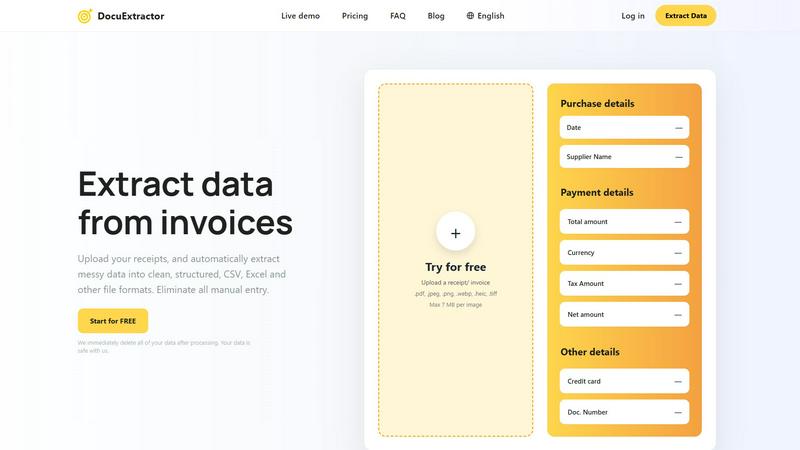
DocuExtractor effortlessly transforms chaotic receipts and invoices into organized, structured data in moments.
Last updated: February 28, 2026

Dokta streamlines document management for SMBs and freelancers, automating invoicing, contracts, and cash flow effortlessly.
Last updated: April 4, 2026
Visual Comparison
DocuExtractor
Dokta

Feature Comparison
DocuExtractor
99.6% Accuracy
DocuExtractor boasts an impressive accuracy rate of 99.6% in extracting data from financial documents. This remarkable precision ensures that users receive reliable and trustworthy data, significantly reducing the potential for human error in critical financial tasks.
Instant Conversions
With DocuExtractor, users can extract data from documents in mere seconds, dramatically accelerating workflow processes. This feature eliminates time-consuming manual entry, allowing professionals to focus on higher-level tasks that require analytical thinking and decision-making.
Fully Automated Processing
The fully automated nature of DocuExtractor combines advanced OCR, deep learning, and large language models to facilitate seamless data extraction. Users simply drag and drop their documents, making the process intuitively easy and accessible, even for those without technical expertise.
Multilingual Support
Catering to a global clientele, DocuExtractor supports over 45 languages, with automatic language detection capabilities. This feature allows users from diverse linguistic backgrounds to process documents effortlessly, broadening the software's applicability across various markets.
Dokta
Automated Invoice Management
Dokta simplifies the entire invoice management process by allowing users to upload any document type—be it a photo, scan, or PDF. The AI engine processes the document in under 60 seconds, identifying key information such as the document type, amount, due date, and client or supplier details. This feature greatly reduces the burden of manual entry and minimizes errors.
Real-Time Cash Flow Tracking
Users can gain insights into their financial health through real-time cash flow tracking. Dokta provides a clear overview of billed revenue, collected payments, outstanding invoices, and VAT obligations, all presented in an intuitive graphical format spanning twelve months. This empowers users to make informed financial decisions promptly.
Contract Management and Automation
Dokta enables users to create invoices and quotes with just a few clicks. It also supports contract management, allowing for automatic monthly billing based on time and materials (TJM) contracts. This feature ensures that users can effortlessly manage recurring billing without the hassle of manual intervention.
Client and Supplier Insights
The platform enriches client and supplier data by automatically retrieving relevant SIRET information, offering payment scoring, and maintaining comprehensive historical records for each entity. This feature allows users to develop deeper insights into their client relationships and enhances overall business strategy.
Use Cases
DocuExtractor
Streamlining Accounting Workflows
Accountants can utilize DocuExtractor to quickly convert a multitude of receipts and invoices into structured data formats. This functionality not only saves time but also enhances accuracy, making month-end reconciliations significantly more efficient.
Enhancing Financial Reporting
Financial operations teams can employ DocuExtractor to extract relevant data from bank statements and other financial documents, facilitating smoother reporting processes. The structured outputs in CSV or Excel formats can be seamlessly integrated into financial analysis tools.
Automating Invoice Processing
Businesses can automate their invoice processing with DocuExtractor, reducing the workload on accounts payable teams. By quickly extracting essential data from invoices, organizations can ensure timely payments and maintain strong supplier relationships.
Improving Data Accuracy in Tax Preparation
Tax professionals can leverage DocuExtractor to extract precise data from financial documents, minimizing the likelihood of errors in tax filings. The software's high accuracy rate ensures that all relevant information is accurately captured, making tax preparation a more straightforward task.
Dokta
Freelance Developer Management
For freelance developers, Dokta provides essential tools to manage contracts and billing seamlessly. With automated invoice generation based on project milestones, developers can focus on coding while Dokta handles the administrative tasks, ensuring timely payment and contract adherence.
Creative Project Tracking
Freelance creatives can benefit immensely from Dokta's intuitive workflow. The platform enables users to send quotes with acceptance links, converting them to invoices in just one click. This streamlined process allows for efficient project management from initial proposal to final payment.
Auto-Entrepreneur Compliance
Auto-entrepreneurs can utilize Dokta to maintain compliance with URSSAF regulations effortlessly. The platform generates compliant invoices, tracks payments, and alerts users of important deadlines, ensuring they remain compliant with local laws without added stress.
Small Business Optimization
For SMBs, Dokta offers comprehensive document management capabilities that enhance operational efficiency. With features such as automated reminders for unpaid invoices and real-time cash flow visualization, businesses can optimize their financial processes and focus on growth.
Overview
About DocuExtractor
DocuExtractor epitomizes the future of document processing, ingeniously designed to alleviate professionals from the burdensome and error-prone task of manual data entry. This state-of-the-art software utilizes a sophisticated blend of Optical Character Recognition (OCR), deep learning technologies, and large language models (AI) to convert unstructured financial documents—such as invoices, receipts, bank statements, and PDFs—into impeccably organized, structured data. Tailored to meet the precise needs of accountants, bookkeepers, and financial operations teams, DocuExtractor offers unparalleled accuracy, transforming chaotic paperwork into easily digestible CSV or Excel formats in mere seconds. The core value proposition of DocuExtractor lies not only in its extraction capabilities but also in the invaluable gift of time and precision it provides, allowing professionals to refocus their efforts on strategic analysis and higher-value activities. With enterprise-grade security, multilingual support, and a user-friendly interface, DocuExtractor emerges as an essential ally for modern practices pursuing efficiency, reliability, and an effortless transition from paper trails to digital clarity.
About Dokta
Dokta is an innovative AI-powered document management platform designed specifically for freelancers, solo entrepreneurs, auto-entrepreneurs, and small to medium-sized businesses (SMBs). This sophisticated tool revolutionizes the way users manage their documents by allowing them to effortlessly drop invoices, quotes, contracts, and other essential files into the system. Within a mere 60 seconds, Dokta's advanced AI engine reads, classifies, and extracts vital data, streamlining the entire document lifecycle. Users can create professional invoices and quotes, track payments, automate reminders for unpaid invoices, manage contracts and deadlines, and even generate actionable tasks directly from their documents. With Dokta, users will no longer struggle with lost files, missed deadlines, or tedious administrative tasks on weekends. The platform builds a comprehensive client database from users' documents, tracks cash flow in real time, and provides easy export options to CSV for accounting purposes. Whether you are a freelance developer looking to optimize your workflow or a growing SMB seeking efficient document management solutions, Dokta places your documents at the core of your business, expertly managed by cutting-edge AI technology.
Frequently Asked Questions
DocuExtractor FAQ
How secure is my data with DocuExtractor?
DocuExtractor prioritizes data security, ensuring that all uploaded documents are immediately deleted after processing. This commitment to privacy means your data is safe and handled with the utmost care.
What types of documents can I upload?
You can upload a variety of documents, including receipts, invoices, PDFs, and JPG files. Supports formats such as .pdf, .jpeg, .png, .webp, .heic, and .tiff, with a maximum size of 7 MB per image.
Is there a limit to the number of documents I can process?
DocuExtractor allows users to upload documents in batches, enabling the processing of multiple files simultaneously. This feature enhances efficiency, particularly for businesses dealing with high volumes of paperwork.
How does the extraction process work?
The extraction process involves three simple steps: upload your documents, allow the AI to extract key information automatically, and then download the results in your desired format (CSV or Excel) for immediate use in accounting software.
Dokta FAQ
What types of documents can I upload to Dokta?
Dokta supports a variety of document formats, including photos, scans, and PDFs. This flexibility allows users to upload virtually any type of document for processing.
How does Dokta ensure data security and compliance?
Dokta is fully compliant with GDPR regulations, ensuring that all data is securely hosted in Europe (AWS). Additionally, it uses AES-256 encryption to protect sensitive information.
Is there a free trial available?
Yes, Dokta offers a free tier that allows users to manage up to 15 documents per month without any cost. This provides an excellent opportunity for potential users to explore the platform's capabilities.
What types of businesses can benefit from using Dokta?
Dokta is designed for a wide range of users, including freelancers, solo entrepreneurs, auto-entrepreneurs, and small to medium-sized businesses. Its versatile features cater to various industries, making it a valuable tool for anyone who manages documents regularly.
Alternatives
DocuExtractor Alternatives
DocuExtractor is a cutting-edge software solution that falls within the realm of automated document intelligence. It is specifically designed to transform chaotic financial documents, such as receipts and invoices, into structured data with remarkable precision. As businesses increasingly embrace digital workflows, users often seek alternatives due to various factors, such as pricing concerns, feature sets that better align with their unique needs, or compatibility with their existing platforms. When exploring alternatives, it is essential to consider the key functionalities that will enhance your workflow, such as accuracy in data extraction, support for multiple document formats, and the ability to handle batch processing. Additionally, evaluating the user interface, security measures, and the overall adaptability of the solution to your specific operational context will ensure a more informed choice.
Dokta Alternatives
Dokta is an innovative AI-driven document management platform tailored for freelancers, solo entrepreneurs, auto-entrepreneurs, and small to medium-sized businesses (SMBs). By seamlessly automating the handling of various documents such as invoices, quotes, and contracts, Dokta enhances productivity and streamlines administrative tasks, allowing users to focus on their core business operations. However, users often seek alternatives to Dokta for various reasons, including pricing considerations, specific feature requirements, or compatibility with existing platforms. When exploring alternatives, it is crucial to evaluate factors such as ease of use, document processing capabilities, integration with other tools, and compliance with data protection regulations to ensure the solution aligns with both operational needs and budget constraints.