DocuExtractor vs Receipt Generator
Side-by-side comparison to help you choose the right product.

DocuExtractor
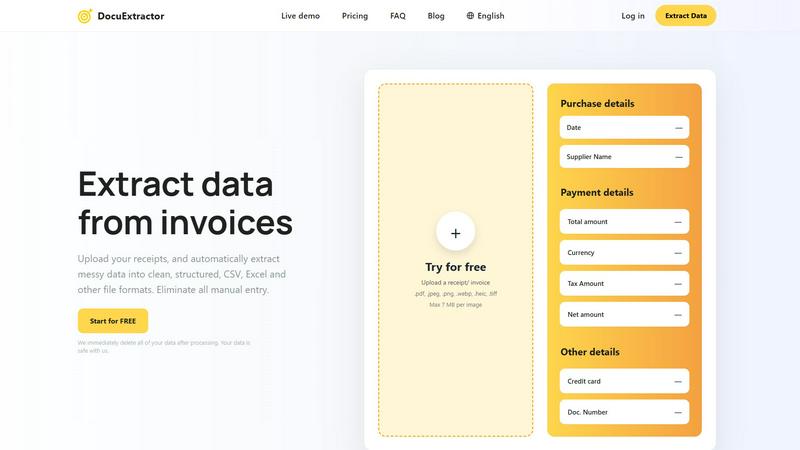
DocuExtractor effortlessly transforms chaotic receipts and invoices into organized, structured data in moments.
Last updated: February 28, 2026

Receipt Generator
Effortlessly create professional, customizable receipts using over 400 templates for business and personal needs in seconds.
Last updated: April 4, 2026
Visual Comparison
DocuExtractor
Receipt Generator

Feature Comparison
DocuExtractor
99.6% Accuracy
DocuExtractor boasts an impressive accuracy rate of 99.6% in extracting data from financial documents. This remarkable precision ensures that users receive reliable and trustworthy data, significantly reducing the potential for human error in critical financial tasks.
Instant Conversions
With DocuExtractor, users can extract data from documents in mere seconds, dramatically accelerating workflow processes. This feature eliminates time-consuming manual entry, allowing professionals to focus on higher-level tasks that require analytical thinking and decision-making.
Fully Automated Processing
The fully automated nature of DocuExtractor combines advanced OCR, deep learning, and large language models to facilitate seamless data extraction. Users simply drag and drop their documents, making the process intuitively easy and accessible, even for those without technical expertise.
Multilingual Support
Catering to a global clientele, DocuExtractor supports over 45 languages, with automatic language detection capabilities. This feature allows users from diverse linguistic backgrounds to process documents effortlessly, broadening the software's applicability across various markets.
Receipt Generator
Extensive Template Library
With over 400 professionally designed templates, Receipt Generator offers a wide variety of options tailored to different stores and industries. Users can easily select a template that best fits their needs, ensuring they create receipts that are both realistic and relevant.
AI "Place in Scene" Feature
The innovative AI-powered "Place in Scene" feature allows users to generate lifelike images of their receipts on various surfaces, such as desks, wallets, or countertops. This capability is perfect for enhancing visual projects without the need for actual printing, thus saving time and resources.
Full Customization Options
Receipt Generator provides users with comprehensive customization tools that enable them to modify every aspect of their receipts. From editing line items and prices to adjusting fonts and colors, users have full control over the presentation of their receipts, ensuring they meet specific requirements.
Instant Download Capabilities
Users can enjoy lightning-fast performance with instant download options. After creating a receipt, it can be exported as a high-resolution PNG or PDF file within seconds, eliminating the need for cumbersome waits and allowing for immediate use.
Use Cases
DocuExtractor
Streamlining Accounting Workflows
Accountants can utilize DocuExtractor to quickly convert a multitude of receipts and invoices into structured data formats. This functionality not only saves time but also enhances accuracy, making month-end reconciliations significantly more efficient.
Enhancing Financial Reporting
Financial operations teams can employ DocuExtractor to extract relevant data from bank statements and other financial documents, facilitating smoother reporting processes. The structured outputs in CSV or Excel formats can be seamlessly integrated into financial analysis tools.
Automating Invoice Processing
Businesses can automate their invoice processing with DocuExtractor, reducing the workload on accounts payable teams. By quickly extracting essential data from invoices, organizations can ensure timely payments and maintain strong supplier relationships.
Improving Data Accuracy in Tax Preparation
Tax professionals can leverage DocuExtractor to extract precise data from financial documents, minimizing the likelihood of errors in tax filings. The software's high accuracy rate ensures that all relevant information is accurately captured, making tax preparation a more straightforward task.
Receipt Generator
Small Business Documentation
Small business owners can utilize Receipt Generator to create professional receipts for their transactions, ensuring accurate record-keeping and enhancing their business’s credibility. This tool simplifies the invoicing process, making it efficient and user-friendly.
Creative Content Development
Content creators can leverage the photorealistic output of receipts for visual storytelling in blogs, videos, or social media posts. The ability to place receipts in real-life scenarios elevates the visual appeal of their content, making it more engaging for audiences.
Expense Tracking for Freelancers
Freelancers can benefit from Receipt Generator by generating detailed receipts for client projects and expenses. This not only aids in tracking expenditures but also provides clients with professional documentation, reinforcing trust and professionalism.
Inventory Management for Resellers
Resellers can create receipts for their inventory documentation, showcasing purchases and sales effectively. This helps in maintaining accurate records and streamlining inventory management, which is crucial for business operations.
Overview
About DocuExtractor
DocuExtractor epitomizes the future of document processing, ingeniously designed to alleviate professionals from the burdensome and error-prone task of manual data entry. This state-of-the-art software utilizes a sophisticated blend of Optical Character Recognition (OCR), deep learning technologies, and large language models (AI) to convert unstructured financial documents—such as invoices, receipts, bank statements, and PDFs—into impeccably organized, structured data. Tailored to meet the precise needs of accountants, bookkeepers, and financial operations teams, DocuExtractor offers unparalleled accuracy, transforming chaotic paperwork into easily digestible CSV or Excel formats in mere seconds. The core value proposition of DocuExtractor lies not only in its extraction capabilities but also in the invaluable gift of time and precision it provides, allowing professionals to refocus their efforts on strategic analysis and higher-value activities. With enterprise-grade security, multilingual support, and a user-friendly interface, DocuExtractor emerges as an essential ally for modern practices pursuing efficiency, reliability, and an effortless transition from paper trails to digital clarity.
About Receipt Generator
Receipt Generator is a premier online tool designed for creating authentic and customizable receipts with unparalleled ease. With an extensive library of over 400 store-specific templates, users can seamlessly generate receipts for renowned retailers such as Walmart, Target, Starbucks, and CVS, among others. This tool is perfect for small business owners, freelancers, content creators, and resellers seeking to document transactions efficiently. The customizable features allow users to modify every detail, including items, prices, dates, and payment methods, resulting in high-resolution PNG files that can be downloaded instantly. Notably, the innovative AI "Place in Scene" feature enables users to generate photorealistic images of receipts displayed on various surfaces, enhancing visual storytelling for creative projects. Receipt Generator prioritizes user convenience, offering a free tier that requires no account setup, making it accessible for anyone looking to create professional receipts swiftly and effectively.
Frequently Asked Questions
DocuExtractor FAQ
How secure is my data with DocuExtractor?
DocuExtractor prioritizes data security, ensuring that all uploaded documents are immediately deleted after processing. This commitment to privacy means your data is safe and handled with the utmost care.
What types of documents can I upload?
You can upload a variety of documents, including receipts, invoices, PDFs, and JPG files. Supports formats such as .pdf, .jpeg, .png, .webp, .heic, and .tiff, with a maximum size of 7 MB per image.
Is there a limit to the number of documents I can process?
DocuExtractor allows users to upload documents in batches, enabling the processing of multiple files simultaneously. This feature enhances efficiency, particularly for businesses dealing with high volumes of paperwork.
How does the extraction process work?
The extraction process involves three simple steps: upload your documents, allow the AI to extract key information automatically, and then download the results in your desired format (CSV or Excel) for immediate use in accounting software.
Receipt Generator FAQ
How does Receipt Generator ensure the authenticity of its receipts?
Receipt Generator utilizes authentic fonts, layouts, and formatting to create receipts that look genuine. The templates are designed to replicate real-world receipts, ensuring they meet the expectations of users seeking realistic documentation.
Is there a cost associated with using Receipt Generator?
Receipt Generator offers a free tier for basic use, allowing users to create and download receipts with a watermark. For those seeking unlimited downloads and additional features, Pro plans are available for a one-time payment.
Can I customize the templates to suit my branding?
Absolutely. Receipt Generator allows users to customize various elements of the templates, including adding logos, editing item details, and adjusting colors and fonts, enabling alignment with your brand’s identity.
What types of receipts can I create with Receipt Generator?
Users can create a wide range of receipts, including those from supermarkets, pharmacies, restaurants, and retail stores. The extensive template library covers numerous categories, ensuring that all user needs are catered to.
Alternatives
DocuExtractor Alternatives
DocuExtractor is a cutting-edge software solution that falls within the realm of automated document intelligence. It is specifically designed to transform chaotic financial documents, such as receipts and invoices, into structured data with remarkable precision. As businesses increasingly embrace digital workflows, users often seek alternatives due to various factors, such as pricing concerns, feature sets that better align with their unique needs, or compatibility with their existing platforms. When exploring alternatives, it is essential to consider the key functionalities that will enhance your workflow, such as accuracy in data extraction, support for multiple document formats, and the ability to handle batch processing. Additionally, evaluating the user interface, security measures, and the overall adaptability of the solution to your specific operational context will ensure a more informed choice.
Receipt Generator Alternatives
Receipt Generator is a distinguished tool in the realm of productivity and management, designed to facilitate the effortless creation of customized receipts. With an impressive library of over 400 store-specific templates, it caters to a diverse clientele, from small business owners to freelancers and content creators. Users often seek alternatives to receipt generation tools due to factors such as pricing structures, specific feature sets, or compatibility with various platforms. When exploring alternatives, it is essential to consider the range of templates available, customization capabilities, ease of use, and overall performance to ensure that the chosen solution aligns with your unique requirements.