
Mailopoly vs SupaSidebar
Side-by-side comparison to help you choose the right product.

Mailopoly
Mailopoly transforms your inbox into a streamlined powerhouse, effortlessly organizing, prioritizing, and responding.
Last updated: February 26, 2026

SupaSidebar
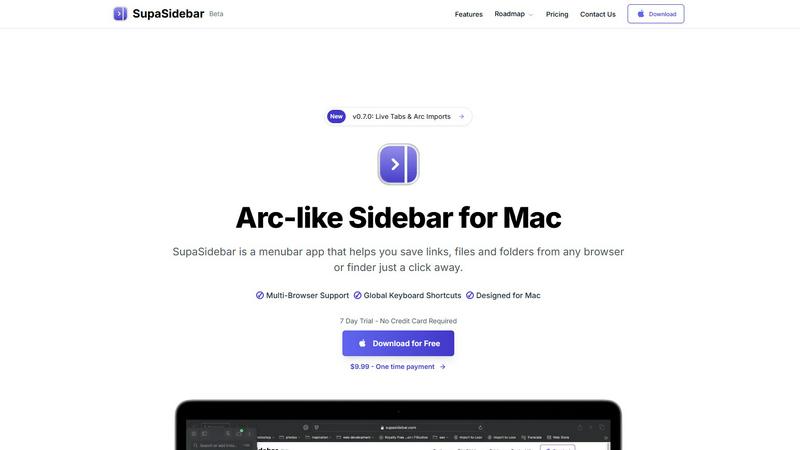
SupaSidebar elegantly organizes your links, files, and folders on Mac, ensuring instant access with effortless.
Last updated: February 28, 2026
Visual Comparison
Mailopoly

SupaSidebar
Feature Comparison
Mailopoly
Intelligent Email Filtering
Mailopoly automatically sorts and prioritizes emails, surfacing critical information and hiding the noise. This innovative feature ensures that users only receive notifications for emails that truly matter, allowing for a more organized and less overwhelming inbox.
AI-Powered Reply Drafting
With Mailopoly, users no longer need to spend precious time crafting responses. The AI system drafts replies in the user's unique voice, capturing their style and tone. Multiple suggestions are available, enabling swift edits or immediate sending, making communication seamless and efficient.
Personal Finance and Task Management
Mailopoly goes beyond email by integrating personal finance management and task tracking. Users can easily monitor invoices, delivery updates, and upcoming events, all while receiving timely reminders and action items to keep their lives organized.
Instant Unsubscribe and Email Tracking
The application features a one-tap unsubscription tool that helps users effortlessly rid themselves of unwanted emails. Additionally, it includes an email tracker that provides insights on who opened messages, where, and how often, giving users valuable feedback on their communications.
SupaSidebar
Instant Access
SupaSidebar provides immediate access to all your essential links, files, and applications with just a click. This feature allows you to save or copy URLs using simple keyboard shortcuts, streamlining your workflow and minimizing time spent on repetitive tasks.
Recents Tracking
With the Recents feature, SupaSidebar automatically tracks every website you have used in the last 48 hours. This function ensures that you can find your work instantly, eliminating the stress of searching through numerous tabs or browsing history.
Pinned Items
SupaSidebar allows you to keep your most important items at your fingertips by pinning them at the top of the list. This feature provides quick access to frequently used resources, ensuring that your favorites are always within easy reach.
Fast Search Functionality
The fast search feature enables users to locate any file, folder, website, or application instantly. By simply pressing CMD CTRL K and entering the desired term, you can navigate your digital workspace without delays, greatly enhancing your overall efficiency.
Use Cases
Mailopoly
Efficient Email Management for Professionals
Busy professionals can leverage Mailopoly to manage multiple email accounts efficiently. The intelligent sorting feature ensures that only essential emails are prioritized, allowing for a more focused workday and reduced stress from excess notifications.
Organizing Life Events and Tasks
Individuals juggling numerous responsibilities can use Mailopoly to keep track of important events, meetings, and deadlines. The built-in task manager consolidates all relevant details, ensuring that nothing slips through the cracks in their busy lives.
Streamlining Personal Finances
Mailopoly assists users in managing their personal finances by automatically extracting invoice details and reminders for upcoming payments. This feature allows users to maintain financial awareness without the hassle of sifting through multiple emails.
Enhancing Communication for Side-Hustlers
For those with side projects or hustles, Mailopoly simplifies communication by drafting replies in the user's voice. This feature saves time and helps maintain a professional image across various platforms, allowing side-hustlers to focus on growing their ventures.
SupaSidebar
For Busy Professionals
Busy professionals can utilize SupaSidebar to manage their crucial links and files efficiently. By organizing their digital assets in one accessible location, they can focus on their primary tasks without the distractions of numerous browser tabs.
For Creative Projects
Creators can benefit from SupaSidebar by storing inspiration links, files, and applications in a dedicated sidebar. This allows for easy access to resources while working on projects, enhancing creativity and workflow continuity.
For Researchers
Researchers can use SupaSidebar to keep track of multiple sources and articles. By saving links and documents in the sidebar, they can quickly reference their materials during writing or analysis, thereby improving their research efficiency.
For Students
Students can streamline their study habits with SupaSidebar by organizing lecture notes, research articles, and useful links. This centralized access fosters better study routines and reduces the time spent searching for materials.
Overview
About Mailopoly
Mailopoly is an innovative email client that redefines how individuals manage their inboxes, transforming chaos into clarity. Designed for anyone overwhelmed by the relentless tide of email, Mailopoly employs advanced artificial intelligence to extract key information from emails, allowing users to focus on what truly matters. With its unique capabilities, it dramatically reduces inbox clutter and notifications by over fifty percent, ensuring that important communications are never missed. Beyond mere email management, Mailopoly integrates a sophisticated AI chatbot, Poly, which acts as a personal assistant for life administration, helping users manage finances, schedules, and tasks. This comprehensive solution is ideal for busy professionals, multitaskers, and anyone seeking to streamline their digital lives, turning the often stressful email experience into a personalized command center.
About SupaSidebar
SupaSidebar is an elegantly designed, universal sidebar application for macOS, meticulously crafted to elevate your digital workflow and organization. This innovative tool is inspired by the intuitive design of the Arc browser, fundamentally transforming the way you interact with your most essential digital assets, including links, files, folders, and applications. With SupaSidebar, all of these resources are instantly accessible in a sleek, distraction-free panel, designed specifically for professionals, creators, researchers, and anyone who values efficiency. It addresses common frustrations such as tab overload and scattered resources, ensuring your digital workspace remains unified across all major browsers and Finder. With a strong emphasis on privacy, native macOS integration, and seamless operation, SupaSidebar serves as a sophisticated command center for your Mac. It is engineered to help you stay organized, browse faster, and maintain an uninterrupted flow, making it an indispensable tool for anyone seeking to optimize their productivity.
Frequently Asked Questions
Mailopoly FAQ
How does Mailopoly improve my email experience?
Mailopoly enhances your email experience by automatically filtering important messages, reducing clutter, and providing quick replies drafted in your voice, making email management seamless and efficient.
Is my data secure with Mailopoly?
Absolutely. Mailopoly is SOC 2 certified, meaning it adheres to strict security protocols. Your privacy is prioritized, and your data is handled with utmost care to ensure a safe user experience.
Can I use Mailopoly with multiple email accounts?
Yes, Mailopoly supports various email providers, including Gmail, Outlook, Yahoo, and IMAP accounts. This allows users to consolidate their inboxes into a single, organized platform effortlessly.
Do I need to set up complex rules to use Mailopoly?
No, Mailopoly is designed for zero setup and friction. It works out of the box, automatically learning your preferences and managing your inbox without the need for complicated rules or manual input.
SupaSidebar FAQ
Is SupaSidebar a browser extension?
No, SupaSidebar is a standalone menubar application designed specifically for macOS. It works seamlessly across all major browsers and Finder, offering a unified workspace.
Which browsers does SupaSidebar work with?
SupaSidebar supports all major browsers including Safari, Chrome, Firefox, and Arc. This compatibility ensures that you can access your essential resources regardless of your preferred browser.
What macOS version do I need?
To run SupaSidebar, you will need macOS version 13 or higher. This requirement ensures optimal performance and compatibility with the latest features.
Where is my data stored?
SupaSidebar prioritizes user privacy, meaning that no data leaves your Mac. Your links, files, and settings are stored locally, ensuring your information remains secure and private.
Alternatives
Mailopoly Alternatives
Mailopoly is a sophisticated, AI-powered email client designed to streamline your digital communication experience. Positioned within the Productivity & Management category, it offers unique functionalities that transform your inbox into a personal command center, reducing clutter and enhancing efficiency. Users often seek alternatives due to various reasons, including pricing structures that may not align with their budgets, specific feature sets that better meet their needs, or platform compatibility issues that arise from diverse operating systems. When exploring alternatives to Mailopoly, it is crucial to consider several factors that align with your individual requirements. Look for features that match your productivity goals, the ease of integration with existing tools, and the overall user experience. Additionally, evaluate the pricing models to ensure that they provide value in relation to the functionalities offered, enabling you to make an informed decision that enhances your email management.
SupaSidebar Alternatives
SupaSidebar is an elegantly designed universal sidebar application specifically crafted for macOS users seeking to enhance their digital productivity and organization. By offering a seamless way to access links, files, folders, and applications, it addresses the pressing need for streamlined workflows in an increasingly complex digital landscape. Users often find themselves in search of alternatives due to various factors including pricing, specific feature requirements, or compatibility with different operating systems, as well as personal preference for user interface design. When evaluating alternatives to SupaSidebar, it is essential to consider a few key aspects. Look for features that enhance organization and accessibility, such as unified search capabilities, real-time tab management, and user-friendly interfaces. Additionally, compatibility with your preferred browsers and operating systems, as well as pricing structures that align with your budget, should also inform your decision.