Mod vs ToolPortal
Side-by-side comparison to help you choose the right product.

Mod is a sophisticated CSS framework for building premium SaaS interfaces with speed and elegance.

ToolPortal offers a suite of browser-based tools for effortless formatting, validation, conversion, and image management tasks.
Last updated: March 18, 2026
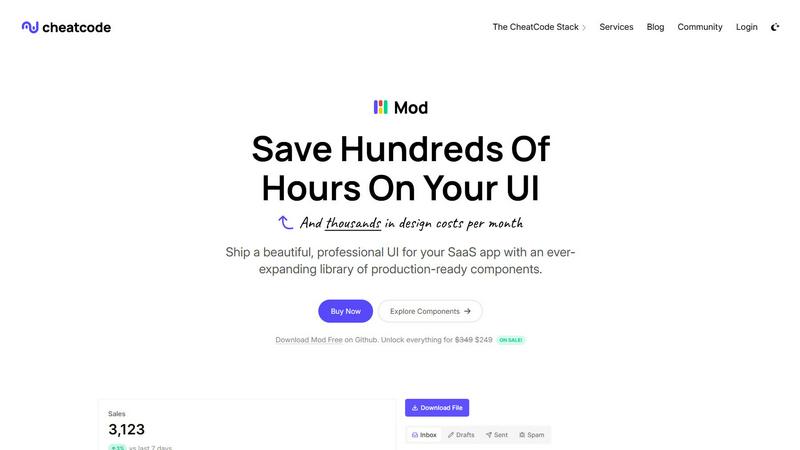
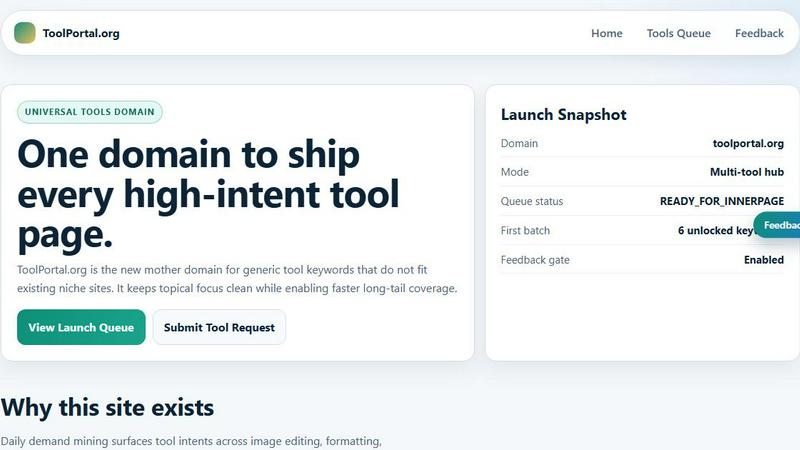
Visual Comparison
Mod
ToolPortal
Feature Comparison
Mod
A Curated Library of 88+ Components
Mod offers an extensive, pre-built collection of over 88 essential UI components, each meticulously designed for SaaS applications. This includes everything from complex data tables, dashboards, and subscription modals to simpler elements like buttons, forms, and navigation bars. Every component is constructed with accessibility, responsiveness, and developer ergonomics in mind, providing a robust foundation that requires minimal customization to deploy. This comprehensive suite ensures you spend zero time reinventing common interface elements, allowing for rapid assembly of complex, functional pages.
Framework-Agnostic Flexibility
Designed for maximum versatility, Mod operates independently of any specific JavaScript framework or backend technology. Its pure CSS foundation, coupled with well-structured HTML examples, ensures seamless integration with popular frontend ecosystems like Next.js, Nuxt, Svelte, and Vite, as well as backend-rendered platforms such as Ruby on Rails and Django. This agnostic approach future-proofs your investment, granting developers the freedom to choose their preferred tech stack without being locked into a proprietary component system or facing arduous migration paths.
Dual-Themed with Full Dark Mode Support
Mod ships with two beautifully coordinated themes—light and dark—engineered from the ground up for visual harmony and readability. The built-in dark mode is not an afterthought but a first-class citizen, with every component and icon thoughtfully adapted for optimal contrast and aesthetic appeal. Implementing theme switching becomes a trivial task, enabling you to meet modern user expectations for personalized interface preferences and reduce eye strain, thereby enhancing the overall sophistication and usability of your application.
Mobile-First, Responsive Design Philosophy
Every component and layout within Mod is built upon a strict mobile-first, responsive design philosophy. The system utilizes a flexible grid and intelligent spacing scales that gracefully adapt from the smallest mobile viewport to the largest desktop display. This ensures that the SaaS applications you build deliver a flawless, intuitive experience across all devices without requiring additional media query wrangling or layout adjustments, guaranteeing your product looks and performs impeccably for every user, everywhere.
ToolPortal
Comprehensive Tool Index
ToolPortal boasts an extensive collection of 228 live tools, encompassing generators, checkers, converters, and formatters. This dense index is designed for quick selection and efficient execution, allowing users to find the right tool for their tasks in mere seconds.
Task Lane Navigation
The platform simplifies the user experience by offering seven distinct task lanes, enabling users to filter tools by intent. This feature ensures that users can swiftly locate the best-fit tool tailored to their specific needs, enhancing productivity and satisfaction.
Updated and Fresh Tools
ToolPortal prides itself on a daily refresh cycle, continuously rolling out new pages and user interface upgrades. This commitment to innovation guarantees that users always have access to the latest tools and functionalities, keeping their workflows efficient and effective.
No Login Required
In a world where account creation often deters productivity, ToolPortal offers a seamless experience with no login flow. Users can immediately open a tool and execute their tasks without the hassle of account gating, making it an incredibly user-friendly option.
Use Cases
Mod
Rapid Prototyping and MVP Development
For entrepreneurs and solo developers validating a new SaaS concept, speed is the ultimate currency. Mod is the perfect catalyst for rapid prototyping and Minimum Viable Product (MVP) development. By leveraging its pre-designed components and themes, you can transform wireframes into a fully functional, polished prototype in a fraction of the traditional time. This allows you to gather crucial user feedback, demonstrate viability to stakeholders, and iterate on core functionality without getting bogged down in interface design decisions.
Scaling Design Consistency Across Teams
As development teams grow, maintaining visual and functional consistency across an application becomes increasingly challenging. Mod serves as a single source of truth for your UI, providing a standardized design system that all developers can utilize. This eliminates style fragmentation, ensures a uniform brand experience, and dramatically reduces the time spent on code reviews for frontend styling. It empowers teams to scale development efforts efficiently while preserving a high-quality, cohesive user interface.
Modernizing Legacy Application Interfaces
Revitalizing the user interface of an existing, legacy SaaS application can be a daunting and resource-intensive project. Mod offers a strategic path to modernization. Its framework-agnostic CSS can be incrementally adopted, allowing teams to replace outdated components section-by-section with Mod's contemporary, responsive equivalents. This approach minimizes risk and disruption, enabling a gradual but significant uplift in user experience and perceived product quality without a complete, costly rewrite.
Building Internal Admin Dashboards and Tools
The need for clean, functional, and efficient internal tools is universal for SaaS companies. Mod is exceptionally well-suited for constructing admin panels, customer relationship management (CRM) views, and operational dashboards. Its data-rich components like tables, charts, and filters, combined with a logical layout system, enable developers to quickly assemble powerful internal interfaces that are both aesthetically pleasing and highly usable, improving operational efficiency without diverting precious design resources.
ToolPortal
Social Media Content Creation
For marketers and creators, ToolPortal serves as an invaluable asset in crafting engaging social media content. With its array of text styling tools, such as the Glitch Text and Gothic Font Generators, users can effortlessly produce eye-catching text that stands out on various platforms.
Data Validation for Developers
Developers can leverage ToolPortal's validation tools to ensure the integrity and accuracy of their data configurations. Tools like the DMARC Checker and Rich Results Test Helper allow for swift checks before deployment, minimizing errors and enhancing project quality.
Image Preparation for Projects
ToolPortal simplifies the process of preparing images for various projects through its robust image tools. Users can crop, remove backgrounds, and optimize images for web use, streamlining the workflow for graphic design and content creation.
Quick File Conversions
Whether it is converting units, time formats, or structured data, ToolPortal's conversion workbench provides a comprehensive solution for quick file conversions. This feature is particularly beneficial for students and professionals who need reliable and immediate results for their conversion tasks.
Overview
About Mod
Mod is an exquisitely crafted CSS framework and component library, meticulously designed for the modern SaaS builder. It transcends the limitations of generic UI kits by offering a sophisticated, opinionated system specifically engineered for the unique demands of software-as-a-service applications. At its core, Mod provides developers with a comprehensive visual language—a cohesive collection of 88+ production-ready components, 168 distinct styles, and two elegant themes (light and dark)—that instantly elevates user interface quality. This framework-agnostic solution seamlessly integrates with the leading technology stacks, including Next.js, Nuxt, Vite, Svelte, Rails, and Django, ensuring flexibility without compromise. Tailored for solo developers, startups, and established teams alike, Mod's primary value proposition is profound acceleration. It eliminates the endless cycles of design deliberation, custom CSS authorship, and component assembly, allowing creators to channel their energy into core product logic and user experience. By providing a polished, responsive, and mobile-first foundation out of the box, complete with over 1,500 curated icons, Mod dramatically reduces time-to-market and design costs, empowering you to ship professional, investor-ready, and user-delighting SaaS applications with unprecedented speed and confidence.
About ToolPortal
ToolPortal is a sophisticated, browser-based hub meticulously crafted for the diverse needs of developers, marketers, creators, students, and everyday users. This versatile platform streamlines daily tasks such as text formatting, data validation, image resizing, and file conversions, all without the cumbersome requirement of software installation. With an intuitive interface that emphasizes speed and efficiency, ToolPortal allows users to access a wealth of practical utilities that can be executed in a single session. Whether you seek to generate captivating text styles, validate essential data configurations, or swiftly convert file formats, ToolPortal stands as your reliable companion. Its commitment to low-friction execution and immediate results empowers users to accomplish a myriad of tasks with ease, making it an indispensable resource in the digital toolkit.
Frequently Asked Questions
Mod FAQ
Is Mod compatible with React/Vue/Svelte?
Absolutely. Mod is fundamentally a CSS framework with accompanying HTML structure examples, making it fully compatible with any frontend framework, including React, Vue, Svelte, and others. You integrate Mod by applying its CSS classes to your framework's components. The provided HTML snippets serve as a direct reference for the required DOM structure, allowing you to easily translate them into your framework's templating syntax, ensuring a smooth and flexible integration process.
How does Mod handle customization and branding?
Mod is built to be both beautifully opinionated and thoughtfully extensible. While it provides a complete, polished visual system out of the box, it is designed for easy customization. The framework uses CSS custom properties (variables) for key design tokens like colors, spacing, and typography, allowing you to override them to match your brand identity seamlessly. You can layer your custom CSS on top of Mod's foundation to create unique variations without breaking the core system or losing its responsive benefits.
What is included in the yearly updates?
A purchase of Mod grants access to a year of updates, which include new components, additional style variants, enhancements to existing components for accessibility and browser compatibility, and any refinements to the core framework. These updates ensure your toolkit evolves alongside modern web standards and design trends, providing ongoing value and keeping your applications current. The update model is designed to provide sustained improvement without unexpected costs or subscription fatigue.
Do I need design experience to use Mod effectively?
Not at all. Mod is specifically engineered to empower developers who may not have extensive design expertise. It encapsulates complex design principles—such as typographic scale, color harmony, spacing rhythm, and responsive behavior—into a ready-to-use system. By following the provided documentation and using the components as intended, developers can achieve professional, designer-grade results. It effectively bridges the gap between development and design, reducing reliance on a dedicated designer for standard interface elements.
ToolPortal FAQ
What types of tools can I find on ToolPortal?
ToolPortal offers a diverse range of tools categorized into generators, checkers, converters, formatters, and image utilities. Users can easily navigate to find exactly what they need for their specific tasks.
Is there a cost associated with using ToolPortal?
ToolPortal is entirely free to use. Users can access all tools without any charges or subscription fees, making it an accessible resource for everyone.
Do I need to create an account to use ToolPortal?
No, ToolPortal does not require users to create an account. This allows for a seamless experience where users can access tools instantly without the distractions of account management.
How often are new tools added to ToolPortal?
ToolPortal undergoes a daily refresh cycle, ensuring that users continuously benefit from new tools and interface upgrades. This commitment to innovation keeps the platform fresh and relevant for all users.