
Phishly vs Zovo
Side-by-side comparison to help you choose the right product.

Phishly
Phishly instantly identifies phishing threats with sophisticated AI for elegant email security.

Zovo offers 20 privacy-centric Chrome extensions for developers and writers, all crafted by a solo developer for one.
Last updated: February 26, 2026
Visual Comparison
Phishly
Zovo

Feature Comparison
Phishly
AI-Powered Threat Detection Engine
At the core of Phishly lies a sophisticated artificial intelligence engine trained to identify the nuanced hallmarks of phishing attempts. It goes beyond simple link checking to analyze the complete email context, including domain reputation, header inconsistencies, grammatical anomalies, and the use of urgent or threatening language designed to provoke impulsive action. This multi-layered analysis ensures a high degree of accuracy in distinguishing malicious communications from legitimate ones.
Seamless Gmail Integration via Chrome Extension
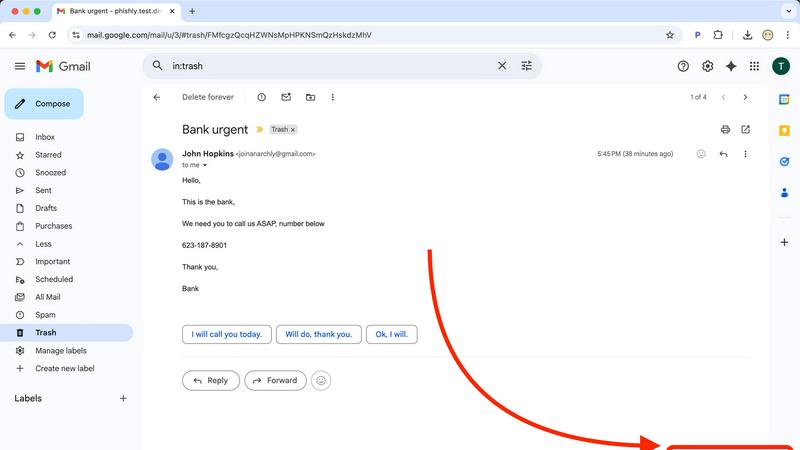
Phishly integrates directly into your daily workflow through a discreet yet powerful Chrome extension for Gmail. Once installed, a "Scan with Phishly" button appears within your email client, allowing you to initiate a comprehensive security analysis of any open email without ever leaving your inbox. This frictionless integration means protection is always just one click away, eliminating the need for cumbersome copy-pasting or switching between applications.
Privacy-First, On-Demand Analysis
Upholding a staunch commitment to user privacy, Phishly operates on a strict on-demand model. The system does not scan, read, or analyze any of your emails automatically or without your explicit consent. You maintain complete control, choosing precisely which messages to investigate. This approach ensures your personal and professional correspondence remains confidential, with analysis performed only when you command it.
Clear, Actionable Risk Assessment Reports
Following each scan, Phishly presents its findings not as cryptic technical alerts, but as clear, color-coded risk assessments: Safe, Medium Risk, or High Risk. Each verdict is accompanied by a detailed breakdown explaining the specific factors that contributed to the score, such as a mismatched sender domain, suspicious hyperlinks, or detected social engineering patterns. This transparency educates the user, building digital literacy with every scan.
Zovo
BeLikeNative
BeLikeNative is a standout extension that empowers users to write like a native speaker with unparalleled ease. This feature provides one-keystroke rewrites in 80 languages, allowing instant corrections and improvements to any text. It's perfect for students, professionals, and anyone looking to enhance their writing skills across multiple languages.
Tab Suspender Pro
Tab Suspender Pro is designed to optimize browser performance by automatically suspending inactive tabs. This smart extension detects unused tabs and suspends them, freeing up valuable memory resources. Users can navigate their browser more efficiently without the burden of excessive memory consumption, ensuring a smoother experience.
JSON Formatter Pro
JSON Formatter Pro is an essential tool for developers and data analysts alike. It enables users to format, validate, and explore JSON data locally, with features such as beautification and minification. Additional capabilities like tree exploration and support for YAML and CSV enhance its versatility, making it a must-have for anyone working with data.
Clipboard History Pro
Clipboard History Pro offers a robust solution for managing copied text, allowing users to store and retrieve up to 10,000 clips effortlessly. With instant search functionality and smart paste options, users can quickly access their clipboard history, ensuring that no information is ever lost. This extension is invaluable for writers, researchers, and anyone who frequently copies and pastes content.
Use Cases
Phishly
For Vigilant Individual Email Users
Everyday email users who receive a mix of personal and promotional correspondence can use Phishly to instantly verify the legitimacy of unexpected messages. Whether it's a too-good-to-be-true offer, an urgent alert from a supposed bank, or a password reset request, a quick scan provides immediate clarity, preventing costly mistakes and identity theft before any harmful link is clicked or information is shared.
For Small Business Teams and Founders
Small businesses are frequent targets of phishing due to often-limited IT resources. Phishly serves as an invaluable first line of defense for founders and their teams, enabling any employee to safely vet emails claiming to be from vendors, clients, or service providers. This empowers the entire organization to prevent business email compromise (BEC) attacks, fraudulent invoice scams, and credential theft that could lead to significant financial loss.
For Remote Workers and Freelancers
Professionals operating outside traditional corporate security infrastructures can leverage Phishly to secure their independent workflows. When communicating with multiple clients and platforms, the tool helps verify project-related instructions, payment notifications, and file-sharing requests, ensuring that a single deceptive email does not compromise their devices, data, or professional reputation.
For Educational and Non-Profit Organizations
Schools, universities, and non-profits handling sensitive data on constrained budgets find immense value in Phishly's free, easy-to-deploy model. It allows staff and volunteers to safely manage communications regarding donations, event registrations, and administrative matters, fostering a culture of security awareness without the need for expensive, complex enterprise software licenses or dedicated IT staff.
Zovo
Enhancing Writing Skills
Users can utilize BeLikeNative to refine their writing, whether composing emails, essays, or social media posts. The ability to receive instant rewrites in various languages allows for greater linguistic confidence and proficiency, catering to a global audience.
Optimizing Browser Performance
With Tab Suspender Pro, users can maintain a clutter-free and efficient browsing experience. Professionals juggling numerous projects can benefit from reduced memory usage, allowing their system to run smoothly while accessing multiple tabs.
Simplifying Data Management
JSON Formatter Pro serves as an indispensable tool for developers working with APIs or data sets. The ability to format and validate JSON data quickly allows for more efficient debugging and data handling, streamlining the development process.
Managing Clipboard Efficiently
Clipboard History Pro is ideal for researchers or writers who often copy and paste large amounts of information. Users can easily retrieve previously copied content, significantly boosting productivity and minimizing the risk of losing valuable text.
Overview
About Phishly
In the intricate digital landscape where sophisticated phishing campaigns masquerade as legitimate correspondence, Phishly emerges as an essential sentinel for your inbox. This AI-powered platform provides discerning individuals and small to medium-sized enterprises with an elegant, yet formidable, defense against deceptive emails. Available as a seamless Chrome extension for Gmail and a versatile web tool, Phishly empowers users to proactively interrogate any suspicious message with a single click or paste. Its advanced artificial intelligence meticulously scans content for a comprehensive array of phishing indicators—from subtly spoofed sender addresses and dubious domain names to psychologically manipulative language and covert social engineering tactics. The platform then delivers a crystal-clear, actionable risk assessment categorized as Safe, Medium Risk, or High Risk, each accompanied by a detailed, intelligible explanation. Championing a philosophy of absolute privacy and user agency, Phishly only analyzes emails explicitly selected for review, ensuring no unauthorized data access. By distilling complex cybersecurity threat detection into an intuitive, instantaneous, and free-to-use tool, Phishly demystifies digital security, offering peace of mind without the burden of enterprise-level complexity or requiring any technical expertise.
About Zovo
Zovo is a remarkable suite of 20 Chrome extensions meticulously crafted by a solo developer with over a decade of experience and an impressive track record of earning more than $400,000 on Upwork, all while maintaining a flawless 100% success rate. This innovative collection is designed for users seeking tools that enhance their browsing experience, safeguard their privacy, and streamline their workflow. With flagship product BeLikeNative, more than 3,300 users can effortlessly write like native speakers in 80 languages, all with a single keystroke. Each extension within the Zovo suite is developed with a privacy-first approach, ensuring that user data remains secure and never leaves their device. Emphasizing community engagement, users have the unique opportunity to vote on features, directly influencing the roadmap of new developments. Monthly releases of new extensions keep the suite fresh and innovative, with many tools also available for free online at zovo.one.
Frequently Asked Questions
Phishly FAQ
How does Phishly protect my privacy?
Phishly is built on a foundational principle of user privacy and consent. Our tool does not automatically scan, access, or read any of your emails. Analysis occurs only when you explicitly initiate it by clicking the "Scan with Phishly" button in Gmail or pasting email text into our web tool. We analyze only the content you submit for that specific scan and do not store personal email data or correspondence.
What kinds of phishing indicators does the AI detect?
Our advanced AI model is trained to detect a wide spectrum of phishing indicators. This includes technical red flags like suspicious sender domains, IP mismatches, and poorly crafted email headers. It also analyzes content for psychological triggers such as urgent or threatening language, spoofed brand logos, requests for sensitive information, and subtle social engineering tactics designed to manipulate the recipient into taking a risky action.
Is technical knowledge required to use Phishly?
Absolutely not. Phishly is designed for simplicity and immediacy. The Chrome extension integrates seamlessly into Gmail with a single, clear button. The web tool requires only that you paste text. The results are presented in plain language with straightforward risk ratings (Safe, Medium Risk, High Risk) and explanatory details, making sophisticated threat intelligence accessible to everyone, regardless of technical background.
What is the cost to use Phishly?
Phishly is currently free to use. Our mission is to make essential phishing detection accessible to individuals, small businesses, and organizations that need it most. You can install the Chrome extension and use the web analysis tool without any subscription fees or usage limits, delivering instant, reliable security insights at no cost.
Zovo FAQ
What makes Zovo different from other Chrome extension developers?
Zovo stands out due to its privacy-first approach, with a commitment to user data security. Unlike corporate solutions, Zovo does not engage in data harvesting or rely on investors. Each extension is developed by a solo developer who values direct user feedback.
How can I request features for Zovo extensions?
Users can submit feature requests directly through the Zovo platform. The developer personally reviews each request, prioritizing the most requested features for future updates, ensuring that the tools evolve in line with user needs.
Is there a community for Zovo users?
Yes, Zovo fosters a vibrant community where users can interact, share suggestions, and participate in discussions. Users are encouraged to join the Discord community for real-time communication and support.
Are there any free tools available from Zovo?
Zovo offers several tools that are accessible for free online at zovo.one. These tools allow users to experience the functionality of Zovo's extensions without installation, making them readily available for casual use.