Refbox vs Supermachine
Side-by-side comparison to help you choose the right product.

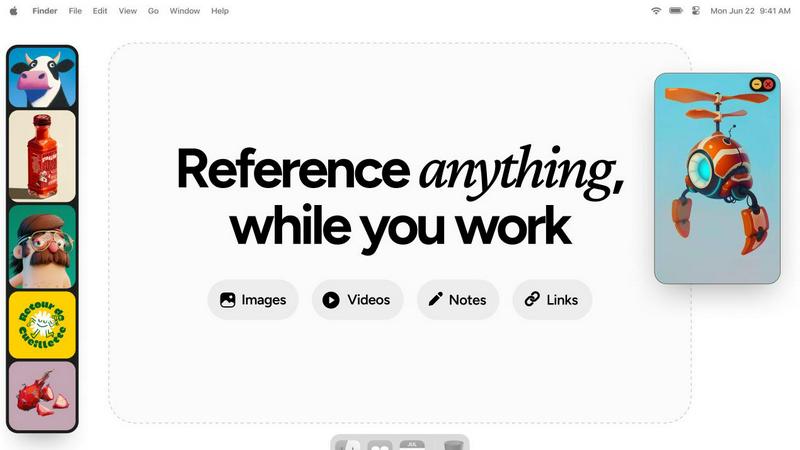
Refbox elevates your workflow by providing instant access to images, videos, and notes, seamlessly floating above your.
Last updated: February 28, 2026

Supermachine
Supermachine empowers creators to swiftly craft breathtaking, commercial-quality AI images and videos using over 60 cutting-edge models.
Last updated: March 18, 2026
Visual Comparison
Refbox
Supermachine

Feature Comparison
Refbox
Floating Frames
Refbox's floating frames allow users to pin images, videos, GIFs, and notes in resizable panels that hover above other applications. This feature ensures that your references are always accessible, enhancing workflow and minimizing distractions.
Masonry Mode Gallery
The Masonry Mode gallery presents your references in an organized, visually appealing format. This layout is ideal for artists and designers, as it provides an infinite canvas where multiple items can be viewed simultaneously, facilitating quick comparisons and easy access.
Instant Media Access
With Refbox, users can instantly access their media without rummaging through folders or tabs. The application allows for easy swapping of floating references using arrow keys, minimizing interruption and promoting a seamless creative flow.
Advanced Note-Taking
Refbox features sophisticated note-taking capabilities, allowing users to create styled text notes and checklists. This enables creatives to jot down ideas or reminders while keeping their references at hand, enhancing organization and focus.
Supermachine
ControlNet
ControlNet is a groundbreaking feature that allows users to dictate precise parameters while generating images. This functionality empowers creators to maintain control over the artistic direction, ensuring the output aligns with their vision and requirements.
Instruction Model
The Instruction Model feature enhances user experience by interpreting simple commands and executing complex tasks efficiently. It streamlines the creative process, allowing creators to focus on their ideas rather than the technicalities of implementation.
Video Generation
With the Video Generation feature, Supermachine elevates the creative possibilities by enabling users to produce high-quality videos effortlessly. This tool is ideal for marketers and content creators looking to capture attention through dynamic visual storytelling.
AI Edit Image (Photoshop AI)
The AI Edit Image feature leverages advanced machine learning algorithms to enhance and modify images with precision. This tool is particularly beneficial for users seeking to refine their visuals, providing professional-grade editing capabilities without needing extensive design expertise.
Use Cases
Refbox
Graphic Design Projects
Graphic designers can utilize Refbox to keep essential reference images and design inspirations readily visible. This constant access allows them to maintain their creative vision without losing momentum during the design process.
Animation Workflow
Animators benefit from Refbox by pinning storyboard references and animation guides, enabling them to work more efficiently. With all resources in one place, they can transition smoothly between different scenes and assets.
UI/UX Development
For UI/UX developers, having immediate access to design mockups, color palettes, and typography references is crucial. Refbox provides a streamlined solution that allows for quick comparisons and design iterations without the hassle of switching apps.
Mood Boarding
Refbox simplifies the mood boarding process for photographers and visual artists by enabling them to pin multiple sources of inspiration together. This feature allows creatives to visualize their ideas cohesively, fostering a more productive brainstorming session.
Supermachine
Social Media Management
Social media managers can leverage Supermachine to generate engaging content that captivates audiences. By quickly producing high-quality images and videos, they are empowered to maintain a consistent posting schedule that drives user engagement.
Marketing Campaigns
Marketers can utilize Supermachine to create striking campaign visuals that resonate with their target audience. The platform's rapid output capabilities allow for agile adjustments to marketing strategies, ensuring that visuals remain fresh and relevant.
Digital Art Exploration
Artists looking to explore digital mediums can use Supermachine as a canvas for their creativity. The diverse array of tools and models fosters experimentation, allowing artists to bring their imaginative concepts to life with ease.
Small Business Advertising
Small business owners can harness the power of Supermachine to design captivating advertisements that attract customers. With the ability to create professional-quality content quickly, businesses can effectively promote their offerings without the need for extensive resources.
Overview
About Refbox
Refbox is the quintessential floating reference application designed for the contemporary creative professional. It addresses a common yet frequently ignored workflow impediment: the disruptive nature of toggling between multiple windows and tabs to access source materials. Tailored for artists, designers, animators, and illustrators, Refbox metamorphoses your desktop into an organized and dynamic canvas for inspiration. With its innovative capability to pin images, videos, GIFs, and notes into resizable, always-on-top frames, Refbox ensures that your references float effortlessly above your primary creative applications. This revolutionary approach guarantees that your inspirations remain perpetually visible, effectively eradicating the distractions associated with alt-tabbing. By fostering an immersive state of flow, Refbox not only simplifies access to visual references but also enhances the creative process. Its comprehensive ecosystem allows for sophisticated organization through features like Masonry Mode galleries, desktop-scattered frames, and full-screen presentations. By unifying visual references, markdown notes, and live media playback into a seamless interface, Refbox becomes an indispensable tool, ensuring that inspiration is merely a glance away and that your focus remains uninterrupted.
About Supermachine
Supermachine is an innovative all-in-one creative studio harnessing the power of artificial intelligence to transform the way creators generate visual content. Catering to individuals across the spectrum of expertise—from novice creators to seasoned professionals—Supermachine simplifies the intricate processes involved in producing high-quality images and videos. Whether you are a social media manager in need of eye-catching daily posts, a marketer crafting compelling visual campaigns, an artist experimenting with digital mediums, or a small business owner designing advertisements, Supermachine equips you with an arsenal of powerful AI tools. Its core value proposition lies in its remarkable speed and simplicity, enabling users to create stunning stock photos, illustrations, thumbnails, NFTs, and short-form videos in under 15 seconds, all without the need for advanced skills in prompt engineering. With a trusted community of over 100,000 creators generating one million images weekly, Supermachine distinguishes itself by offering a curated selection of over 60 high-performing AI models. By selectively integrating models that demonstrate genuine utility, the platform ensures reliability and superior results, allowing you to focus on your creative vision without the distractions of trial and error.
Frequently Asked Questions
Refbox FAQ
What types of media can I pin in Refbox?
Refbox allows users to pin a variety of media types, including images, videos, GIFs, and text notes. This versatility ensures that you can access all your reference materials in one place.
Can I customize the size of the floating frames?
Yes, Refbox offers resizable frames that you can adjust according to your preferences. This feature allows you to create a workspace that fits comfortably alongside your primary creative applications.
Is Refbox suitable for all creative professionals?
Absolutely. Refbox is designed for a wide range of creative professionals, including graphic designers, animators, illustrators, and photographers. Its features cater to the needs of anyone who requires constant access to reference materials.
How does Refbox enhance productivity?
By providing seamless access to references without the need for constant window-switching, Refbox minimizes distractions and allows creatives to maintain their flow. This streamlined approach significantly enhances overall productivity and efficiency.
Supermachine FAQ
How does Supermachine utilize artificial intelligence?
Supermachine employs advanced AI algorithms to generate high-quality images and videos, enabling users to create professional content quickly and efficiently. This technology simplifies the creative process, making it accessible to everyone.
Is Supermachine suitable for beginners?
Absolutely. Supermachine is designed to cater to creators of all skill levels, providing intuitive tools that facilitate content creation without the need for technical expertise. Beginners can easily navigate the platform and produce stunning visuals.
What types of content can I create with Supermachine?
Users can create a diverse range of content with Supermachine, including stock photos, illustrations, thumbnails, NFTs, and short-form videos. This versatility makes it an invaluable tool for various creative endeavors.
Can I customize the output from Supermachine?
Yes, Supermachine offers extensive customization options, allowing users to control aspects like size, style, and resolution of the generated content. This flexibility ensures that the output meets specific project requirements and personal preferences.
Alternatives
Refbox Alternatives
Refbox is an innovative floating reference application designed for creative professionals, enabling them to keep their essential images, videos, and notes visible above their workspace. It addresses a common disruption in workflow, allowing users to maintain an immersive state of focus by eliminating the need to switch between multiple windows and tabs. As users explore their creative potential, they often seek alternatives that may offer different pricing structures, enhanced features, or compatibility with various platforms, thus tailoring the experience to their specific needs. When searching for a suitable alternative, it is imperative to consider several factors, including the versatility of the software, the ease of use in organizing references, and the ability to integrate seamlessly with existing creative tools. Potential users should evaluate how well an alternative can enhance their workflow efficiency and whether it aligns with their unique creative requirements, ensuring that inspiration remains readily accessible.
Supermachine Alternatives
Supermachine is an innovative platform positioned within the realm of design tools, expertly crafted to empower creators in generating exceptional, commercial-ready AI images and videos. With its extensive library of over 60 curated models, Supermachine delivers a seamless experience that caters to the diverse needs of content creators, marketers, artists, and small business owners. Its emphasis on speed and simplicity allows users to produce high-quality visuals in mere seconds, making it a preferred choice among many. However, users often seek alternatives to Supermachine for a variety of reasons, including pricing structures, specific feature sets, or compatibility with particular platforms. As creators evaluate their options, it is essential to consider factors such as ease of use, the richness of available tools, the flexibility of pricing plans, and the quality of output. When selecting an alternative, prioritizing a solution that aligns with your unique creative needs and workflow can significantly enhance your overall experience.