
Decode This Text vs SupaSidebar
Side-by-side comparison to help you choose the right product.

Decode This Text
Decode This Text offers swift, insightful analyses of complex conversations, helping you navigate communication with.
Last updated: February 28, 2026

SupaSidebar
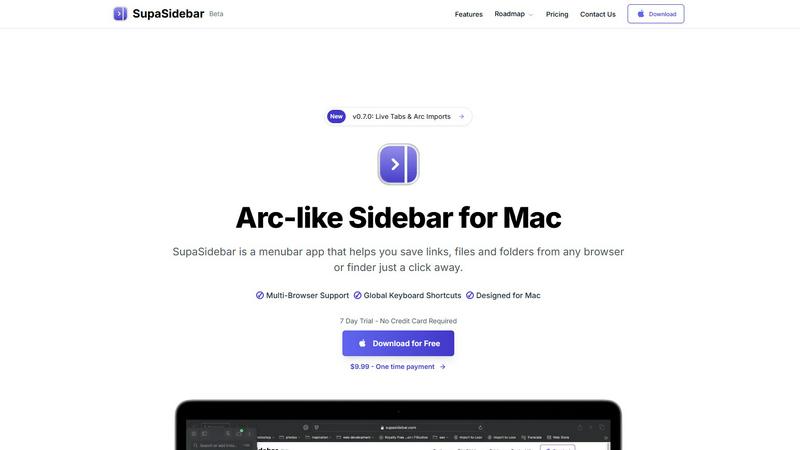
SupaSidebar elegantly organizes your links, files, and folders on Mac, ensuring instant access with effortless.
Last updated: February 28, 2026
Visual Comparison
Decode This Text

SupaSidebar
Feature Comparison
Decode This Text
The Vault
This feature allows users to securely store and revisit past conversations. By keeping a repository of analyzed messages, users can reflect on previous insights and track changes in communication patterns over time, enhancing their understanding of relationships.
Instant Analysis
With just a few clicks, users can paste a conversation or upload a screenshot. The tool processes the input within 30 seconds, providing a detailed breakdown of emotional tones, intentions, and recommended responses, all designed to facilitate effective communication.
Tone Detection
Decode This Text meticulously evaluates the emotional temperature of messages, helping users discern whether the sender is being friendly, sarcastic, or cold. This vital insight prevents misinterpretations, enabling users to respond appropriately to the emotional context of a conversation.
Response Suggestions
Unsure of how to reply? This feature offers three tailored response options—calm, direct, or assertive—allowing users to choose the tone that best fits their communication style and the situation at hand, empowering them to engage with confidence.
SupaSidebar
Instant Access
SupaSidebar provides immediate access to all your essential links, files, and applications with just a click. This feature allows you to save or copy URLs using simple keyboard shortcuts, streamlining your workflow and minimizing time spent on repetitive tasks.
Recents Tracking
With the Recents feature, SupaSidebar automatically tracks every website you have used in the last 48 hours. This function ensures that you can find your work instantly, eliminating the stress of searching through numerous tabs or browsing history.
Pinned Items
SupaSidebar allows you to keep your most important items at your fingertips by pinning them at the top of the list. This feature provides quick access to frequently used resources, ensuring that your favorites are always within easy reach.
Fast Search Functionality
The fast search feature enables users to locate any file, folder, website, or application instantly. By simply pressing CMD CTRL K and entering the desired term, you can navigate your digital workspace without delays, greatly enhancing your overall efficiency.
Use Cases
Decode This Text
Clarifying Ambiguous Messages
For those who often find themselves puzzled by vague texts from friends or colleagues, Decode This Text provides immediate clarity. Users can uncover the true meaning behind ambiguous messages, allowing for more productive and meaningful interactions.
Navigating Professional Communication
In the workplace, deciphering subtle cues can be critical. Decode This Text assists professionals in understanding the implications of brief emails or cryptic messages, ensuring they respond appropriately and maintain positive relationships with colleagues and superiors.
Enhancing Personal Relationships
Decoding the intentions behind a partner's or friend's messages can significantly enhance personal relationships. By providing insights into emotional tones and intentions, the tool helps users navigate sensitive topics and foster deeper connections.
Addressing Family Dynamics
Family communication can often be fraught with misunderstandings. Whether it's a terse message from a sibling or an unclear email from a parent, Decode This Text aids users in interpreting familial messages, leading to improved understanding and resolution of conflicts.
SupaSidebar
For Busy Professionals
Busy professionals can utilize SupaSidebar to manage their crucial links and files efficiently. By organizing their digital assets in one accessible location, they can focus on their primary tasks without the distractions of numerous browser tabs.
For Creative Projects
Creators can benefit from SupaSidebar by storing inspiration links, files, and applications in a dedicated sidebar. This allows for easy access to resources while working on projects, enhancing creativity and workflow continuity.
For Researchers
Researchers can use SupaSidebar to keep track of multiple sources and articles. By saving links and documents in the sidebar, they can quickly reference their materials during writing or analysis, thereby improving their research efficiency.
For Students
Students can streamline their study habits with SupaSidebar by organizing lecture notes, research articles, and useful links. This centralized access fosters better study routines and reduces the time spent searching for materials.
Overview
About Decode This Text
Decode This Text is a groundbreaking digital tool meticulously crafted to unravel the complexities of modern communication. In an era where messages can often be vague, cryptic, or misleading, this innovative platform offers users the ability to gain clarity and insight into the true meaning behind their conversations. Whether you are deciphering an ambiguous email from a superior, a perplexing text from a friend, or an unclear message from a client, Decode This Text serves as your trusted companion in effective communication. By allowing users to paste conversations or describe their context, the tool delivers a nuanced analysis of underlying intentions, emotional tones, and optimal response strategies. Ideal for individuals seeking to refine their communication skills, foster better relationships, and eliminate misunderstandings, Decode This Text features a user-friendly interface and a rapid response time, ensuring that you can engage confidently in your interactions without the burden of second-guessing every word.
About SupaSidebar
SupaSidebar is an elegantly designed, universal sidebar application for macOS, meticulously crafted to elevate your digital workflow and organization. This innovative tool is inspired by the intuitive design of the Arc browser, fundamentally transforming the way you interact with your most essential digital assets, including links, files, folders, and applications. With SupaSidebar, all of these resources are instantly accessible in a sleek, distraction-free panel, designed specifically for professionals, creators, researchers, and anyone who values efficiency. It addresses common frustrations such as tab overload and scattered resources, ensuring your digital workspace remains unified across all major browsers and Finder. With a strong emphasis on privacy, native macOS integration, and seamless operation, SupaSidebar serves as a sophisticated command center for your Mac. It is engineered to help you stay organized, browse faster, and maintain an uninterrupted flow, making it an indispensable tool for anyone seeking to optimize their productivity.
Frequently Asked Questions
Decode This Text FAQ
How does Decode This Text ensure my privacy?
Decode This Text guarantees complete anonymity; no human reads your texts, ensuring that your conversations remain private and secure throughout the analysis process.
What types of messages can I analyze with Decode This Text?
You can analyze any text-based conversation, including messages from friends, family, colleagues, or clients. The tool is designed to handle a wide range of communication scenarios.
How quickly can I expect a response after submitting my message?
The analysis is completed in an impressive 30 seconds, providing you with quick insights and responses to help you navigate your conversations effectively.
Can I upload screenshots of conversations?
Yes, Decode This Text allows users to upload screenshots of their chats. This feature makes it easy to analyze conversations without the need to type them out manually, streamlining the process for users.
SupaSidebar FAQ
Is SupaSidebar a browser extension?
No, SupaSidebar is a standalone menubar application designed specifically for macOS. It works seamlessly across all major browsers and Finder, offering a unified workspace.
Which browsers does SupaSidebar work with?
SupaSidebar supports all major browsers including Safari, Chrome, Firefox, and Arc. This compatibility ensures that you can access your essential resources regardless of your preferred browser.
What macOS version do I need?
To run SupaSidebar, you will need macOS version 13 or higher. This requirement ensures optimal performance and compatibility with the latest features.
Where is my data stored?
SupaSidebar prioritizes user privacy, meaning that no data leaves your Mac. Your links, files, and settings are stored locally, ensuring your information remains secure and private.
Alternatives
Decode This Text Alternatives
Decode This Text is an innovative tool that resides within the realm of productivity and management, specifically designed to assist users in unraveling the complexities of communication. With its ability to provide quick, human-like analyses of ambiguous conversations, it serves as a valuable resource for those seeking clarity in their interactions. As users navigate the often murky waters of text-based communication, they may find themselves in search of alternatives for various reasons, including pricing, feature sets, and compatibility with different platforms. When exploring alternatives to Decode This Text, it is essential to consider several key factors. Users should evaluate the specific features that align with their communication needs, such as emotional tone analysis and response suggestions. Additionally, the user experience, including interface intuitiveness and processing speed, plays a crucial role in selecting an appropriate alternative that ensures seamless interaction and satisfaction.
SupaSidebar Alternatives
SupaSidebar is an elegantly designed universal sidebar application specifically crafted for macOS users seeking to enhance their digital productivity and organization. By offering a seamless way to access links, files, folders, and applications, it addresses the pressing need for streamlined workflows in an increasingly complex digital landscape. Users often find themselves in search of alternatives due to various factors including pricing, specific feature requirements, or compatibility with different operating systems, as well as personal preference for user interface design. When evaluating alternatives to SupaSidebar, it is essential to consider a few key aspects. Look for features that enhance organization and accessibility, such as unified search capabilities, real-time tab management, and user-friendly interfaces. Additionally, compatibility with your preferred browsers and operating systems, as well as pricing structures that align with your budget, should also inform your decision.