
Hush Touch | Voice-to-Text for MacOS vs Sketch To
Side-by-side comparison to help you choose the right product.

Hush Touch | Voice-to-Text for MacOS
Hush Touch offers intelligent offline voice-to-text dictation for Mac, learning your vocabulary and enhancing accuracy.
Last updated: February 26, 2026
Sketch To
Sketch To effortlessly transforms your images into stunning AI-generated sketches with unmatched precision and detail.
Last updated: March 1, 2026
Visual Comparison
Hush Touch | Voice-to-Text for MacOS

Sketch To
Feature Comparison
Hush Touch | Voice-to-Text for MacOS
Dual-Engine Recognition
Hush Touch employs a sophisticated dual-engine recognition system that combines DictationTranscriber for natural flow and punctuation with SFSpeechRecognizer, which enhances custom vocabulary recognition. This integration ensures that users receive highly accurate transcriptions tailored to their unique speaking patterns and terminologies.
Custom Vocabulary
With the ability to store up to 500 custom terms and an auto-learn feature from corrections, Hush Touch is remarkably adept at recognizing specialized jargon, brand names, and medical terms. This feature ensures that users can dictate complex language confidently, knowing that their specific vocabulary will be understood and transcribed accurately.
Smart Text Processing
The smart text processing capabilities of Hush Touch include the removal of filler words and automatic correction of common errors, such as misheard phrases. Additionally, the app can format voice snippets for repeated phrases and create numbered lists, all performed in real time. This functionality enhances the clarity and professionalism of dictated text.
100% On-Device Privacy
Hush Touch stands out for its commitment to user privacy, processing all voice data on the user's Mac without any reliance on cloud services. This approach guarantees that sensitive information remains private and secure, making it an optimal choice for individuals and organizations that prioritize confidentiality.
Sketch To
AI Image to Sketch Conversion
Sketch To features an advanced AI engine that converts photographs into exquisite sketches in various styles, including pencil, charcoal, and watercolor. This capability allows artists and designers to generate stunning visual content from ordinary images, enhancing their creative workflows.
Sketch to Image Transformation
The platform also excels in converting preliminary sketches into photorealistic images with remarkable detail. This feature is particularly beneficial for professionals who require high-quality visuals for client presentations, marketing materials, or portfolio development.
Instant Processing
With its powerful cloud-based infrastructure, Sketch To offers instant processing capabilities, ensuring that users receive their converted images within seconds. This efficiency is crucial for creators who need to meet tight deadlines while maintaining high standards of quality.
High Resolution Output
Users can download their AI-generated sketches and images in high resolution, making them suitable for both digital and print applications. This feature ensures that the final products retain exceptional clarity and detail, meeting the demands of professional quality.
Use Cases
Hush Touch | Voice-to-Text for MacOS
Drafting Emails
Professionals can use Hush Touch to quickly and accurately dictate emails, allowing them to focus on their thoughts without the distractions of typing. This feature streamlines communication, particularly for those who need to send multiple messages throughout the day.
Taking Notes
Students and researchers can leverage Hush Touch to take notes during lectures or meetings, ensuring that they capture every important detail without missing a moment. The app's ability to process information in real time allows for a fluid and engaging note-taking experience.
Writing Content
Content creators can benefit from Hush Touch by using it to generate articles, blogs, or reports. The app's adaptive learning and custom vocabulary features make it perfect for maintaining a consistent tone and style, while also accommodating specific industry terminology.
Medical Documentation
Healthcare professionals can utilize Hush Touch to dictate medical notes and reports efficiently. The app's proficiency in recognizing medical jargon and its ability to learn from corrections make it an invaluable tool in busy clinical environments, where accuracy and speed are paramount.
Sketch To
Social Media Content Creation
Hobbyists and casual users can utilize Sketch To to enhance their social media presence by transforming ordinary photos into captivating sketches. This artistic touch can significantly increase engagement and interest among followers.
Professional Art and Design Projects
Professional artists and designers can leverage Sketch To's capabilities to create stunning visuals for their projects. The ability to generate both sketches and photorealistic images allows for a versatile approach to art and design, catering to diverse client needs.
Educational Purposes
Students and educators can use Sketch To for various educational projects, such as creating illustrative content for presentations or enhancing visual learning materials. The tool's accessibility and ease of use make it an invaluable resource in the academic environment.
Marketing and Branding
Businesses can benefit from Sketch To by using it to create unique marketing collateral that stands out. Transforming images into artistic sketches can help brands convey their message more effectively, capturing the attention of potential customers.
Overview
About Hush Touch | Voice-to-Text for MacOS
Hush Touch is an innovative voice-to-text application designed specifically for macOS users, providing a seamless and efficient dictation experience that prioritizes speed, natural flow, and privacy. Unlike many dictation tools that rely on cloud processing, Hush Touch operates entirely on-device, allowing for offline functionality without sacrificing accuracy. By harnessing the power of two advanced Apple transcription engines combined with an Apple Intelligence final pass, Hush Touch delivers clean and precise text outputs that evolve and improve with each use. With a lightweight footprint of just 5.5 MB, the app integrates effortlessly into daily writing workflows, enabling users to draft emails, messages, and documents hands-free. This product is ideal for professionals and creatives alike, who seek a reliable dictation solution that respects their privacy while enhancing their productivity. The commitment to user control is further exemplified by a one-time purchase of $20 for a lifetime license, eliminating the burden of subscription fees.
About Sketch To
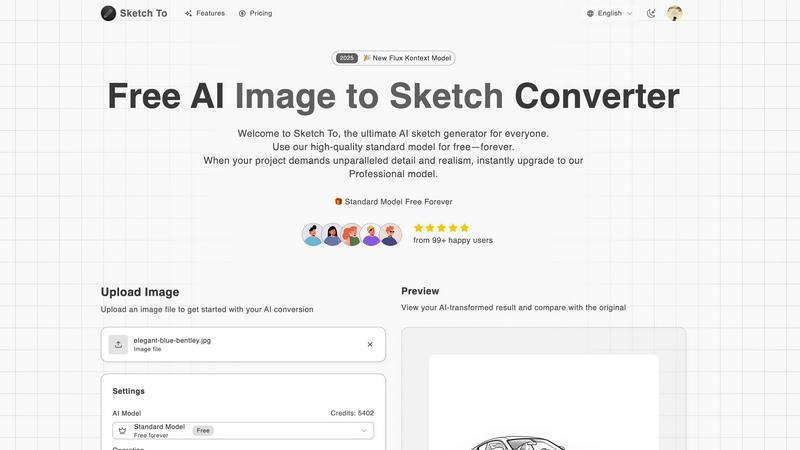
Sketch To is an innovative AI-powered platform designed to seamlessly transform photos into stunning artistic sketches and vice versa. This unique dual-functionality tool caters to a diverse audience, including casual users, hobbyists, and professional artists and designers, enabling them to elevate their creative endeavors. By leveraging advanced AI technology, Sketch To provides a user-friendly experience that prioritizes creativity and artistic expression.
The platform's main value proposition lies in its elegant tiered access model, which offers a high-quality standard model for free, allowing users to explore their artistic potential without financial constraints. For those seeking unparalleled detail and realism in their projects, the option to upgrade to a professional model is readily available. Sketch To combines sophisticated technology with refined simplicity, empowering users to effortlessly bring their visions to life and enrich their creative projects with a touch of artistry.
Frequently Asked Questions
Hush Touch | Voice-to-Text for MacOS FAQ
How does Hush Touch ensure accuracy in transcriptions?
Hush Touch utilizes dual transcription engines that work in tandem to provide enhanced accuracy. The app combines the strengths of DictationTranscriber and SFSpeechRecognizer, followed by an Apple Intelligence final pass, to refine the output text.
Is there a trial available for Hush Touch?
Yes, Hush Touch offers a 7-day free trial that does not require a credit card, allowing potential users to experience its features and capabilities before making a purchase decision.
Can Hush Touch be used offline?
Absolutely. One of the key features of Hush Touch is its on-device processing capability, which means that users can dictate and transcribe text without needing an internet connection.
What is the pricing structure for Hush Touch?
Hush Touch is available for a one-time purchase of $20, offering users a lifetime license without the burden of ongoing subscription fees. This straightforward pricing structure makes it an economical choice for long-term use.
Sketch To FAQ
What types of images can I upload to Sketch To?
Users can upload a variety of image formats, including JPEG, PNG, and GIF. The platform supports files up to a maximum size of 5MB, allowing for flexibility in content creation.
Is there a cost associated with using Sketch To?
Sketch To offers a free standard model for everyday creativity, along with the option to upgrade to a professional model for those requiring enhanced detail and realism. New users receive trial credits to explore the features of the standard model.
How do I upgrade to the Professional Model?
Upgrading to the Professional Model is straightforward. Users can select the professional option during the conversion process, which provides access to advanced features and superior quality for commercial projects.
Can I compare the original image with the converted result?
Yes, Sketch To allows users to preview their AI-transformed results and compare them with the original image. This interactive feature helps users assess the quality of the conversion before downloading their final creation.
Alternatives
Hush Touch | Voice-to-Text for MacOS Alternatives
Hush Touch | Voice-to-Text for MacOS is a sophisticated dictation application designed to provide seamless and private voice-to-text conversion on Apple's operating system. As part of the AI Assistants category, it harnesses the power of on-device processing to ensure user privacy while delivering highly accurate transcriptions. With its lightweight design and ease of use, Hush Touch appeals to a diverse range of users, from professionals drafting emails to students taking notes. Users often seek alternatives to Hush Touch for various reasons, including budget constraints, specific feature requirements, or compatibility with different operating systems. When selecting an alternative, it is essential to consider factors such as transcription accuracy, ease of integration into existing workflows, and the app's ability to function offline. Additionally, features that enhance user experience—like voice command customization and learning capabilities—can significantly impact the overall effectiveness of a voice-to-text solution.
Sketch To Alternatives
Sketch To is a cutting-edge platform that belongs to the realm of AI-assisted creative tools, specializing in the transformation of images into stunning sketches and the enhancement of preliminary drawings into photorealistic visuals. This innovative software enables users to effortlessly merge their artistic visions with advanced technology, making it an appealing choice for both amateur creators and seasoned professionals. However, users often seek alternatives to Sketch To for various reasons, including pricing structures, feature sets, and compatibility with specific workflows or devices. When exploring alternatives, it's essential to consider the range of functionalities offered, the quality of outputs, ease of use, and the flexibility of the platform to cater to your unique creative needs.