Sketch To
Sketch To effortlessly transforms your images into stunning AI-generated sketches with unmatched precision and detail.
Visit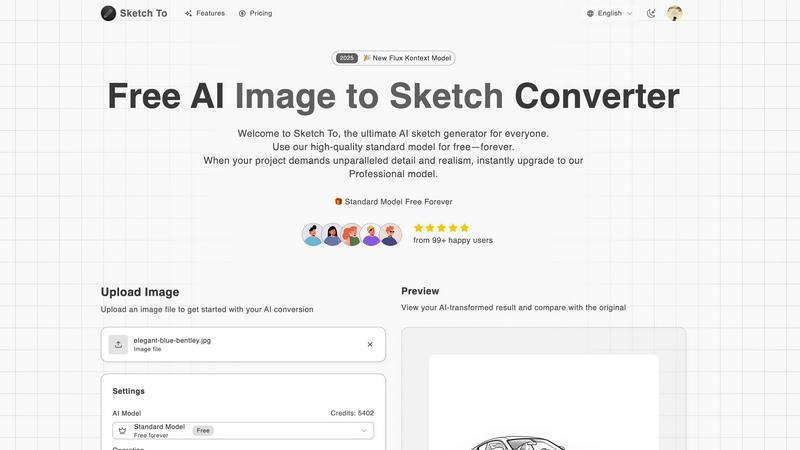
About Sketch To
Sketch To is an innovative AI-powered platform designed to seamlessly transform photos into stunning artistic sketches and vice versa. This unique dual-functionality tool caters to a diverse audience, including casual users, hobbyists, and professional artists and designers, enabling them to elevate their creative endeavors. By leveraging advanced AI technology, Sketch To provides a user-friendly experience that prioritizes creativity and artistic expression.
The platform's main value proposition lies in its elegant tiered access model, which offers a high-quality standard model for free, allowing users to explore their artistic potential without financial constraints. For those seeking unparalleled detail and realism in their projects, the option to upgrade to a professional model is readily available. Sketch To combines sophisticated technology with refined simplicity, empowering users to effortlessly bring their visions to life and enrich their creative projects with a touch of artistry.
Features of Sketch To
AI Image to Sketch Conversion
Sketch To features an advanced AI engine that converts photographs into exquisite sketches in various styles, including pencil, charcoal, and watercolor. This capability allows artists and designers to generate stunning visual content from ordinary images, enhancing their creative workflows.
Sketch to Image Transformation
The platform also excels in converting preliminary sketches into photorealistic images with remarkable detail. This feature is particularly beneficial for professionals who require high-quality visuals for client presentations, marketing materials, or portfolio development.
Instant Processing
With its powerful cloud-based infrastructure, Sketch To offers instant processing capabilities, ensuring that users receive their converted images within seconds. This efficiency is crucial for creators who need to meet tight deadlines while maintaining high standards of quality.
High Resolution Output
Users can download their AI-generated sketches and images in high resolution, making them suitable for both digital and print applications. This feature ensures that the final products retain exceptional clarity and detail, meeting the demands of professional quality.
Use Cases of Sketch To
Social Media Content Creation
Hobbyists and casual users can utilize Sketch To to enhance their social media presence by transforming ordinary photos into captivating sketches. This artistic touch can significantly increase engagement and interest among followers.
Professional Art and Design Projects
Professional artists and designers can leverage Sketch To's capabilities to create stunning visuals for their projects. The ability to generate both sketches and photorealistic images allows for a versatile approach to art and design, catering to diverse client needs.
Educational Purposes
Students and educators can use Sketch To for various educational projects, such as creating illustrative content for presentations or enhancing visual learning materials. The tool's accessibility and ease of use make it an invaluable resource in the academic environment.
Marketing and Branding
Businesses can benefit from Sketch To by using it to create unique marketing collateral that stands out. Transforming images into artistic sketches can help brands convey their message more effectively, capturing the attention of potential customers.
Frequently Asked Questions
What types of images can I upload to Sketch To?
Users can upload a variety of image formats, including JPEG, PNG, and GIF. The platform supports files up to a maximum size of 5MB, allowing for flexibility in content creation.
Is there a cost associated with using Sketch To?
Sketch To offers a free standard model for everyday creativity, along with the option to upgrade to a professional model for those requiring enhanced detail and realism. New users receive trial credits to explore the features of the standard model.
How do I upgrade to the Professional Model?
Upgrading to the Professional Model is straightforward. Users can select the professional option during the conversion process, which provides access to advanced features and superior quality for commercial projects.
Can I compare the original image with the converted result?
Yes, Sketch To allows users to preview their AI-transformed results and compare them with the original image. This interactive feature helps users assess the quality of the conversion before downloading their final creation.
Similar to Sketch To
Speechyou
AI transcription for voice notes, meetings, and audio files in 1,700 languages, with AI summaries and subtitle export and unlimited chat ai usage.
ProspectHalo
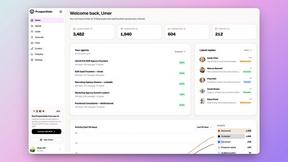
AI sales agent that finds qualified leads, runs outreach, follows up automatically, creates content, and helps book more meetings.
benchmark.directory
AI tools written up by the people who paid for them. Pricing, integrations, data policy and the limit we hit in a week of use.
Explainer Video
AI Explainer Video Generator turning topics, scripts, URLs, or PDFs into clear animated stories.
saasgrow.ai
saasgrow.ai is a curated directory of SaaS growth tools. Every tool is screened before it appears, so the list stays short and the quality stays high.


Built2Win AI Indexing
Custom PHP websites, AI Indexing Pack ($599 one‑time), and WebAgentScan SaaS ($9/mo). MCP, A2A, llms.txt, full ownership.