
Picture Enhancer
Picture Enhancer uses AI to deblur, upscale, and restore your photos instantly in a browser with no software install.
Visit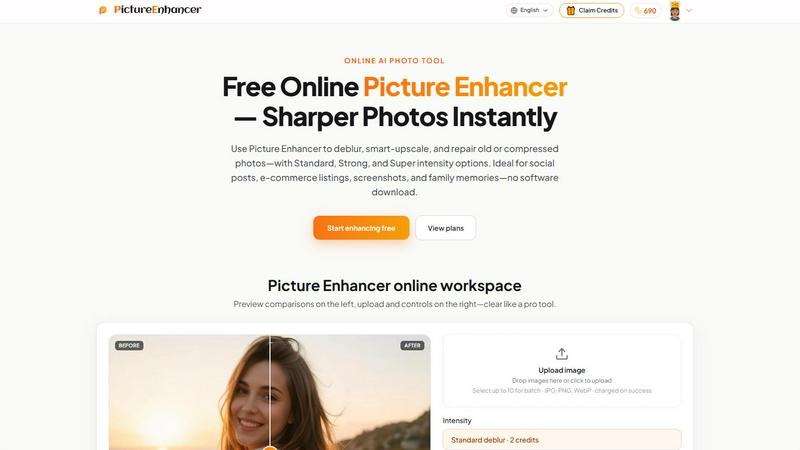
About Picture Enhancer
Picture Enhancer is a sophisticated online AI photo enhancement platform designed to deliver professional grade image refinement without the complexity of traditional desktop software. This tool serves a diverse audience ranging from content creators and e commerce sellers to everyday users who require sharper, clearer images with minimal effort. The platform operates entirely within a web browser, eliminating the need for downloads or installations while providing access to advanced artificial intelligence that can deblur, upscale, and restore photographs with remarkable precision. Users simply upload a JPG, PNG, or WebP image, select their desired enhancement mode, choose an intensity level from Standard, Strong, or Super, and receive a watermark free result in seconds. The value proposition centers on accessibility and quality, offering three complimentary guest tries per IP address with no signup required, then transitioning to a credit based system for authenticated users. Credits are charged only upon successful enhancement, ensuring users pay exclusively for results that meet their expectations. The platform also provides a before and after comparison slider, allowing users to inspect quality improvements before downloading their enhanced images. Picture Enhancer positions itself as an elegant solution for anyone seeking to elevate their visual content, whether for social media posts, e commerce product listings, screenshots, or cherished family photographs, all while maintaining a refined user experience that prioritizes simplicity and effectiveness.
Features of Picture Enhancer
AI Deblur Technology
Picture Enhancer employs sophisticated artificial intelligence algorithms that intelligently rebuild edges and texture details compromised by camera shake, soft focus, and mild motion blur. The technology analyzes each image at a granular level to distinguish between intentional softness and unwanted blur, then applies targeted correction that restores clarity to faces, text, and fine details. Users can select from three distinct intensity tiers, Standard, Strong, and Super, allowing precise control over the restoration process based on the severity of the original image degradation. This feature proves particularly valuable for salvaging photographs that appeared irreparably blurry, transforming them into usable, sharp images suitable for professional applications.
Smart Upscale Capability
The smart upscale feature enables users to enlarge images by 2x or 4x while intelligently adding detail rather than simply stretching pixels. This sophisticated process uses machine learning to predict and generate missing information, resulting in enlargements that maintain visual coherence and sharpness. The technology excels at enhancing small source files for applications such as social media cover images, e commerce hero shots, or preliminary print previews where starting resolution may be inadequate. Unlike traditional interpolation methods that produce soft, pixelated results, Picture Enhancer creates natural looking enlargements that preserve image integrity and visual appeal across various display contexts.
Old Photo and Damage Restoration
Picture Enhancer includes a dedicated restoration mode designed to address the unique challenges of aging and damaged photographs. The AI technology effectively reduces common imperfections including scratches, fading, compression artifacts, and environmental wear that accumulate over time on printed photographs and scanned images. Strong and Super intensity settings provide progressively aggressive restoration capabilities, with Super mode specifically engineered to handle heavily damaged scans of vintage family portraits and historical documents. This feature breathes new life into cherished memories, making them suitable for digital sharing, reprinting, or archival preservation with significantly improved visual quality.
Watermark Free Output and Preview Comparison
Every successful enhancement produced by Picture Enhancer downloads completely free of watermarks, ensuring users receive clean, professional results suitable for immediate publication or printing. The platform enhances this value with an intuitive before and after comparison slider that allows users to inspect quality improvements at full resolution before committing to a download. This interactive preview tool provides granular control over the comparison, enabling users to examine specific areas of the image to verify that enhancement met their expectations. The combination of watermark free downloads and thorough preview capabilities ensures complete user confidence in the final output quality.
Use Cases of Picture Enhancer
Portraits and Everyday Photography Enhancement
Picture Enhancer excels at improving personal photography by reducing mild blur that commonly occurs in casual portraits and everyday snapshots. The AI deblur technology restores clarity to facial features, making eyes, smiles, and clothing details appear sharper and more defined for social media feeds, personal portfolios, or family albums. Users can transform slightly out of focus photographs into presentable images that capture moments with greater fidelity, eliminating the frustration of otherwise perfect memories compromised by camera movement or autofocus issues. This use case appeals to anyone seeking to elevate their personal photography without investing in professional editing software or developing complex technical skills.
E Commerce and Product Photography Optimization
Online sellers and e commerce professionals benefit significantly from Picture Enhancer ability to upscale product detail and reduce compression noise that degrades listing images. The platform enhances product photographs to stand out in competitive marketplaces, ensuring that texture, color, and fine details appear crisp and appealing to potential buyers. Standard strong and super intensity options allow sellers to match enhancement levels to specific product categories, from delicate jewelry requiring subtle refinement to larger items benefiting from more aggressive sharpening. This capability directly impacts conversion rates by presenting merchandise in the most favorable visual light possible.
Screenshot and UI Capture Refinement
Technical writers, support professionals, and documentation specialists use Picture Enhancer to sharpen text edges within screenshots and user interface captures for tutorials, support articles, and archival documentation. The AI technology excels at clarifying small text, button labels, and interface elements that often appear soft or pixelated in screen captures, particularly when compressed for web delivery. This application ensures that instructional materials maintain readability and professional appearance, reducing confusion for readers who rely on clear visual references. The platform ability to process screenshots without introducing artifacts makes it particularly valuable for technical documentation workflows.
Vintage and Family Photo Restoration
Picture Enhancer serves as an accessible solution for preserving family history by repairing damage and degradation in scanned vintage photographs. The restoration mode effectively reduces scratches, fading, and compression artifacts that accumulate over decades, bringing new life to cherished memories that might otherwise deteriorate beyond recovery. Strong and super intensity settings provide the power needed to address heavily damaged prints, while the standard setting handles minor imperfections on relatively well preserved photographs. This use case resonates with individuals seeking to digitize and restore family archives for sharing across generations or printing for display in homes and gatherings.
Frequently Asked Questions
What is Picture Enhancer?
Picture Enhancer is a free online AI powered photo enhancement tool that enables users to deblur, upscale, and restore photographs without downloading software. The platform supports JPG, PNG, and WebP formats and offers three intensity levels, Standard, Strong, and Super, to match enhancement requirements to specific image conditions. It serves creators, sellers, and everyday users seeking sharper, higher quality images for social media, e commerce, documentation, and personal memories.
Can I try Picture Enhancer without signing in?
Yes, guests receive three free lifetime tries per IP address with no signup required. These complimentary attempts allow users to experience the platform capabilities before committing to an account. After exhausting guest tries, users must sign in to continue enhancing images using credits, with new accounts receiving starter credits upon registration.
How does billing work after sign in?
After signing in, users enhance images using credits that are charged only when a result succeeds. Standard intensity requires 2 credits, Strong requires 4 credits, and Super requires 6 credits. Paid subscribers unlock Super intensity tiers and batch enhancement capabilities for up to 10 images simultaneously. Monthly subscription plans grant credits each billing cycle, while permanent credit packs never expire, providing flexibility for different usage patterns.
Which modes does Picture Enhancer support?
Picture Enhancer supports three primary enhancement modes: Deblur, which rebuilds edges and texture from camera shake and soft focus; Upscale, which enlarges images by 2x or 4x while adding detail; and Restore, which reduces scratches, fade, and compression artifacts on damaged photographs. Each mode offers Standard, Strong, and Super intensity tiers, with Super and batch processing available exclusively to paid users.
Will downloads include a watermark?
No, all successful enhancement downloads are completely watermark free. Users receive clean, professional quality images suitable for immediate publication, printing, or further editing without any branding or attribution marks. The platform ensures that users own and control their enhanced outputs entirely.
What is the difference between subscription and permanent credit packs?
Monthly subscription plans provide credits that refresh each billing cycle, making them ideal for regular users who enhance images consistently. Permanent credit packs offer credits that never expire, providing long term value for users who enhance images periodically or prefer to purchase credits in advance without ongoing commitments. Both options unlock Super intensity tiers and batch enhancement capabilities.
Are my photos safe?
Picture Enhancer processes images privately and securely, using uploaded photos exclusively to complete enhancement requests. The platform does not share or store images beyond what is necessary for processing and account management. Users concerned about privacy can review the privacy policy for detailed information about data handling practices.
Where do I check balance and history?
Signed in users can access their credit balance and enhancement history through the My Assets section of the platform. This dashboard provides transparency regarding available credits, past enhancements, and usage patterns, enabling users to manage their account effectively and plan future enhancements accordingly.
Pricing of Picture Enhancer
Picture Enhancer offers a flexible pricing structure designed to accommodate various usage levels. Guests receive three free lifetime tries per IP address without requiring signup or payment. Signed in users enhance images using credits, with new accounts receiving starter credits upon registration. Credit costs are based on intensity tier: Standard enhancement requires 2 credits, Strong requires 4 credits, and Super requires 6 credits. Credits are charged exclusively on successful enhancements, ensuring users pay only for results that meet their expectations. Paid subscribers unlock access to Super intensity tiers and batch enhancement capabilities, allowing simultaneous processing of up to 10 images. Monthly subscription plans provide credits that refresh each billing cycle, while permanent credit packs offer credits that never expire, providing flexibility for users with varying enhancement frequencies and long term needs.
Explore more in this category:
Similar to Picture Enhancer

ImageGenerator
Create and edit AI images online with multiple models, text-to-image, image-to-image, background removal, and upscaling.
ideogram-45
AI image generation and editing with sharp typography, native 2K output, and localized edits that preserve the rest of your image.

ImageGPT
ImageGPT is an all-in-one AI creative platform for generating, editing and transforming images and videos using AI.

AI Album Cover Maker
Create release-ready album covers from a prompt or photo. Generate, refine, and export art for singles, EPs, mixtapes, and playlists.

Free Gemini Omni
Create, remix, and edit cinematic AI videos online with Free Gemini Omni using text, image, audio, and video prompts.

Sprite Sheet Maker
Create pixel-art sprite sheets from text with AI, preview animations, and export PNG assets for game prototypes.

Flux Lora
Explore Flux LoRA online workflows and the roadmap for models, generation, and training

Qwen Image Edit
Edit and generate visuals online with Qwen Image Edit using natural-language prompts for backgrounds, text, product images, posters, outpainting, and