
EditTextImage
EditTextImage lets you replace text in any image online, keeping the original font, color, and perspective perfectly intact.
Visit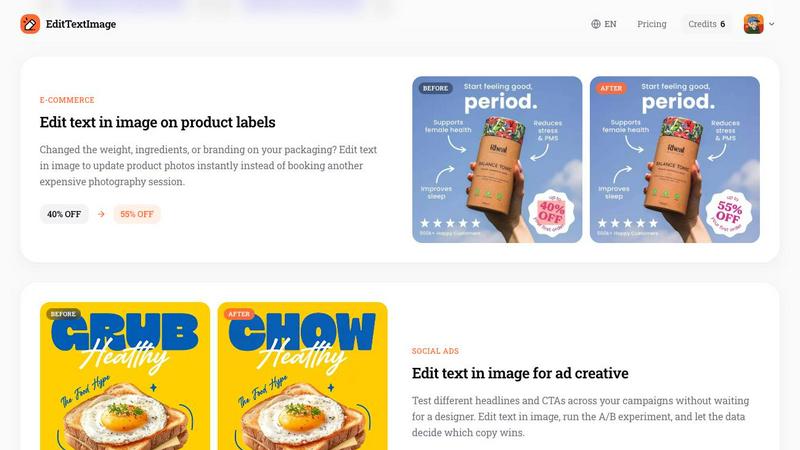
About EditTextImage
EditTextImage is a sophisticated AI powered online tool that redefines how professionals and creators edit text within image files. It eliminates the need for complex software like Photoshop, expensive font libraries, or recurring subscription fees. The core innovation lies in its ability to sample typography directly from the pixels of an uploaded image, allowing users to replace text while preserving the original font, color, size, perspective, drop shadow, and background with pixel perfect accuracy. Whether you are a marketer updating a headline on a finished poster, a developer localizing app screenshots for international markets, or a business owner fixing a typo on a product label, EditTextImage delivers results in approximately ten seconds at a stunning 2K resolution. The tool is designed for anyone who has ever needed to change a single word on a finished design but lost the source file. It supports common image formats including PNG, JPEG, and WebP up to 10 MB. With a generous free credit to start and a simple one time payment model for additional edits, EditTextImage positions itself as the fastest, most elegant solution for seamless text replacement in images, all while maintaining the highest ethical standards for acceptable use.
Features of EditTextImage
AI Powered Typography Sampling
The core technology behind EditTextImage is its advanced AI that analyzes the pixels surrounding the text you wish to replace. It intelligently identifies the typeface, weight, color, and even intricate details like drop shadows, gradients, and perspective distortions. This means you can edit text in images that use paid fonts or custom hand lettering without ever needing to install those fonts on your system. The AI samples the typography directly from the visual data, ensuring the replacement text matches the original with stunning fidelity.
Pixel Perfect Preservation
Unlike generic image editors that often smear backgrounds, reset fonts, or warp perspective when text is altered, EditTextImage ensures every pixel around the edited text remains exactly where it should be. The tool meticulously reconstructs the background behind the original text and seamlessly blends the new text into the image. This results in an output that is virtually indistinguishable from the original, maintaining the integrity of the design layout, lighting, and overall aesthetic.
Blazing Fast Processing
Time is a premium commodity, and EditTextImage respects that by delivering edits in approximately ten seconds on average. The entire workflow is streamlined into three simple steps: upload your image, type the original text and its replacement, and generate the result. There is no waiting for complex rendering or manual adjustments. This speed makes it ideal for rapid iteration in A/B testing campaigns, last minute corrections for print deadlines, or quick localization tasks for multiple languages.
No Subscription, One Time Credits
EditTextImage operates on a refreshingly simple and fair pricing model. There are no monthly subscriptions or hidden fees. Every new user receives one free credit to edit text in an image without needing to provide a credit card. After that, you purchase a pack of 30 edits for a one time payment of $9.90. These credits never expire, and they include commercial use rights, making the tool accessible for freelancers, small businesses, and large enterprises alike.
Use Cases of EditTextImage
Document Corrections and Updates
Professionals frequently encounter situations where a scanned document or a screenshot of a contract contains a typo, an incorrect date, or a wrong invoice number, and the original editable file is lost. EditTextImage allows you to upload that image and replace the erroneous text with the correct information instantly. The tool preserves the document's formal appearance, ensuring the edited version looks authentic and professional without raising any red flags about tampering.
Poster and Flyer Modifications
Event planners and marketing teams often finalize posters and flyers only to have last minute changes such as a speaker cancellation, a venue change, or a date shift. Instead of tracking down the original design file and waiting for a graphic designer, EditTextImage enables you to edit the text directly on the finished image. This capability saves hours of work and hundreds of dollars in redesign costs, allowing you to reuse beautiful materials season after season with simple text updates.
App Screenshot Localization
For app developers and product managers, creating screenshots for multiple app stores in different languages is a significant challenge. Rebuilding UI mockups for each language is tedious and expensive. EditTextImage solves this by letting you edit text in image files of your existing screenshots. You can quickly swap out English text for French, German, Japanese, or any other language, and the AI will perfectly match the original UI font and style, delivering pixel perfect localized assets in seconds.
E Commerce Product Photography
E commerce businesses frequently update product labels with new weights, ingredient lists, promotional offers, or branding changes. Booking a new photography session for every minor update is impractical. EditTextImage allows you to edit text in image files of your existing product photos. You can change a price from 40% off to 55% off, update a product name, or alter a batch number directly on the photograph, ensuring your online listings are always accurate and up to date without additional photography costs.
Frequently Asked Questions
What image formats does EditTextImage support?
EditTextImage accepts PNG, JPEG, and WebP file formats. The maximum file size allowed for upload is 10 MB. These formats cover the vast majority of use cases including screenshots, photographs, scanned documents, and web graphics. If your image is in a different format, you can easily convert it to one of these supported types using standard image conversion tools before uploading.
How does the AI preserve the original font if I don't have it installed?
The AI does not require the font file to be installed on your computer. Instead, it analyzes the pixel data of the text in the uploaded image. It examines the shape of each character, the spacing, the thickness of strokes, and the overall style. It then uses this analysis to generate replacement text that visually matches the original typeface, including any unique characteristics of hand lettering or decorative fonts.
Is there a limit on how many times I can use the free credit?
Every new user receives one free credit to edit text in an image. This credit is provided without requiring a credit card. You can use this single credit to test the tool on any image you choose. After the free credit is used, you can purchase a pack of 30 edits for a one time payment of $9.90. There is no limit on the number of packs you can buy, and the credits never expire.
Can I use EditTextImage for commercial projects?
Yes, commercial use is included with all credits. Whether you are editing text for a client's marketing materials, updating product labels for your online store, or localizing screenshots for a commercial app, you are fully licensed to use the edited images for any commercial purpose. There are no additional fees or royalties required beyond the initial cost of the credits.
Similar to EditTextImage
Free Gemini Omni
Create, remix, and edit cinematic AI videos online with Free Gemini Omni using text, image, audio, and video prompts.
Sprite Sheet Maker
Create pixel-art sprite sheets from text with AI, preview animations, and export PNG assets for game prototypes.

Flux Lora
Explore Flux LoRA online workflows and the roadmap for models, generation, and training

Qwen Image Edit
Edit and generate visuals online with Qwen Image Edit using natural-language prompts for backgrounds, text, product images, posters, outpainting, and

Ideogram Studio
Ideogram 4 AI workflows for creating text-rich images, logos, posters, ads, and packaging.
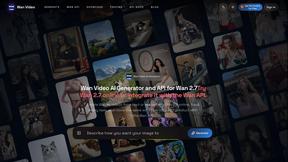
Wan Video
Create videos from text, images, references, or clips with Wan 2.7 workflows, task history, cost estimates, and API access.
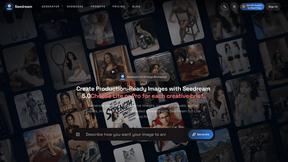
Seedream 5.0
Seedream 5.0 Pro and Lite for production-ready AI image generation and editing.