
ProspectBuddy
ProspectBuddy simplifies manual lead capture from LinkedIn to your CRM, ensuring compliance and efficiency with just one click.
Visit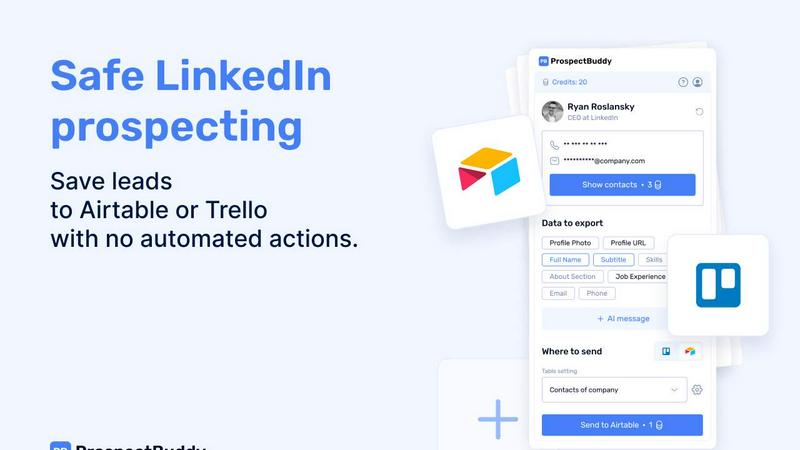
About ProspectBuddy
ProspectBuddy is an avant-garde LinkedIn prospecting tool meticulously crafted to integrate seamlessly with Airtable and Trello workflows. It is tailored for sales teams, recruiters, founders, and operators, aiming to transform the way they manage leads by facilitating the saving of LinkedIn profiles with a mere click. This innovation eradicates the tedious and error-prone practice of manual copy-pasting, converting LinkedIn profiles into structured records that can be utilized efficiently. Unlike conventional automation tools that execute actions on behalf of users, ProspectBuddy prioritizes manual prospecting, ensuring that users retain complete control over their outreach processes. This focus on user autonomy makes it a safer and more compliant choice for those aiming to enhance their LinkedIn activities. Featuring capabilities such as verified email and phone number discovery, personalized AI-generated outreach messages, and selective data capture of essential profile fields, ProspectBuddy not only streamlines the prospecting workflow but also maintains an organized and consistent approach to lead management.
Features of ProspectBuddy
One-Click Profile Saving
ProspectBuddy allows users to save LinkedIn profiles directly to Airtable or Trello with just one click. This feature eliminates the need for cumbersome manual entry, ensuring that lead data is captured quickly and efficiently.
Manual Prospecting Focus
Designed with compliance in mind, ProspectBuddy emphasizes manual prospecting. Users engage directly with LinkedIn profiles without the interference of automation or bots, preserving the integrity of their outreach efforts.
AI-Powered Outreach Messages
Harness the power of artificial intelligence to generate personalized outreach messages based on LinkedIn profile data. This feature enables users to craft tailored communications that resonate with prospects, enhancing engagement rates.
Selective Data Capture
Users can choose specific LinkedIn fields to capture and send to their Airtable or Trello databases. This selective approach ensures that only pertinent information is stored, keeping data organized and relevant for future outreach.
Use Cases of ProspectBuddy
Efficient Lead Management for Sales Teams
Sales teams can utilize ProspectBuddy to streamline their lead management processes. By capturing LinkedIn profiles and integrating them with Airtable or Trello, they can maintain a structured and organized pipeline, allowing for more effective follow-ups.
Recruiting Made Simple
Recruiters can benefit from ProspectBuddy by simplifying the candidate sourcing process. With one-click data capture from LinkedIn, candidates can be added as structured cards in Trello, enabling a smoother hiring workflow and better candidate tracking.
Enhanced Networking for Founders
Founders looking to expand their network can use ProspectBuddy to efficiently save and manage potential contacts from LinkedIn. The ability to generate personalized outreach messages helps in establishing meaningful connections with industry peers.
Targeted Outreach for Marketers
Marketers can leverage ProspectBuddy to identify and connect with potential clients or partners. By using the AI-generated messages tailored to specific LinkedIn profiles, they can enhance their outreach campaigns and drive better results.
Frequently Asked Questions
How do I connect Airtable?
Connecting Airtable is simple. Click "Airtable" on the Connect screen or in your Profile, select the bases/workspaces you want to give access to, and click "Grant access." You can disconnect anytime.
How do I send LinkedIn data to Airtable?
To send data, first create a setting in the Settings menu. Choose your Airtable base and table, map LinkedIn fields to Airtable fields, and save the setting. Then, open a LinkedIn profile, parse it, select the fields, and click "Send to Airtable."
Is ProspectBuddy safe to use with LinkedIn?
Yes, ProspectBuddy is designed for safe, manual LinkedIn prospecting. It does not perform automated actions, allowing you to maintain control over your outreach while ensuring compliance with LinkedIn's policies.
Why don’t I see some Airtable fields?
Only compatible field types are supported in Airtable. If a certain field type is incompatible, it will not appear in the dropdown options during data mapping, ensuring a smooth integration experience.
Similar to ProspectBuddy
CleanSmart
CleanSmart removes duplicates, fixes formatting, fills gaps, and flags anomalies in one automated pass. No code. No data engineers.
LaunchBert
LaunchBert saves you hours launching to directories - with a curated roadmap, one-click badge integration, and a form auto-fill Chrome extension.

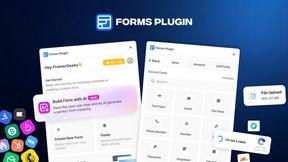
Forms Plugin
The #1 Native Form Builder Plugin for Framer - No Code, No Embeds, No External Platforms.


ContextBolt SEO
Research keywords, competitors, backlinks and AI visibility inside Claude or Codex, with findings saved to your SEO dashboard.
