RoomCreator
RoomCreator instantly transforms your uploaded photos into stunning, professional interior designs with no expertise required.
Visit
About RoomCreator
RoomCreator represents the pinnacle of accessible, intelligent design technology, transforming the way we envision and realize our living spaces. It is an all-in-one AI-powered platform that empowers homeowners, real estate professionals, and design enthusiasts to visualize stunning interior and exterior transformations with unprecedented speed and realism. By simply uploading a photograph—whether of a cluttered room, an empty space, or even a rough sketch—users can generate hyper-realistic redesigns in mere seconds. The platform intelligently applies sophisticated style themes, suggests smart layout alterations, and renders changes to furniture, colors, and materials with photorealistic accuracy, including natural lighting and 3D depth. This eliminates the guesswork, expensive consultants, and lengthy design cycles traditionally associated with renovation. RoomCreator is not merely a tool; it is a visionary partner for confident design decision-making, enabling anyone to explore the full potential of their space before committing a single resource to physical change.
Features of RoomCreator
Instant AI-Powered Redesign
Upload a single photo of any room and witness a comprehensive transformation in just ten seconds. The AI analyzes your space and generates multiple, professionally curated design options across various aesthetics—from minimalist Scandinavian to eclectic Bohemian. It realistically applies new furniture arrangements, color palettes, flooring, and decor, providing a complete visual makeover that respects the dimensions and architecture of your original space.
Precision Brush Editing Tool
Move beyond full regenerations with targeted, granular control. This advanced feature allows you to brush over specific areas within an image—such as a piece of furniture, a wall, or decor—to remove or replace it seamlessly. The surrounding environment remains perfectly intact, enabling meticulous edits and customizations without the need to start the design process from scratch, offering a level of precision typically reserved for professional software.
Photorealistic Exterior Visualizer
Test the curb appeal of your home with confidence. Using a photo of your home's exterior, the AI can visualize new paint colors, siding materials, roofing styles, and landscaping elements. This tool is indispensable for planning renovations, selecting the perfect hue for repainting, or enhancing real estate listings with compelling, market-ready visuals that showcase a property's potential.
Empty Room & Sketch-to-Design Conversion
Unlock the foundational potential of any space. The 'Empty Room' feature intelligently removes all furniture and clutter from a photo, leaving a clean canvas of walls, floors, and windows. Conversely, the sketch renderer transforms hand-drawn layouts and conceptual sketches into fully realized, photorealistic interior images, bridging the gap between initial inspiration and tangible visual reality.
Use Cases of RoomCreator
Homeowner Renovation Planning
For individuals contemplating a redecorating project or full renovation, RoomCreator serves as an essential visualization lab. It allows homeowners to experiment with bold new styles, furniture layouts, and color schemes risk-free. By seeing hyper-realistic "after" images of their own spaces, they can make confident, unified design decisions, avoid costly mistakes, and align vision with all stakeholders before any physical work begins.
Real Estate Listing Enhancement
Real estate agents can dramatically increase a property's market appeal by transforming listing photos. Outdated interiors can be restyled with modern furniture and fresh paint, while empty rooms can be virtually staged with appealing decor. This creates emotionally engaging, magazine-quality visuals that attract more potential buyers and can help properties sell faster and at a better value.
Interior Design Concept Development
Design professionals and DIY enthusiasts can use RoomCreator as a dynamic brainstorming and client presentation tool. It accelerates the concept phase by quickly generating multiple style iterations from a single base image. This facilitates clearer communication of ideas, streamlines the approval process, and provides clients with a tangible preview of proposed designs, elevating the professional service offering.
Investment Property Analysis
Real estate investors and flippers can utilize the platform to evaluate and showcase a property's renovation potential. By visualizing different upgrade scenarios—from cosmetic updates to layout changes—they can accurately assess cost-to-value ratios, plan projects more effectively, and create compelling "future state" visuals for presentations to partners, contractors, or potential buyers.
Frequently Asked Questions
How accurate and realistic are the AI-generated redesigns?
RoomCreator utilizes advanced generative AI models trained on vast datasets of interior and exterior design. The results are highly realistic, incorporating proper lighting, shadows, textures, and spatial coherence that match your original photo's perspective. While the output is photorealistic and intended for accurate visualization, it is a AI-generated interpretation meant to inspire and guide your design decisions.
What kind of photos work best with RoomCreator?
For optimal results, use clear, well-lit photos taken from a corner of the room to show two walls, similar to a standard real estate listing photo. While the AI is robust and can work with messier or pixelated images, a clear starting photo yields the most coherent and detailed transformations. Photos of exteriors should have a clear, frontal view of the property.
Is there a free trial available?
Yes, RoomCreator offers a generous free trial that provides users with credits to experience the core features without requiring a credit card. This allows you to upload photos, generate several redesigns, and explore the platform's capabilities to ensure it meets your needs before selecting a paid plan.
Can I use RoomCreator for commercial purposes, like my design business?
Absolutely. RoomCreator's premium plans are designed to support commercial use. Real estate agents, interior designers, stagers, and investors can use the generated visuals in client presentations, marketing materials, and property listings. It is a powerful tool to enhance professional services and deliverables.
Similar to RoomCreator


Egmatic
No-code 2D game editor: visual node logic, drag-and-drop scenes, live preview. Exports to Windows, macOS, Linux, Android, iOS, Web.

Hishab
Hishab is business software for Bangladeshi shops and SMEs — POS billing, inventory, customer due, accounting, and reports in one system.

Tally Counter
Online tally counter for tracking attendance, workouts, inventory, visitors, sports scores, habits, and everyday counting tasks.

SnitchFeed
SnitchFeed is an agentic social listening tool that surfaces high-intent conversations on LinkedIn, X, Hackernews, and more for GTM and product teams.

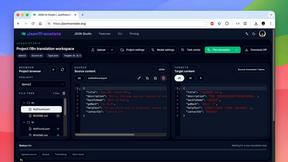
JsonTranslate
Translate JSON, Markdown, and TXT files while preserving keys, nested paths, and project structure.