ButterKit
ButterKit is a sophisticated design tool that streamlines the creation of stunning, localized App Store screenshots to elevate your app's global.
Visit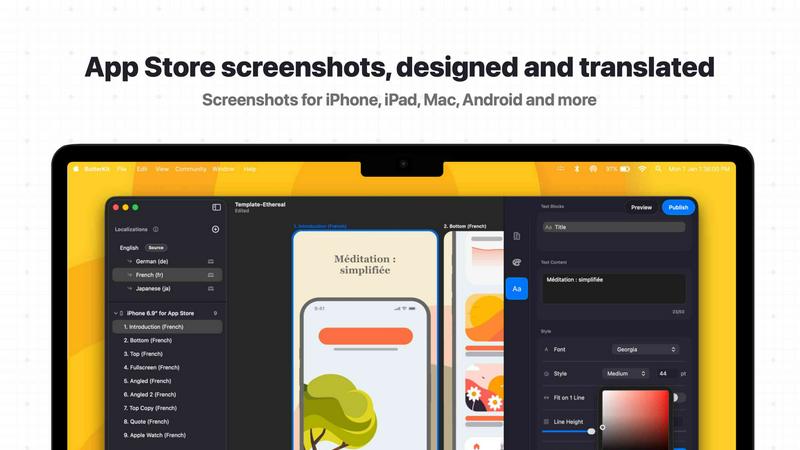
About ButterKit
ButterKit is a sophisticated native macOS application crafted exclusively for Apple developers who demand efficiency and elegance in their App Store publishing workflow. This powerful tool addresses one of the most labor-intensive aspects of app marketing: the creation, localization, and deployment of polished App Store screenshots and metadata. Designed by a solo developer who understands the nuances of the Apple ecosystem, ButterKit transforms a traditionally tedious process into a seamless, automated experience. The application enables users to capture screenshots directly from the Xcode Simulator, place them into photorealistic 3D device frames, and design stunning visual narratives that drive conversion. Beyond mere aesthetics, ButterKit incorporates advanced AI models to translate app metadata into all 50 App Store Connect languages, eliminating the friction of manual localization. Its deep integration with the App Store Connect API allows for one-click uploads of both screenshots and metadata, while folder linking capabilities make it a natural fit for modern CI/CD pipelines and Fastlane workflows. Whether you are an indie developer, a design studio, or a marketing agency managing multiple applications, ButterKit provides a unified platform to create, translate, and publish App Store assets with unprecedented speed and consistency. The result is a product that not only saves hours of repetitive work but also elevates the quality of your App Store presence, helping you reach more users across the globe with a polished, professional presentation.
Features of ButterKit
Intelligent Screenshot Capture and Integration
ButterKit offers a sophisticated capture tool that integrates directly with Xcode and the Simulator, allowing developers to take screenshots without leaving their development environment. Unlike web-based alternatives, this native integration eliminates the need for manual file transfers and enables rapid iteration. Users can also drag and drop PNG or JPG images directly onto 3D device frames, or link entire folders of pre-generated screenshots from automated workflows like Fastlane or Xcode UI tests. This flexibility ensures that regardless of your current workflow, ButterKit adapts to your process and accelerates it.
Photorealistic 3D Device Rendering Engine
At the heart of ButterKit lies a powerful 3D rendering engine built on Apple's Metal framework, capable of delivering up to 120 frames per second for a fluid editing experience. Users can place their screenshots into high-resolution, photorealistic 3D device frames that are fully adjustable. The engine allows for seamless spanning of devices across multiple artboards, creation of panoramic backgrounds, and precise control over fonts, gradients, and background elements. This level of detail ensures that every screenshot tells a compelling story and meets the highest visual standards expected by App Store users.
Professional Design Templates and Marketplace
ButterKit comes bundled with a curated collection of high-quality, professionally designed templates that can be applied with a single click. For those seeking even more variety, the application provides access to a growing community marketplace of templates and add-ons. This ecosystem allows users to start from a proven design foundation or build entirely custom layouts from scratch. The combination of ready-made templates and powerful editing tools means that both novice designers and seasoned professionals can achieve exceptional results without investing excessive time in design iteration.
AI-Powered Translation and One-Click Publishing
ButterKit leverages advanced AI models to translate both screenshots and app metadata into all 50 App Store Connect localizations in seconds, while maintaining design consistency across languages. The translation feature ensures that your visual narrative remains intact regardless of the target market. Once your assets are ready, the application integrates directly with the App Store Connect API, enabling batch export of images or direct upload of designs in the correct order. An integrated preview function allows you to see how your app's story will appear on every device and in every language before publishing, eliminating costly mistakes.
Use Cases of ButterKit
Indie Developer App Launches
Solo developers managing their own applications can dramatically reduce the time spent on App Store preparation. ButterKit allows them to capture screenshots directly from Xcode, apply professional templates, translate metadata into multiple languages, and upload everything to App Store Connect in a single streamlined workflow. This efficiency enables indie developers to focus more on product development and less on the administrative overhead of publishing.
Design Studio Client Deliverables
Design agencies and studios managing multiple client applications benefit from ButterKit's folder linking and batch processing capabilities. They can create consistent, branded templates for each client, generate screenshots for all required devices and languages, and maintain a standardized quality across projects. The ability to preview the final App Store presentation before publishing ensures that client approvals are faster and revisions are minimized.
Marketing Agency Global Campaigns
Marketing agencies handling international app campaigns require seamless localization workflows. ButterKit's AI-powered translation engine handles all 50 App Store languages while preserving design integrity, allowing agencies to launch coordinated campaigns across multiple markets simultaneously. The one-click upload feature eliminates the risk of manual errors when managing dozens of language variants for a single application.
Continuous Integration and Automation Pipelines
Development teams using CI/CD pipelines or Fastlane workflows can integrate ButterKit directly into their automated processes. By linking folders of screenshots generated through automated UI tests, the application can automatically apply device frames, translate metadata, and publish updates without human intervention. This integration ensures that every build submitted to the App Store has polished, up-to-date marketing assets.
Frequently Asked Questions
How does ButterKit capture screenshots from the Xcode Simulator?
ButterKit integrates directly with Xcode and the iOS Simulator through a native macOS connection. When you initiate a capture, the application communicates with the Simulator to take a high-resolution screenshot of your app's current state. This screenshot is then automatically imported into ButterKit's workspace, where it can be immediately placed onto a 3D device frame. This direct integration eliminates the need for manual screenshot saving and file importing, significantly speeding up the iterative design process.
Can ButterKit handle screenshots generated by Fastlane or Xcode UI tests?
Yes, ButterKit is designed to work seamlessly with automated screenshot generation tools. You can link an entire folder of images produced by Fastlane, Xcode UI tests, or any other automated process. The application will automatically detect and import all screenshots, applying your chosen device frames and design templates. This folder linking capability makes ButterKit an ideal component in CI/CD pipelines, where screenshots are generated automatically as part of the build process.
What languages does the AI translation feature support?
ButterKit's AI translation engine supports all 50 App Store Connect localizations, covering every language and regional variant available on the App Store. This includes major languages like English, Chinese, Spanish, and Arabic, as well as less common localizations. The translation applies to both text within screenshots and app metadata, ensuring that your entire App Store presentation is linguistically accurate and culturally appropriate for each target market.
Is ButterKit compatible with Apple Silicon and Intel Macs?
ButterKit is a native macOS application built using Apple's latest frameworks, including Metal for 3D rendering. It is fully compatible with both Apple Silicon (M1, M2, M3 series) and Intel-based Macs running macOS 12 Monterey or later. The application is optimized to take advantage of the performance benefits of Apple Silicon, delivering smooth 120fps editing experiences on supported hardware. A free trial is available for download, allowing you to verify compatibility with your specific system configuration.
Similar to ButterKit

laya.tools
A free directory of 950+ projects built on Laya, the open-source decision model. Updated daily.
Forms Plugin
The #1 Native Form Builder Plugin for Framer - No Code, No Embeds, No External Platforms.
JsonTranslate
Translate JSON, Markdown, and TXT files while preserving keys, nested paths, and project structure.

Flux Lora
Explore Flux LoRA online workflows and the roadmap for models, generation, and training