
HypeShare
HypeShare is a secure, no-signup file transfer platform offering end-to-end encryption and up to 10GB free for fast, controlled sharing.
Visit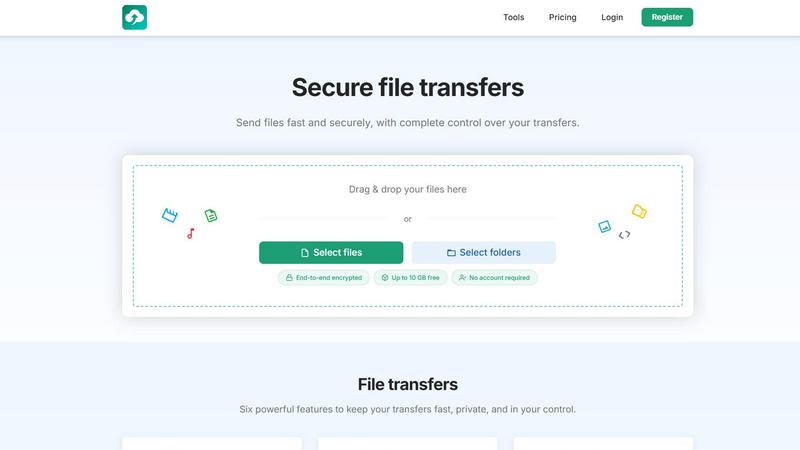
About HypeShare
HypeShare is a sophisticated file transfer platform meticulously engineered for those who demand both velocity and confidentiality in their digital exchanges. In an era where data moves at the speed of commerce, HypeShare offers a refreshingly elegant alternative to the cumbersome, bloated file-sharing tools that dominate the market. At its core, the platform enables users to send files up to 10 gigabytes without the friction of creating an account, while those who register for a complimentary account receive 20 gigabytes of secure cloud storage. Every transfer is fortified with end-to-end encryption, ensuring that your sensitive documents, creative assets, and proprietary information remain visible only to you and your intended recipient. The platform is designed for freelancers, creative agencies, and professional teams who require a seamless, no-friction experience. Beyond simple transfers, HypeShare provides granular control through custom expiry links, password protection, and download limits. A standout feature is the File Requests capability, which allows users to create a personalized upload page; anyone can upload files directly to the sender without needing their own account, making client collaboration effortless. For power users, Pro plans unlock larger transfer capacities, download notifications, and priority support. HypeShare positions itself not merely as a utility, but as a premium service for those who treat their digital privacy and workflow efficiency with the seriousness they deserve.
Features of HypeShare
End-to-End Encryption
Every file transferred through HypeShare is protected by robust end-to-end encryption, meaning your data is scrambled from the moment it leaves your device until it is decrypted by the intended recipient. This ensures that no intermediary, including HypeShare itself, can access the contents of your files. For professionals handling confidential contracts, intellectual property, or sensitive client materials, this level of security is not optional; it is essential. The encryption operates seamlessly in the background, requiring no technical configuration from the user, yet providing enterprise-grade protection for every transfer.
File Requests
HypeShare revolutionizes the way professionals receive files from clients and collaborators through its innovative File Requests feature. You can create a custom, branded upload page with a unique link, such as hypeshare.io/request/yourname, and share it with anyone. The recipient can upload files directly to your dashboard without needing to create an account or log in. This eliminates the common friction of asking clients to sign up for yet another service. You gain full control with options to set an expiry date for the request, receive email notifications for each upload, and accept any file type, from high-resolution videos to complex project files.
Transfer Control and Expiration
HypeShare places the power of control firmly in your hands with a suite of transfer management tools. When sharing a file, you can set an automatic expiration date, after which the link becomes invalid, ensuring that sensitive data does not linger indefinitely in the digital ether. Additionally, you can define the exact number of times a transfer can be downloaded, preventing unauthorized redistribution. For an extra layer of security, each transfer can be protected with a unique password, ensuring that only the person with the key can access the content. This level of granularity is ideal for time-sensitive projects and confidential disclosures.
Custom Alias and Domains
For professionals and businesses who value brand consistency, HypeShare offers the ability to customize transfer links with your own alias and, on Pro plans, up to five custom domains. This transforms a simple file transfer into a branded experience, reinforcing your professional identity with every link shared. Instead of a generic URL, your clients see a link that reflects your business name, building trust and recognition. This feature is particularly valuable for agencies and freelancers who want every touchpoint with their clients to feel polished and deliberate, turning a utilitarian function into a subtle brand asset.
Use Cases of HypeShare
Freelancer Client Deliverables
A freelance graphic designer or photographer frequently needs to send large, high-resolution files to clients for approval. Using HypeShare, they can drag and drop a 5-gigabyte video portfolio or a collection of raw images, set a password for confidentiality, and create a link that expires after the project deadline. The client downloads the files without needing an account, and the freelancer receives a notification when the download is complete. This eliminates the need for physical drives or unreliable email attachments, creating a professional, secure, and efficient delivery pipeline.
Agency File Collection from Clients
Marketing agencies often require clients to upload assets such as logos, brand guidelines, or product photos. With HypeShare's File Requests, the agency creates a branded upload page with a custom link and sends it to the client. The client uploads their files without any login, and the agency receives immediate email notifications. The request can be set to expire after the campaign deadline, automatically closing the submission window. This streamlines the intake process, reduces back-and-forth emails, and ensures all assets are centrally stored in the agency's dashboard.
Secure Internal Team Collaboration
For small teams working on confidential projects, HypeShare provides a secure alternative to unencrypted messaging apps or shared drives. A team lead can share a sensitive financial model or a draft contract with colleagues, setting a download limit of three times and an expiration of 48 hours. The end-to-end encryption ensures that even if the link is intercepted, the file remains unreadable. This use case is critical for legal, finance, and R&D teams who must adhere to strict data privacy protocols while maintaining rapid workflow.
Large Media File Distribution
Video producers and musicians often need to distribute large media files, such as 4K video edits or high-fidelity audio masters, to multiple stakeholders for review. With HypeShare, they can send a single link that allows up to 100 downloads, ensuring that every stakeholder can access the file without the sender having to re-upload or manage multiple links. The transfer analytics feature, available on Pro plans, allows the creator to see who has downloaded the file, providing valuable insight into the review process.
Frequently Asked Questions
Do I need to create an account to send a file?
No, you can send files up to 10 gigabytes without creating an account. HypeShare allows you to drag and drop your files, set transfer options like passwords and expiration dates, and generate a secure link immediately. This guest mode is perfect for one-off transfers. However, creating a free account unlocks additional benefits, including 20 gigabytes of storage, the ability to create File Requests, and access to transfer history and download notifications.
How is my data protected during a transfer?
All files transferred via HypeShare are protected with end-to-end encryption. This means your data is encrypted on your device before it is uploaded, and it remains encrypted while stored on HypeShare's servers. It is only decrypted on the recipient's device. This ensures that no third party, including HypeShare, can access the content of your files. Additionally, you can add an extra layer of protection by setting a password for each transfer.
What is a File Request and how does it work?
A File Request allows you to create a personalized upload page where others can send files directly to you. You generate a unique link, such as hypeshare.io/request/yourname, and share it with clients or collaborators. They can upload files to this page without needing to create an account or log in. You receive an email notification for each upload, and all files appear in your HypeShare dashboard. You can set an expiry date for the request and accept any file type.
What happens to my files after the transfer expires?
Files are automatically deleted from HypeShare's servers based on the data retention policy associated with your account. For guest users, files are retained for 7 days. Free account holders benefit from a 30-day retention period, while Pro users enjoy unlimited data retention. You can also manually delete files at any time from your dashboard. Setting an expiration date on your transfer link ensures that the link becomes invalid after the specified time, but the file itself remains available in your account until the retention period ends.
Similar to HypeShare

Product Launch Checklist
A free launch checklist for SaaS, apps, AI tools and more. Every step says why it matters and when you can skip it.

Whop Trends
Whop Trends unveils emerging product trends, enabling you to maximize income with precise market insights and data.

Blueberry
Blueberry is a unified Mac app that seamlessly integrates your editor, terminal, and browser for streamlined product.
Shrinkpad
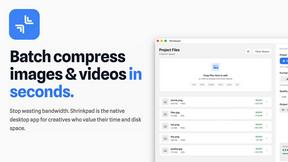
Shrinkpad effortlessly batch compresses images and videos on Mac, optimizing file sizes while preserving quality.

Skene
Skene empowers you to harness your codebase as a prompt-driven growth engine you fully control and own.

Yellow Systems
Yellow Systems delivers tailored AI and software solutions that fuel sustainable growth for ambitious businesses.

Agenta
Agenta is an open-source LLMOps platform that unifies teams to build reliable AI applications with streamlined.