
JustPDF
JustPDF is a privacy-focused, browser-based PDF toolkit offering 17 powerful tools for seamless file management without ever leaving your device.
Visit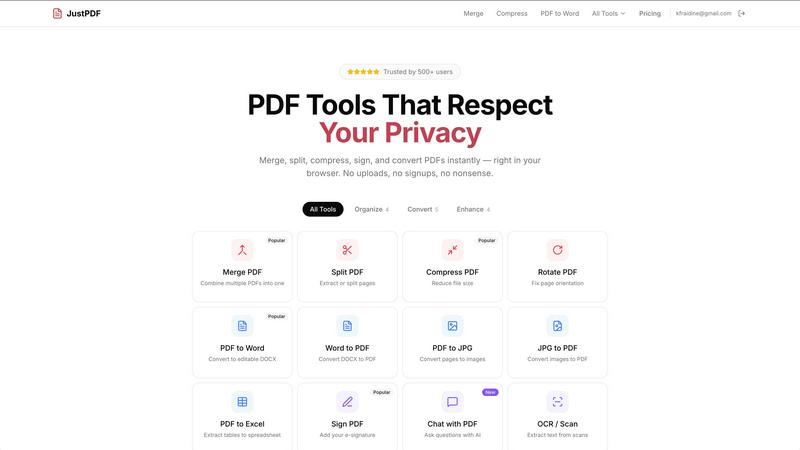
About JustPDF
JustPDF is an innovative and sophisticated online platform that offers a suite of 17 professional-grade PDF tools designed to meet the diverse needs of users, from students to professionals. What sets JustPDF apart from competitors like Smallpdf and iLovePDF is its commitment to privacy and efficiency; all processing occurs locally within the user's browser, meaning files never leave their devices. This unique approach leverages advanced technologies such as JavaScript and WebAssembly, ensuring that users can confidently edit, convert, and manipulate PDF files without the risk of data exposure. With a user-friendly interface and no requirement for account creation, JustPDF epitomizes convenience, allowing users to perform three operations per day for free. For those who require more extensive functionality, a Pro version is available starting at just $4 per month, offering unlimited access. Additionally, JustPDF is FERPA-compliant, making it an ideal choice for educational environments where data privacy is paramount.
Features of JustPDF
Merge PDF
The Merge PDF feature allows users to seamlessly combine multiple PDF documents into a single cohesive file. This tool is particularly beneficial for those looking to consolidate reports, presentations, or any other multi-document projects. With a simple drag-and-drop interface, users can quickly arrange their files and merge them with a single click, ensuring a hassle-free experience.
Compress PDF
JustPDF’s Compress PDF tool enables users to reduce the file size of their PDFs without sacrificing quality. This feature is essential for anyone needing to share documents via email or upload them to platforms with size limitations. The compression process occurs in mere seconds, providing a swift solution that maintains the integrity of the original document.
PDF to Word
Transforming PDFs into editable Word documents is made effortless with JustPDF’s PDF to Word feature. Users can convert their static PDF files into dynamic DOCX formats, facilitating easy editing and manipulation of text. This functionality is invaluable for professionals who require alterations or updates to existing documents, enhancing productivity and efficiency.
Chat with PDF
The Chat with PDF feature introduces a groundbreaking method for engaging with PDF content using AI. Users can pose questions about the document’s content, receiving instant, contextual responses. This innovative tool is perfect for students and researchers who need to extract information quickly, making the process of information retrieval more interactive and efficient.
Use Cases of JustPDF
Academic Research
Students and researchers can utilize JustPDF to manage their academic papers efficiently. By merging various articles into a single document or converting PDFs to Word for further editing, they can streamline their workflow and enhance productivity in their research endeavors.
Business Documentation
For professionals working with contracts, reports, or presentations, JustPDF offers essential tools like PDF compression and merging. By efficiently managing business documents, users can ensure timely submissions and maintain an organized digital workspace.
Creative Projects
Artists and designers can benefit from JustPDF by converting images to PDF and utilizing the PDF to JPG feature. This allows them to create portfolios or presentations that showcase their work in a polished and professional format, suitable for sharing with clients and colleagues.
Data Management
The versatility of JustPDF makes it an excellent choice for data analysts and managers who frequently work with spreadsheets. With features like PDF to Excel and OCR/Scan, users can convert and extract data from PDFs to analyze information more effectively, enhancing their reporting capabilities.
Frequently Asked Questions
How does JustPDF ensure my files remain private?
JustPDF processes all files locally within your browser, ensuring that they never leave your device. Users can verify this by checking the Network tab in DevTools, providing peace of mind regarding data privacy.
Is there a limit to the number of operations I can perform for free?
Yes, JustPDF allows users to perform three operations per day at no cost. This is ideal for light users who require occasional PDF manipulation without committing to a subscription.
What features are included in the Pro version?
The Pro version of JustPDF, starting at $4 per month, offers unlimited access to all PDF tools, allowing users to merge, compress, convert, and interact with PDFs without any restrictions.
Can I use JustPDF on my mobile device?
JustPDF is fully browser-based, meaning it can be accessed on any device with a compatible web browser. This flexibility allows users to manage their PDFs on the go, whether using a smartphone, tablet, or desktop computer.
Explore more in this category:
Similar to JustPDF

ftak
Select a word on any web page to get its definition, a Wikipedia summary and a map, right where you read.

Panzoe
Panzoe is an all-in-one AI platform for personal productivity, business automation, AI assistants, content creation, and custom AI solutions.
Filler
Free Chrome extension: save your details once, then fill Google Forms, job applications, surveys and signups in one click.
AI Email Filter
AI Email Filter sorts incoming mail into folders using plain-language prompts you write. Works with any IMAP mailbox; bring your own LLM if you want.

Egmatic
No-code 2D game editor: visual node logic, drag-and-drop scenes, live preview. Exports to Windows, macOS, Linux, Android, iOS, Web.
Kody Tools
Free collection of online developer utilities, code formatters, and digital converters designed to streamline your daily workflow.

Tally Counter
Online tally counter for tracking attendance, workouts, inventory, visitors, sports scores, habits, and everyday counting tasks.
Flan
Visual financial timelines for couples and young professionals: model cash flow, life events, and shared goals.