
Subclip
Subclip is an AI-powered platform that edits, captions, and dubs videos with voice cloning, saving creators 80% of their time.
Visit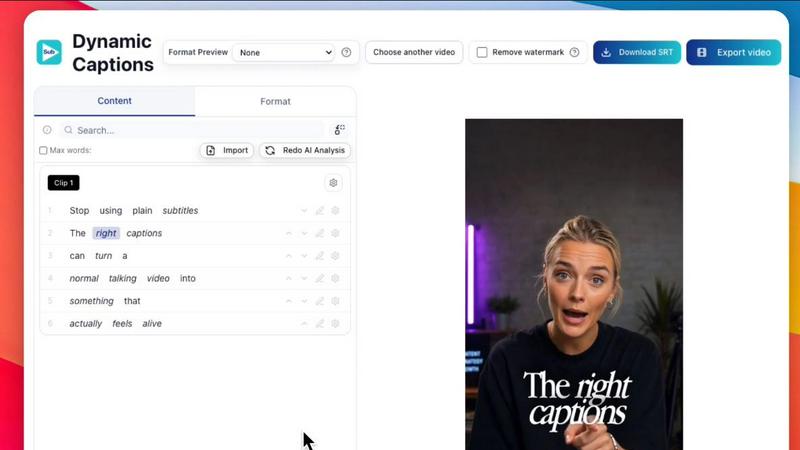
About Subclip
Subclip represents a paradigm shift in video editing, moving away from the archaic, timeline-based workflows that have dominated the industry for decades. This AI-powered platform is meticulously engineered for creators, marketers, educators, and content teams who demand efficiency without sacrificing quality. At its core, Subclip allows you to edit video as intuitively as editing a document: simply drag and drop a transcript, and your video becomes as malleable as text. The platform’s sophisticated AI engine handles the heavy lifting, enabling you to clone your own voice for seamless re-recording of segments, remove silences and filler words with a single click, generate stunningly accurate subtitles, and dub your content into over 21 languages while preserving the original background music and emotional tone. Subclip is designed for YouTubers, podcasters, course creators, coaches, vloggers, and agencies who need to produce high-volume, high-quality video content. By replacing the complexity of traditional non-linear editors with intuitive, AI-driven features, Subclip reclaims up to 80% of your production time, allowing you to focus on creativity rather than technical drudgery. It is a complete, browser-based ecosystem for editing, captioning, dubbing, and publishing videos, all within a premium, streamlined interface.
Features of Subclip
Text-Based Video Editing (Rough Cut)
Subclip revolutionizes the editing process by allowing you to manipulate your video through its transcript. Simply upload your footage, and the AI generates a precise, searchable text document. You can then edit this transcript like a Google Doc, cutting mistakes, rearranging segments, and trimming pauses. Every change you make to the text automatically and instantly updates the video timeline. This eliminates the need for manual scrubbing and rework, enabling you to create a polished rough cut in minutes. The edited timeline can then be exported as a .fcpxml file for seamless integration into professional NLEs like DaVinci Resolve, Final Cut Pro, and Adobe Premiere Pro.
AI Dubbing with Voice Cloning
This feature allows you to transcend language barriers without losing your authentic voice. Subclip analyzes your original vocal performance, capturing its unique tone, emotion, and inflection. It then creates a digital clone of your voice that can be used to dub your video into 21+ languages. The result is a natural-sounding translation that feels as though you recorded it yourself, with the original background music and sound effects perfectly preserved. This is far superior to robotic text-to-speech, offering a premium, global-ready solution for reaching international audiences.
One-Click Captioning and Subtitles
Subclip eliminates the tedious task of manual captioning. With a single click, the AI generates unlimited, highly accurate subtitles for your video in over 48 languages. You have full creative control to customize the caption style, including font, color, size, and animation, ensuring they align with your brand’s aesthetic. The platform supports both local and cloud-based transcription, making it incredibly fast. Once generated, you can make quick edits to the text before publishing, guaranteeing perfect synchronization and flawless spelling.
Intelligent Audio Enhancement and Silence Removal
Subclip’s Audio AI suite polishes your video’s sound to a studio-quality finish. With one click, you can remove background noise, eliminate room echo, and enhance vocal clarity, making every word crisp and intelligible. The platform also intelligently detects and removes awkward silences and filler words like “um” and “ah” from your timeline. This feature is invaluable for podcasters and educators who want to tighten their content and maintain a professional, energetic pace without spending hours manually cutting audio tracks.
Use Cases of Subclip
For Creators and Podcasters
Long-form content creators can dramatically increase their output and reach. Subclip’s AI clipping engine automatically scans hours of footage to identify high-energy segments, punchlines, and key emotional shifts, generating short, high-retention clips ready for social media. This allows creators to repurpose a single podcast or video into dozens of shareable assets. The integrated scheduling tool then allows them to plan and post this content directly to platforms like YouTube and X (Twitter), streamlining the entire workflow from raw footage to published post.
For Coaches and Course Creators
Educators can now scale their impact globally without re-recording content. A coach who has recorded a course in English can use Subclip’s AI dubbing with voice cloning to translate the entire course into Spanish, French, or any of the 21+ supported languages. The voice clone ensures the instructor’s unique tone and teaching style are preserved, creating an authentic learning experience for international students. This removes the significant cost and time barrier of hiring human voice actors for every new language.
For Vloggers and Social Media Marketers
Vloggers need speed and simplicity to keep up with daily content demands. Subclip enables them to add dynamic, auto-generated captions, insert B-Roll, adjust audio, and remove background noise all within a single platform. The one-click export feature allows them to instantly render videos in the optimal aspect ratios for different platforms (16:9, 9:16, 1:1) without any manual resizing. This streamlined process turns hours of work into a few minutes, allowing vloggers to focus on their story, not the technical setup.
For Agencies and Freelancers
Agencies handling multiple clients can drastically increase their output while reducing operational costs. Subclip offers unlimited transcription, export, and team collaboration features. Project managers can share projects with their team members, collect feedback directly on the timeline, and collaborate in a single workspace, much like a Google Doc. This eliminates the chaos of emailing large video files and version confusion. The ability to export edited timelines directly to professional editors like DaVinci Resolve ensures a seamless handoff for any final, high-end polish.
Frequently Asked Questions
How does Subclip's text-based video editing work?
Subclip transcribes your uploaded video into a searchable and editable text document. You can then edit this text by deleting words, sentences, or paragraphs. The AI engine automatically applies these changes to the corresponding video footage, cutting out the selected sections from the timeline. This allows you to remove mistakes, pauses, and filler words as easily as deleting text in a word processor, creating a rough cut without ever touching a traditional video timeline.
Can I really dub my video into other languages with my own voice?
Yes. Subclip uses advanced AI voice cloning technology. You first record a short sample of your voice, which the AI analyzes to understand your unique vocal characteristics, tone, and emotion. When you select a target language for dubbing, the AI generates a new audio track that speaks the translated script using this cloned voice. The result is a natural-sounding voiceover that retains your original personality, ensuring your message resonates authentically with international audiences.
What file formats and editors does Subclip support for export?
Subclip is designed for flexibility and seamless integration. You can export your final video in standard formats suitable for social media and web publishing. For advanced editing, Subclip allows you to export the timeline as a .fcpxml file, which is compatible with professional non-linear editors like DaVinci Resolve, Final Cut Pro, and Adobe Premiere Pro. This allows you to use Subclip for the fast, rough cut and then hand off the project for final color grading or complex effects in your preferred professional tool.
Is Subclip suitable for team collaboration?
Absolutely. Subclip is built with team workflows in mind. You can share any project with your colleagues or clients via a simple link. They can view the video, leave timestamped comments, and provide feedback directly on the timeline. This collaborative environment functions similarly to a shared document, allowing for real-time iteration and approval. This feature is particularly valuable for agencies and content teams who need to streamline their review and approval processes.
Pricing of Subclip
Subclip operates on a freemium model. It offers a free tier that allows new users to explore the platform’s core features. For users who need more advanced capabilities, higher export limits, or team collaboration tools, Subclip provides affordable paid plans. Specific pricing details for these plans can be found on the official Subclip pricing page.
Similar to Subclip

HubVanta
HubVanta is a free AI creative toolkit for generating images, videos, voices, and visual edits from one browser workspace.

Hush Touch | Voice-to-Text for MacOS
Hush Touch offers intelligent offline voice-to-text dictation for Mac, learning your vocabulary and enhancing accuracy.

Glossa
Glossa seamlessly translates your sermons into 100+ languages in real time, connecting your congregation like never.

Bantr: Offline & Unlimited TTS for Mac
Bantr is a premium Mac app that generates unlimited, natural voiceovers entirely offline for complete privacy.

KaiCalls
KaiCalls is your 24/7 AI voice agent that captures and qualifies leads, ensuring instant customer engagement and.

Vowen
Vowen seamlessly converts your voice into text and actions, empowering intelligent automation for effortless.
Bargou One
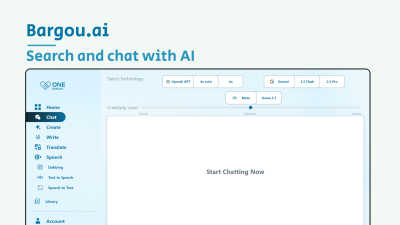
Bargou One is your elegant AI suite for seamless creation, communication, and translation.