
QuickSigner
QuickSigner offers a seamless and secure online eSigning solution, enabling you to sign documents swiftly and legally from any device.
Visit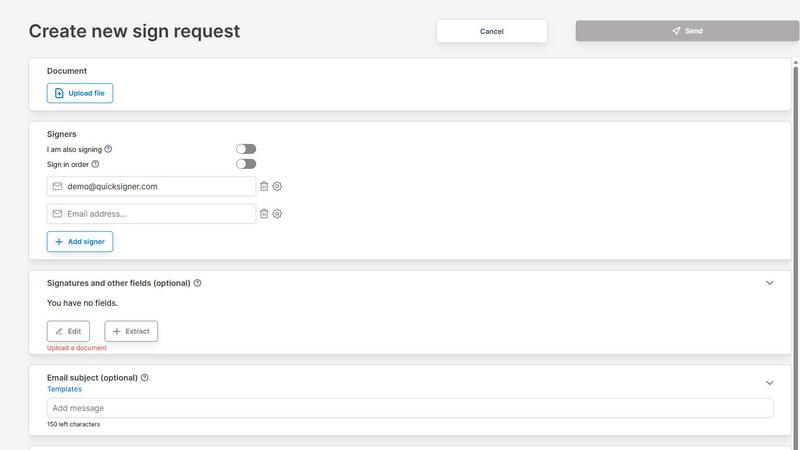
About QuickSigner
QuickSigner is an innovative electronic signature platform designed for individuals and organizations seeking a swift, secure, and efficient way to manage their signing processes. This user-friendly software transforms the often tedious task of signing and finalizing documents into a streamlined experience, reducing the time spent on back-and-forth communications from days to mere minutes. QuickSigner supports a variety of document types, including PDFs and Word files, making it versatile for any industry. With its robust features, including Adobe Approved Trust List electronic signatures and ISO 27001 certification, users can trust that their documents are handled with the utmost security and compliance. Whether you are a small business, a freelancer, or part of a larger enterprise, QuickSigner provides the tools necessary to enhance collaboration and improve operational efficiency.
Features of QuickSigner
Efficient Document Upload
QuickSigner offers a seamless document upload feature that allows users to easily drag and drop contracts, agreements, and various documents into the platform. This capability simplifies the initial step in the signing process, accommodating both PDF and Word formats for maximum flexibility.
Customizable Signing Fields
Users can personalize their documents by adding recipient email addresses and placing signature, date, or text fields exactly where needed. This feature ensures that every document is tailored to meet specific requirements, facilitating a smooth signing experience for all parties involved.
Secure Signing Process
Once documents are prepared, recipients can sign securely online from any device using a secure link, eliminating the need for account creation or software installation. This accessibility enhances user experience and supports a diverse range of signing scenarios.
Real-Time Tracking and Finalization
QuickSigner provides users with real-time tracking capabilities, allowing them to monitor the signing progress of their documents. Upon completion, users receive the finalized, legally binding document instantly, ensuring that no critical steps are overlooked.
Use Cases of QuickSigner
Small Business Contracts
Small businesses can leverage QuickSigner to expedite their contract signing processes. By using customizable templates and the secure signing feature, they can ensure that agreements are executed swiftly, allowing them to focus on growth and customer service.
Educational Institutions
Schools and universities can utilize QuickSigner for managing consent forms, enrollment agreements, and other important documents. The platform simplifies the process of obtaining necessary signatures from students and parents, streamlining administrative tasks.
Freelance Services
Freelancers can enhance their client service by using QuickSigner to send proposals and contracts for signature. The quick turnaround time allows them to secure agreements faster, leading to improved project timelines and customer satisfaction.
Real Estate Transactions
Real estate agents can benefit from QuickSigner by facilitating the signing of property agreements and leases. The platform's efficiency in document management helps agents close deals more rapidly, providing a better experience for buyers and sellers alike.
Frequently Asked Questions
What types of documents can I upload with QuickSigner?
QuickSigner supports a variety of document formats, including both PDF and Word files. This flexibility allows users to upload contracts, agreements, and other important documents with ease.
Is QuickSigner secure for sensitive documents?
Yes, QuickSigner is ISO 27001 certified, ensuring that your documents are handled with the highest level of security. Additionally, it employs Adobe Approved Trust List electronic signatures for added legal protection.
Can recipients sign without creating an account?
Absolutely. Recipients can sign documents using a secure link without the need to create an account or install any software, making the process hassle-free for all involved.
What is the pricing structure for QuickSigner?
QuickSigner offers a free plan for occasional use, along with a business tier that provides additional features for small teams. The business plan includes unlimited documents and multiple signers, ensuring that users have the tools they need to operate efficiently.
Explore more in this category:
Similar to QuickSigner

@fuck.it - email with attitude
Private email. Pure. Secure. Exclusive. No ads, no tracking, no data selling. GDPR compliant, EU-hosted.
Verla AI
Verla is an AI academic assistant for university and college students, combining AI essay writing, academic research, AI detection, AI humanization
Novastart
Apps and files on an infinite canvas where people and AI agents work together.

ftak
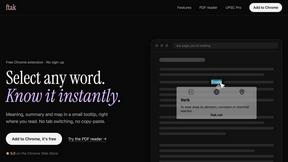
Select a word on any web page to get its definition, a Wikipedia summary and a map, right where you read.

Panzoe
Panzoe is an all-in-one AI platform for personal productivity, business automation, AI assistants, content creation, and custom AI solutions.
Filler
Free Chrome extension: save your details once, then fill Google Forms, job applications, surveys and signups in one click.
